Writing page titles and meta descriptions that earn the click
How Google builds title links and snippets, how to write a unique title and meta description for each page, and why Google sometimes rewrites them.
- Nº
- 38
- Published
- Read
- 13 min
- Category
- Notes
- Written by
- Revylio
Writing page titles and meta descriptions: one pair per page, written for the searcher
Writing page titles and meta descriptions works best page by page, during the redesign. Match each pair to what the searcher behind that page wants. Google builds the search result itself from your page, so a clear, unique title and description give it the right material. Bulk text added after launch rarely does.
A page title is the HTML <title> element. It names the page for browsers and search engines. A meta description is a short summary in the page's HTML code. Like other meta tags, it is not visible on the page itself, as a help article on the nitty-gritty of SEO tags explains. When the page appears in search results, the title and description are usually what people see first.
Google calls the clickable headline of a result the title link. Its documentation says title links are often the element people weigh most when they choose which result to click. The text underneath is the snippet, meaning the description or summary of the result. Google generates both automatically, so it does not simply copy either one from your HTML. Your job is to make your own version the best candidate.
This guide explains how Google builds both. It shows how to write a unique pair for each page and why Google sometimes replaces them. It ends with what to check before and after a relaunch.
How Google builds a title link from your page
Google builds title links automatically. It uses the content of the page and references to the page elsewhere on the web. Its documentation on influencing title links lists nine sources it may draw on. The first four are:
- the content of the
<title>element - the main title that is visible on the page
- heading elements, such as
<h1> - the content of
og:titlemeta tags
Because the process is fully automatic, Google says it cannot change the title link of an individual site by hand. If Google cannot access a page's content, it falls back on external content. One example is the text other sites use when they link to you.
A robots.txt file can stop Google crawling a page, but it does not always stop the page being indexed. A blocked page can therefore still appear in results, with a title link built from text you did not write.
Title link changes are not instant. Google first has to recrawl and reprocess the page. Its documentation says detecting the update can then take from a few days to a few weeks. Plan for that delay when you relaunch, and judge new titles only once that time has passed.
How Google builds the snippet, and when it uses your meta description
Google mainly uses the content of the page to create the snippet. Its guide to snippets and meta descriptions says it may use the meta description when that text describes the page better than other parts of the content. The meta description is a candidate, not an instruction.
The snippet can also change with the search. Google may show different snippets for the same page, depending on what the person typed. A meta description that sums up the whole page gives Google a good option for broad searches. Specific passages on the page serve narrower searches.
Google does not edit snippets by hand. It does document three settings that let you control them:
- nosnippet meta tag: stops Google showing a snippet for the page.
- max-snippet:[number] meta tag: sets the maximum length of the snippet.
- data-nosnippet attribute: keeps specific parts of the page out of the snippet.
Use these settings sparingly. A result with no snippet gives the searcher less reason to click. On a business site, the data-nosnippet attribute is usually the most useful of the three. It suits text that would mislead if quoted on its own, such as a time-limited notice.
Title and description length: what Google says, and how to avoid truncation
Google sets no length limit for page titles or meta descriptions. Its documentation on title links and on snippets says neither element has a limit. Google truncates both in results when needed, usually to fit the width of the device.
The character counts you see in SEO tools are rules of thumb, not Google rules. Their aim is to reduce the chance that the line is cut off on a typical screen. Because truncation depends on the device, no single number guarantees that the full text shows everywhere.
The practical rule is to put the words that matter first. A truncated title or description then still makes sense. Two habits help:
- Lead the title with the service, product or topic, and keep secondary detail for the end.
- Put the core answer in the first sentence of the description, so a cut-off loses only supporting detail.
Before you publish, check how the result looks in a SERP preview tool at both desktop and mobile widths. Google's snippet guidance adds one more control. The max-snippet:[number] meta tag sets a maximum snippet length. It limits what Google shows, but it does not make a long description fit.
Writing a unique page title for each page: subject first, brand last
Each page needs its own title. That title should name what the page offers, with the most important words first. Truncation cuts the end of the line, so the start must carry the subject. Lead with the service, product or topic, not with the company name.
Put the brand at the end, after a separator
Placing the brand toward the end of the title, after a separator, keeps the descriptive part visible if Google truncates the line. A pattern such as "Service in place | Company" does this. Google may also leave the site name out of the title link when it matches the site name already shown in the result. That is another reason not to open with it.
Avoid keyword stuffing and template titles
Repeating keywords in a title backfires. Google warns that an excess of keywords can make both Google and users think a site has misleading content.
Google's documentation also defines a template title. A template title is long text in the <title> element where only one fragment changes from page to page. When every title follows the same template, searchers have little to tell your pages apart.
Keep the title and the H1 related but different
The page title and the H1 do different jobs. The title names the page in search results, while the H1 heads the visible text. They can differ in wording, but keep them consistent in meaning, so the person who clicks finds what the title promised. Google may draw on visible headings when it builds the title link, so a heading that contradicts the title gives it a reason to look elsewhere. Our guide to writing accessible content that stays accessible after launch covers heading structure in more detail.
Writing a unique meta description for each page: answer the searcher's question
A good meta description answers the question the searcher had when they typed the query. It uses the words they would use. Write a different description for every page, so that someone comparing results can tell which page to visit.
A missing or generic description has a cost. Without one, search engines may generate a summary that does not reflect the page, according to the help article on SEO tags. The same article notes that when people share a page on social media, the title and description may be the only information shown.
Concrete details work better than general claims. A useful description states the offer, plus the practical detail a searcher needs before deciding. For a service page, that could be the area you cover and the first step to book, provided the page supports both. The same thinking applies to case study pages that win new clients. There, the description can name the problem solved.
Avoid long strings of keywords. Google says descriptions made of keyword lists do not give searchers a clear idea of the page. It adds that they are unlikely to be shown as the snippet.
Keep expectations realistic as well. Google uses the meta description only when it describes the page better than other parts of the content. A strong description is therefore a good candidate, not a guarantee.
Worked example: page title and meta description for one service page
Take a hypothetical heating firm, Example Heating, with a page for annual boiler servicing in Leeds. The searcher wants to know two things: whether the firm covers their area, and how to book. The title and description below answer both. The H1 differs from the title in wording but not in meaning.
The fragment below shows where each element sits in the page template. The title and description go in the <head>, and the heading and text go in the <body>.
<html>
<head>
  <title>Boiler servicing in Leeds, booked online | Example Heating</title>
  <meta name="description" content="Annual boiler servicing for homes in Leeds.
    Book online, choose a morning or afternoon slot and receive a written service record
    after the visit.">
</head>
<body>
  <h1>Annual boiler servicing in Leeds</h1>
  <!-- Time-limited notice, kept out of the snippet -->
  <div data-nosnippet>New winter booking slots are released every Monday.</div>
  <p>We service gas boilers for homes across Leeds and leave a written record.</p>
</body>
</html>
The title leads with the service and the place. It adds the booking method and puts the brand last, after a pipe. It is 58 characters long, so the subject survives if a narrow screen cuts the end.
The description is 145 characters. Its first sentence names the service and the place, so a truncated snippet still answers the main question. It runs over three lines here only to fit this page. In your template, keep it on one line.
The data-nosnippet attribute stops Google quoting the weekly notice in the snippet. Replace the service, place, brand and booking detail with your own, and keep the H1 close in meaning to the title.
Why Google rewrites page titles and snippets, and how to prevent it
Google replaces your title or description when it judges that other text serves the searcher better. Google's documentation describes several causes. Most of them can be fixed in the copy or the template:
| Cause | What Google may do | What you change |
|---|---|---|
| Too many keywords in the title | Treat the site as possibly misleading | Write one plain description of the page's subject |
| Title in a different language or script from the main content | Choose different text as the title link | Write the title in the language of the page |
| Several large, prominent headings | Use the first of them as the title link text | Keep one main heading at the top of the page |
| Page content Google cannot access | Build the title link from external content, such as link text on other sites | Let Google crawl the pages you want in results |
| Meta description made of keyword strings | Not show it as the snippet | Write one or two sentences that summarise the page |
| Prices that change quickly, as on flight pages | Leave the prices out of the title link | Keep fast-changing figures out of titles |
The flight example shows Google's reasoning. Flight prices can change every few minutes, so a price in the title would soon be wrong. A figure that goes out of date fast is a poor title for any page.
Most rewrites are Google working around weak input. Fix the title or description, wait for Google to recrawl the page, and then check the result again. Remember that Google cannot change a title link by hand, so there is no request you can send instead.
Titles and descriptions written during the redesign, not in bulk after launch
A title and description written during a redesign match the page because they are written alongside it. When the copy, the headings and the metadata come from the same brief, the title, the H1 and the opening paragraph tell one consistent story. That consistency gives Google's automatic systems the right material to work with.
Bulk generation does have its place. Google itself recommends generating descriptions automatically on sites that manage large databases, such as product aggregators, where writing them by hand is impossible. A typical business site, with service pages, case studies and a handful of guides, is not in that position. Each page there serves a different searcher, and a single formula cannot capture the difference.
At Svennis, we add the title and description for each page to the content document during the redesign, so the person who writes the page also writes its search result, and we check both in the page's HTML before launch. The failure we see most often at clients is a CMS default that copies the site name or one template line into every title after go-live.
Layout decisions also shape the snippet
Google can add "Read more" deep links to a snippet. A deep link sends people straight to a specific section of the page. Google says the content must be immediately visible to a person, not hidden behind an expandable section or a tabbed interface. It also warns against removing the hash fragment from the URL when the page loads, because that breaks deep links. Both are design and development choices, so settle them during the redesign rather than after launch.
Page titles and descriptions for a business working in several European languages
The main risk for a business that publishes in more than one language is a mismatch between the title and the page. This applies whether you work from the UK or elsewhere in Europe. Google's documentation covers the case directly. If a <title> element does not match the language or writing system of the main content, Google may choose different text as the title link. A Dutch page that inherits an English title template is a typical example.
Each language version therefore needs its own title and meta description, written in that language. A mechanical translation of the main site's text is not enough. Searchers in each country type their own words, and Google may show different snippets depending on the search. The description should answer the question as people in that market ask it.
Check the length of every version as well. Google truncates titles and descriptions to fit the width of the device. The same message can take more space in one language than in another. Preview each language version in a SERP preview tool, rather than assuming the English length works everywhere.
The rules on keyword stuffing and unique text apply in every language. A site with five language versions has five sets of titles to write, not one set to copy.
Next steps: check your page titles and meta descriptions page by page
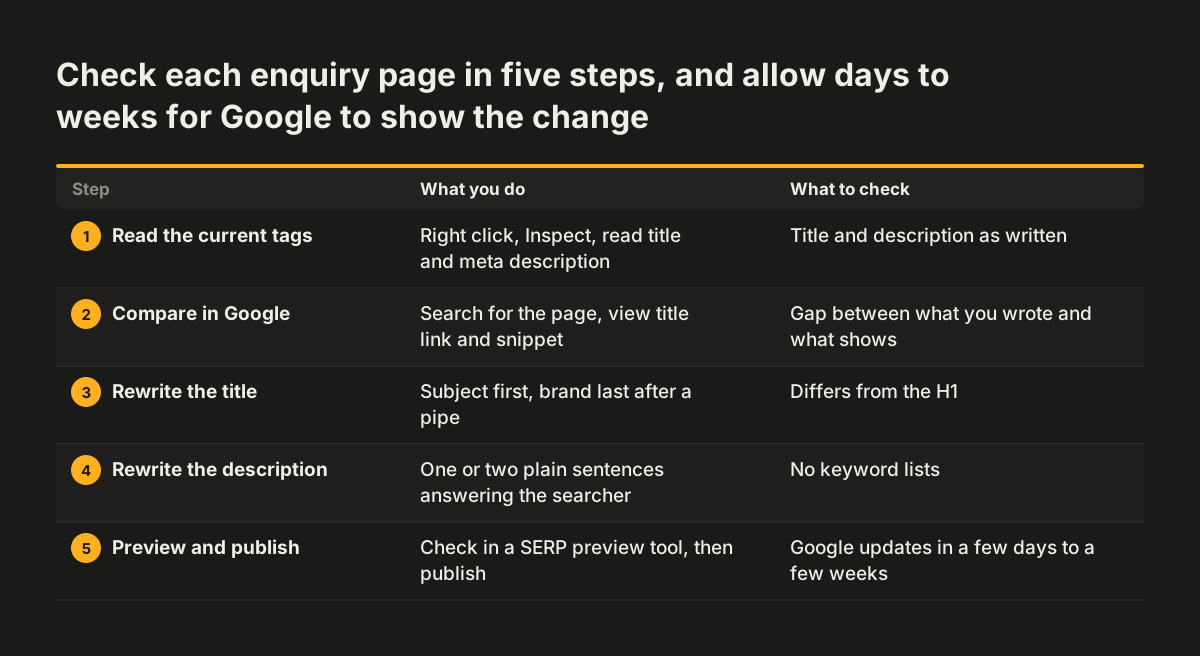
Start with the pages that bring enquiries, then work outward to the rest of the site. For each page, follow these steps:
- Open the page, right-click and choose Inspect to read the current title and meta description in the HTML.
- Search for the page in Google and compare the title link and snippet with what you wrote.
- Rewrite the title with the subject first and the brand last, after a pipe.
- Rewrite the description as one or two plain sentences that answer the searcher's question, with no keyword lists.
- Check the result in a SERP preview tool, publish, and allow a few days to a few weeks for Google to pick up the change.
If you are planning a redesign, begin with the pages that sell. Our guide to writing service pages that bring enquiries shows how to build the page that the title and description promise. To help Google recognise the organisation behind those pages, read our guide to structured data that describes your company next.