Choosing a CMS for your redesign based on what happens after launch
Choose a CMS for your redesign by what your team can keep after launch: accessible pages, fast load times, GDPR-safe plugins and safe everyday editing.
- Nº
- 15
- Published
- Read
- 12 min
- Category
- Notes
- Written by
- Revylio
Choosing a CMS for your redesign: judge it by life after launch
Choosing a CMS for your redesign comes down to one test: what the system lets your team keep after launch. Pick the platform that keeps pages accessible, fast and GDPR-safe while ordinary staff edit them. The feature list in the sales demo matters far less.
A content management system (CMS) is the software your team uses to create, edit and publish website content without writing code. It keeps content and code apart, so everyday changes do not need a developer. That separation is the main benefit, and also the main risk. Every edit an editor makes goes live without a developer checking it.
A redesigned site is usually at its best on launch day. Accessibility has been tested, the pages load quickly and the plugins have been reviewed. Over the following months the CMS decides whether that quality survives. A new plugin, an image without a description or a heading chosen for its size can each undo part of the work.
This guide shows how to test a CMS for that before you commit. If you are still deciding whether a redesign is worth doing at all, read when a website redesign pays off first.
Four types of CMS and what each asks of your team after launch
The type of CMS decides who has to look after the site once it is live. Most options fall into four groups. They differ in where the content lives and who controls the page layout.
- Traditional (monolithic) CMS, such as WordPress or Drupal: one system holds the content, the admin panel, the plugins and the templates that display the pages.
- Headless CMS, such as Contentful, Sanity or Strapi: the system stores and structures content and sends it through an API, a defined connection between programs, to a front end that developers build separately.
- Hybrid headless CMS, such as Storyblok: a headless system with a visual editor, where marketers assemble pages from components that developers have defined.
- No-code or low-code builders, such as Webflow or Framer: visual drag-and-drop tools that also host and display the site.
Each type moves the after-launch work to a different place. A traditional CMS puts it into plugin updates and theme discipline. A headless CMS puts it on the developers who build and maintain the front end. A no-code builder puts it on the vendor, at the price of less freedom for custom features.
Skills matter as much as architecture. Drupal, for example, assumes someone on your team or at a retained agency understands PHP, module management and server configuration. A platform your team cannot maintain will drift, however good it looked in the demo.
Accessibility after launch depends on what editors are allowed to change
A CMS protects accessibility when it makes the accessible choice the easy one for editors. WCAG 2.1 AA is the AA conformance level of version 2.1 of the Web Content Accessibility Guidelines, the benchmark most accessibility requirements point to. A site can meet it at launch and fall short within weeks if editors can freely break the rules.
Three editing habits cause most of the drift. Editors upload images without alt text, the short description a screen reader reads aloud. They pick heading levels for how big the text looks rather than for the page structure. They paste content with its own colours and fonts, which can push contrast below the required level.
When you assess a CMS for accessibility, check whether it can prevent these habits, not just permit good practice:
- Can the image field require alt text, with a clear way to mark an image as purely decorative?
- Can you limit the heading levels and text styles editors see in each content block?
- Can colours come only from a fixed palette that has already passed contrast checks?
- Do the templates keep keyboard focus and form labels correct when editors change the content?
A system where editors build pages from approved components keeps these rules in place automatically. A system that gives every editor a blank canvas relies on training alone, and training fades.
Page speed after launch depends on plugins and front-end discipline
A website stays fast after launch only if the CMS limits what gets added to each page. A redesign usually ships with optimised images, a lean theme and few scripts. Speed then erodes one addition at a time.
Traditional CMS platforms can grow bloated with features nobody uses. A plugin may add its own scripts and styles to every page, whether that page needs them or not. Slower pages follow, and so do more security weaknesses. The fix is governance: decide who may install a plugin, and test each one for its effect on load time before it goes live.
A headless CMS gives developers more control over front-end performance. The catch is that they must build the good practice in themselves, from image sizing to caching. That suits a business with a developer on hand. It suits a business without one far less.
No-code builders handle hosting and much of the page delivery for you. Your influence over speed then sits mostly in what editors upload, and oversized images and embedded videos are the usual culprits. Ask every vendor whether the CMS resizes and compresses images automatically, because editors will not always remember to do it.
GDPR-safe plugins: check what each extension sends to third parties
A plugin or extension is safe for data protection when you know what personal data it collects, where it sends that data and whether it waits for consent. The cookie rules (PECR in the UK) require consent for most non-essential cookies and scripts. UK law now allows a few low-risk uses, such as basic site statistics, without consent if you explain them clearly and let visitors object. Advertising and tracking scripts always need consent.
The CMS core is rarely the problem. The extensions added after launch usually are: forms, chat widgets, embedded maps, analytics and social feeds. Each can load code from another company and pass on visitor data.
Plugins create a second risk. Outdated plugins are a common way for attackers to get into traditional CMS platforms. A compromised site can expose the personal data your forms collected. A plugin nobody updates is therefore both a security problem and a data protection problem.
Some platforms apply security updates automatically. Others need someone to apply them every month. SaaS, short for software as a service, means you rent the CMS and the vendor runs and updates it. Before you choose a CMS, ask these five questions:
- Who may install a new plugin or embed a third-party script, and who signs it off?
- Does the consent banner block scripts until the visitor agrees, including scripts added after launch?
- Are security updates automatic, or does a named person apply them on a schedule?
- For a SaaS CMS, where is the content hosted, and which certifications does the vendor hold?
- Does the vendor sign a data processing agreement, and if it stores data outside the UK or EEA, what transfer safeguard covers it?
The answers help you judge whether your site will still be GDPR-ready a year after launch, not just on the day it goes live.
SEO controls your editors need without calling a developer
A CMS supports SEO after launch when editors can set the basic search signals on every page themselves. If a developer has to change a page title, the titles stop being changed. Search visibility then drifts with every new page your team publishes.
These are the SEO controls to look for in the editor screen:
- an editable page title and meta description for each page
- a canonical URL field that adds the
rel="canonical"tag, so duplicate pages do not compete in search - alt text and captions on images, which help search engines as well as screen readers
- redirects that editors can add when they rename or remove a page
- clean heading and list markup from the editor, rather than styled text
Traditional platforms usually cover these, often through an SEO plugin. Headless platforms may need extra configuration to handle SEO metadata properly, because the front end is built separately. Ask the vendor or your developer to show each control working on a test page, not on a slide.
Moving to the new CMS is the other SEO risk. A migration can change URL structures, miss redirects, lose metadata, drop image alt text and break internal links. Plan the redirect map and the metadata transfer before the content moves, not after launch.
Worked example: testing a CMS demo with one real page
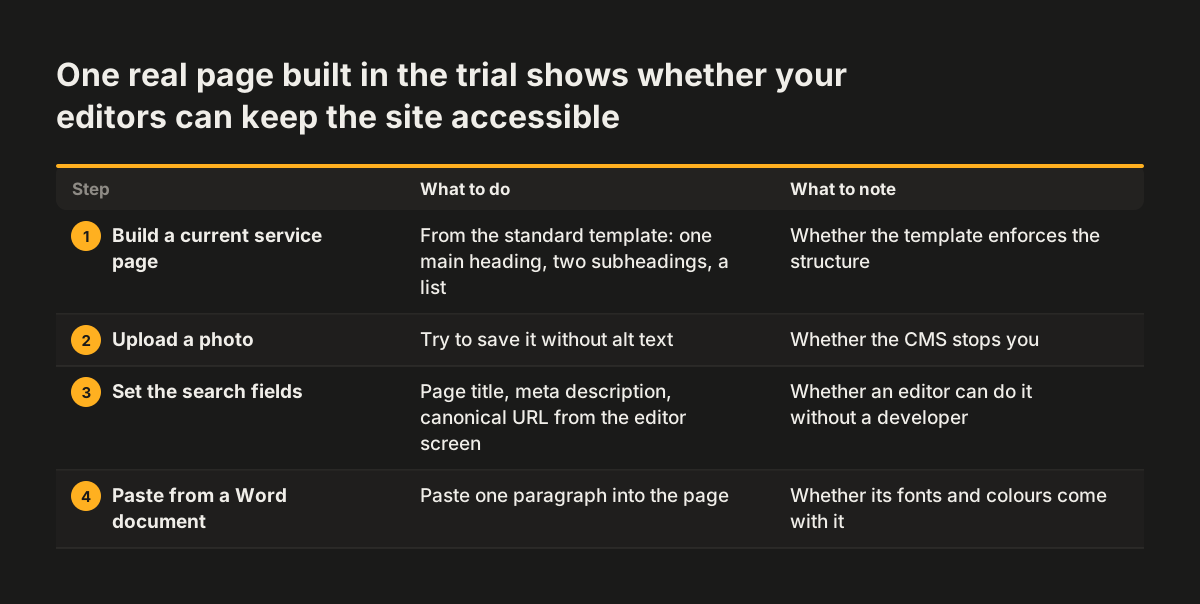
The most reliable CMS test is to watch your own editor build one real page in the free trial or demo. A feature tour shows what the system can do. A real page shows what your team will actually do with it. Take a current service page and ask the person who will maintain the site to rebuild it, with the vendor's help kept to a minimum.
A listed feature can still fail in use. Anthropic's models documentation notes that even when a tool is supported, an organisation's own settings can cause a request that uses it to fail. Its example is an administrator disabling web search. A CMS feature list carries the same gap, so test each feature with your own account and settings.
- Create the page from the standard template, with one main heading, two subheadings and a bullet list.
- Upload a photo and try to save it without alt text. Note whether the CMS stops you.
- Set the page title, meta description and canonical URL from the editor screen.
- Paste a paragraph from a Word document and check whether its fonts and colours come with it.
- Add a contact form, then check whether its tracking or spam filter loads before the visitor consents.
- Rename the page and see whether the CMS offers a redirect from the old address.
- Publish, then open the live page on a phone and move through it with the keyboard alone.
Score each step as done unaided, done with help, or not possible. At Svennis we run this test with the client's own editor before we recommend a platform, and the steps where they reach for help are the ones we lock down in the templates before launch. A CMS that looks fine on paper but fails at step two or four will fail the same way every week after launch.
CMS decision table: four types against four after-launch tests
The table compares the four CMS types on what typically happens to accessibility, speed, data protection and everyday editing once the site is live. Use it to build your shortlist, not as a verdict. A well-built site on any of these types can pass every test, and a badly built one can fail them all.
| CMS type | Accessibility after launch | Speed after launch | GDPR and security | Editing without breaking things |
|---|---|---|---|---|
| Traditional (WordPress, Drupal) | Depends on the theme and on limits set for editors | Plugin and theme bloat is the main risk | Outdated plugins are a common attack vector; updates need an owner | Very flexible; needs restrictions to stay safe |
| Headless (Contentful, Sanity, Strapi) | Front end built to your standard; editors cannot change the layout | Developers control performance but must build it in | Vendor or host runs the platform; check front-end scripts | Structured fields are safe; visual editing varies by platform and plan, so check what your chosen version offers |
| Hybrid headless (Storyblok) | Approved components keep the rules in place | As headless: depends on the front-end build | As headless | Visual editor using components developers defined |
| No-code builder (Webflow, Framer) | Depends on the builder's output and your design choices | Vendor handles hosting; editor uploads are the risk | Vendor runs updates; check every embed | Easy to edit; custom features can be hard |
Read the table by the column that would hurt your business most if it failed. A firm with a small, non-technical team usually weights the last column highest. A firm with heavy form traffic usually weights the GDPR column first.
Running costs: the CMS licence is rarely the largest line
The licence fee is rarely the biggest cost of a CMS over its life. Hosting, plugins, developer time, security updates and later migrations usually cost more. Open-source platforms such as WordPress and Drupal have no licence fee, but development, hosting and security work add up. SaaS platforms such as Contentful and Webflow include hosting and updates, and their fees can rise with extra users, storage or API usage.
The after-launch costs are the ones a demo never shows. Someone has to apply updates, review new plugins, check accessibility and fix what editors break. Budget for that work as a recurring line, alongside the build itself.
Two further costs catch businesses out. Choosing a CMS for short-term needs alone can force a costly migration a few years later. And a team learning a new CMS works more slowly for some weeks after launch, so avoid launching in your busiest season.
For how platform choice feeds into the total project price, see what drives the cost of a website redesign.
What CMS choice means for a business selling in Europe
For a business selling in Europe, accessibility and data protection are legal questions as well as design ones. The UK GDPR governs the personal data a UK business collects through its forms, analytics and embedded tools, and the EU GDPR applies as well if you sell to customers in the EU. The cookie rules decide when scripts may load. The European Accessibility Act has made accessibility a compliance matter for many businesses that sell to consumers online in the EU. A CMS that lets editors quietly undo either one turns a design decision into a legal exposure.
Language is the third European factor. Many businesses publish in two or more languages. WordPress handles this with plugins such as WPML or Polylang, which work well but add complexity and licence costs. Some headless platforms, including Sanity and Contentful, build locale support into the content model. Test how a translated page keeps its alt text, headings and SEO fields, because translations often lose them.
Hosting location and vendor documentation complete the picture. Ask where the vendor stores your content and backups. Ask which compliance documents it provides: headless SaaS vendors often hold certifications such as SOC 2 and ISO 27001 and describe their GDPR readiness. Keep those answers with your records of processing.
Next steps: shortlist, test with a real page, then decide
The practical next step in choosing a CMS is a short list and a real-page test, not another sales demo. Work through these steps in order:
- Write down who will edit the site after launch and how comfortable each person is with web tools.
- Shortlist two or three platforms of the type that fits that team.
- Run the one-page test from the worked example in each free trial.
- Score the results against the decision table and the five plugin questions.
- Name who installs plugins, applies updates and checks accessibility each month.
If you are not sure your site needs a new CMS at all, read how to tell whether your site needs a redesign or a repair before you shortlist anything. To see how platform choice fits into a full project, look at our website redesign service and at recent Revylio website projects.