
Website migration without losing Google traffic, step by step
Plan redirects, a URL map, sitemaps and Search Console before launch, then check the first 30 days, so a redesign keeps the traffic you earned.
- Nº
- 14
- Published
- Read
- 11 min
- Category
- Notes
- Written by
- Revylio
How to migrate a website without losing Google traffic
Website migration without losing Google traffic comes down to four jobs. You list every old URL. You map each one to its closest new page. You make 301 redirects live at the moment of the switch.
Then you check Search Console closely for the first 30 days. Skip any of these, and rankings fall.
A website migration is any change large enough to alter how search engines perceive a site. That covers a new platform, restructured URLs, substantially rewritten content, a new domain or a complete design overhaul. That definition comes from a seoBusiness guide to recovering traffic after a site migration. Most redesigns qualify, even when the domain stays the same.
The rest of this guide takes each job in order. It covers why migrations lose traffic and how to build the URL map, with a worked example. It then sets out the launch-day checklist in a table and what to watch in the weeks after. It closes with what this means for a UK business planning a redesign.
Types of website migration, and which carry the highest risk
Website migrations come in several forms, and a redesign often combines two or three of them. A YouStable guide on LinkedIn lists the common types.
- Domain migration: changing the domain, for example from yourcompany.com to yourbrand.com.
- CMS migration: moving from one content management system to another, such as WordPress to Shopify or a custom build.
- Hosting or server migration: moving the site to a different host.
- HTTPS migration: upgrading from HTTP to HTTPS.
- Structural or URL changes: page addresses change across the site.
seoBusiness rates three of these as high SEO risk: domain migrations, platform or CMS migrations and URL structure migrations. All three change the addresses that Google has already indexed. Every changed address needs to be told where its content went.
The same YouStable guide advises against changing the domain, the CMS and the design all at once. It recommends phasing big moves where you can. Phasing means that if traffic drops, you know which change caused it. If your redesign must include a new domain, plan for the extra work that the domain move adds on top of the new design.
Why migrations lose traffic: incomplete redirect maps and slow fixes
Migrations lose traffic mainly because old URLs stop working and nobody fixes them quickly. The YouStable guide states that a poorly planned migration can cut traffic by 30% or more. It also states that only 1 in 10 migrations improves SEO rankings.
Recovery from a bad migration is slow. seoBusiness reports that Semrush's Website Migration Checklist, updated in May 2026, cites Search Engine Journal research. That research found that sites losing traffic during a migration need 17 months on average to recover.
A third-party study cited by seoBusiness examined 892 domain migrations using data collected in October 2024. Its findings are worth knowing before you set a budget:
- 17% of the sites did not regain their pre-migration traffic.
- The average recovery time was 523 days.
- Platform choice, design updates and budget did not separate good outcomes from bad ones.
- Redirect map completeness and the speed of post-launch fixes did.
The last two points shape the whole plan. A new platform or a bigger budget will not protect your rankings. A complete URL map and a team that fixes errors in the first days after launch will. The rest of this guide is built around those two things.
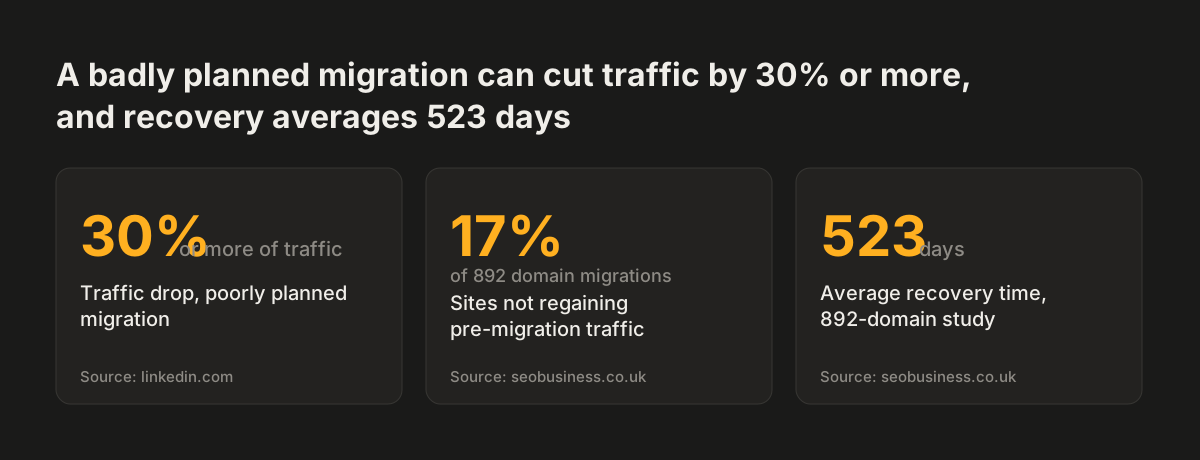
Source: linkedin.com, seobusiness.co.uk
Step 1: list every old URL and rank the ones that earn traffic
The first step in a migration is a complete list of the URLs your current site answers. That includes pages no menu links to any more. Old campaign landing pages, PDF downloads and blog posts from years ago often carry backlinks and search traffic, even if nobody on your team remembers them.
Once you have the list, rank it. seoBusiness cites a UK migration guide that recommends cross-referencing three data sources to find the priority pages for the redirect map:
- Google Search Console, Google's report on how your site performs in search, for organic click data.
- Google Analytics, for the pages that drive revenue or enquiries.
- A backlink tool such as Ahrefs or Semrush, for the pages other sites link to.
A page that scores on any of the three needs a carefully chosen destination. A page that scores on none still needs a decision, but it can be a quicker one. Export each source to a spreadsheet and merge them on the URL. The result is the left-hand column of your URL map.
Do this before design starts. The list tells the designer which pages the new structure must keep, which it can merge and which it can drop.
Step 2: build the URL map, one old address to its closest new page
A URL map is a spreadsheet that gives each old URL exactly one destination on the new site, or a deliberate decision to retire it. The rule for choosing the destination is simple: send each old page to the new page that answers the same question.
Do not send everything to the homepage. seoBusiness cites Ahrefs' guide to 301 redirects: Google treats a redirect without a matching destination as a soft 404, an error disguised as a working page. Redirecting every old page to the homepage therefore fixes nothing.
A worked example: yourcompany.com to yourbrand.com
Take a firm moving from yourcompany.com to yourbrand.com while also redesigning. The addresses below are illustrative.
| Old URL | New URL | Decision |
|---|---|---|
| yourcompany.com/ | yourbrand.com/ | 301 redirect |
| yourcompany.com/services.html | yourbrand.com/services/ | 301 redirect |
| yourcompany.com/web-hosting.html | yourbrand.com/services/hosting/ | 301 to the closest match |
| yourcompany.com/news/office-move | none | Retire on purpose; no homepage redirect |
At Svennis we write the URL map before the first page template exists, and we test every row on the new site before launch rather than after it. Doing it in that order means the new structure is built around the pages that already earn traffic.
Step 3: use 301 redirects and make them live at the switch
A 301 redirect is a server response that tells browsers and search engines a page has moved permanently. It transfers ranking authority from the old URL to the new one. seoBusiness notes that a 301 passes the majority of a page's link equity, but not 100%. Link equity is the ranking value a page earns from links pointing to it.
The type of redirect matters. The YouStable guide says to favour 301 over 302, the temporary kind, for permanent moves. seoBusiness states that a 302 placed in error passes no authority to the target page. Check the status code of each redirect, not just that the browser lands in the right place.
Avoid redirect chains
A redirect chain is one redirect leading to another before the visitor reaches the final page. seoBusiness says each extra hop weakens authority. Chains often appear when a site has been redesigned before. Old redirects then still point at pages that are now moving again. Update those older rules so every address goes straight to its final page.
Timing
The YouStable guide says to make 301 redirects live at the same moment as the site switch. A gap of even a day causes harm. Google and your visitors meet error pages on URLs that used to work. Failing to implement 301 redirects loses equity and traffic, in the guide's words.
Step 4: keep page titles, content and structured data stable through the move
Page titles, descriptions, headings and structured data are signals Google has already read and ranked. Structured data is code that labels what a page contains, such as an organisation, a service or an article. A redesign that changes all of these at once, on every page, gives Google a lot to re-learn while the URLs are moving too.
The YouStable guide's advice to phase big moves applies here as well. Carry each mapped page's title, main heading and core copy across to its new URL first. Improve them in a later round, once the new site is indexed and stable. That way, if a page loses position, you can tell whether the move or the rewrite caused it.
Structured data deserves a line in the URL map. If the old page carried it, the new page should carry the same markup on launch day. Our guide on how site structure affects citations in Google AI Overviews explains why that markup matters beyond classic rankings.
One setting causes more damage than any rewrite. The YouStable guide warns that migrating with the root directory disallowed in robots.txt blocks indexing. Robots.txt is the file that tells crawlers which parts of a site they may visit. Development sites often block everything on purpose, and that rule can travel to the live site unnoticed.
Launch day checklist: redirects, robots.txt, sitemap and Search Console
The launch day checklist below brings the steps of a migration into one table. It covers what to do before launch, on the day and in the days that follow, and what goes wrong if a task is skipped.
| When | Task | What goes wrong if you skip it |
|---|---|---|
| Before design | List every old URL; rank by clicks, revenue and backlinks | Pages that earn traffic disappear from the new structure |
| Before launch | Complete the URL map; one destination or one deliberate retirement per row | Visitors and Google meet error pages |
| Before launch | Remove chains; point old redirects straight at final pages | Authority weakens with each hop |
| At the switch | Make all 301 redirects live | Equity and traffic are lost |
| At the switch | Check robots.txt does not disallow the root | The whole site is blocked from indexing |
| At the switch | Submit the new XML sitemap in Search Console | Google finds new URLs more slowly |
| At the switch, new domain only | Submit a change of address in Search Console | Google is not told the domain has moved |
| 48 to 72 hours after | Crawl the site and confirm every redirect resolves | Broken redirects go unnoticed |
An XML sitemap is a file listing the URLs you want search engines to crawl. The YouStable guide recommends submitting the new sitemap, and a change of address where the domain changes, in Search Console at launch.
The first 30 days after launch: what to watch and when to act
The first 30 days after a migration decide whether a temporary dip becomes a long recovery. The YouStable guide says typical migrations cause a temporary dip in rankings and traffic. The 892-domain study cited by seoBusiness found that the speed of post-launch fixes separated good outcomes from bad ones.
Days 1 to 3
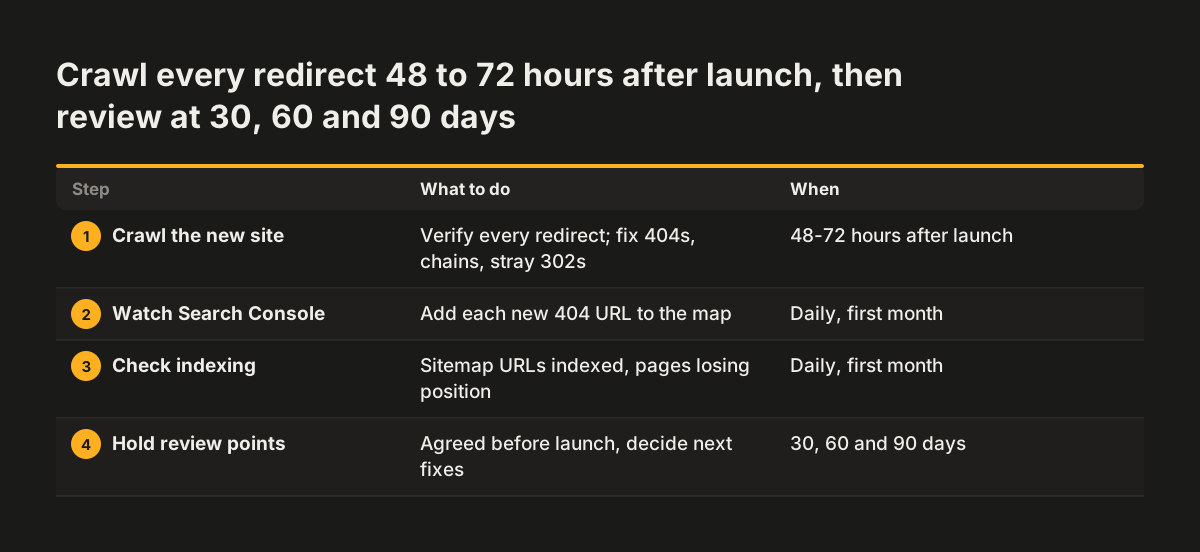
seoBusiness recommends crawling the site 48 to 72 hours after launch to verify that every redirect resolves correctly. Look for 404 errors, redirect chains and any 302 that should be a 301. Fix each one the same day.
The first month
In Search Console, check daily for new 404 errors and add each missing URL to the map. Watch how many sitemap URLs are indexed, and which pages lose clicks. Test every contact form as well: a broken form costs enquiries even when rankings hold. Our post on connecting website forms to a CRM covers what a working form should do.
Speed on the live site
seoBusiness reports a UK Core Web Vitals guide finding that pages with a Largest Contentful Paint (LCP) above 3 seconds lost 23% more traffic than faster competitors after the December 2025 core update. LCP is a Core Web Vitals measure of loading speed. Measure it on the live site, not the staging copy. Our guide on what to fix first on a slow website sets out the order.
Set review points before launch. Semrush recommends 30, 60 and 90-day reviews, according to seoBusiness.
What a migration plan means for a UK business planning a redesign
For a UK business, the migration plan belongs in the redesign brief, not in a task list for launch week. The 892-domain study suggests budget did not protect rankings, but redirect map completeness did. So the question to ask any supplier is who builds the URL map, when, and who fixes errors in the first month.
Three situations are common for UK firms:
- A redesign on the same domain. The URL map and redirects still matter whenever paths change. A change of address in Search Console does not apply.
- A move between domains, for example from a .com to a .co.uk. This is a domain migration, rated high risk by seoBusiness. Plan the change of address step and keep the old domain registered so its redirects keep working.
- A rebrand after a merger. Domain, design and often the platform change together. Phase the moves where you can.
Migration work also affects the quote. Our post on what drives the cost of a website redesign explains how page count and existing content shape the price. If you sell into the EU, the redesign is also the natural moment for accessibility work; see our guide to the European Accessibility Act for business websites.
Next steps: start the URL list before you brief a designer
The most useful thing you can do this week is export your current URLs and their traffic. That list is the base of the URL map, and it tells you how much migration work your redesign carries.
- Export the pages report from Google Search Console for the last 12 months.
- Export your top pages by conversions or enquiries from Google Analytics.
- Export your most-linked pages from a backlink tool such as Ahrefs or Semrush.
- Merge the three into one spreadsheet and mark every page that scores on any of them.
- Write down which changes you plan: domain, platform, URL structure or design. If it is more than one, decide what can wait.
- Agree 30, 60 and 90-day review dates before launch.
Bring that spreadsheet to the first conversation with whoever builds the new site. It turns a vague question about rankings into a concrete scope. If you want us to plan and run the migration as part of the rebuild, our website redesign service sets out how the work is structured.