Website redesign cost: what actually drives the price
Website redesign cost depends less on page count than on accessibility, GDPR-ready forms, speed, structure, hosting and maintenance. Here is what to price.
- Nº
- 06
- Published
- Read
- 10 min
- Category
- Notes
- Written by
- Revylio
Website redesign cost depends on scope, not page count
Website redesign cost is the total you pay to plan, design, build and launch a new version of an existing site. It also includes what it takes to run the site afterwards. The price depends less on how many pages you have than on the work buyers forget to price. That work covers accessibility, privacy-ready tracking and forms, speed, readable structure, and hosting and maintenance after launch.
Page count still matters. A ten-page site takes less design and content work than a hundred-page one. But two quotes for the same number of pages can differ widely. One includes the invisible work and the other leaves it out. Published prices start from a few hundred pounds, and most of the gap between quotes is scope rather than design flair.
The useful question is not "how much per page?". It is "what does this quote include, and what will I pay for separately later?" The sections below take each hidden cost in turn: what it is, why it costs money, and what to ask your supplier about it.
You may still be deciding whether you need a full redesign at all. If so, start with how to tell whether your site needs a redesign or a repair. A targeted fix can cost far less than a rebuild.
Low redesign quotes and what they usually cover
A low redesign quote usually covers a fresh template on a small site, with little work behind the visible design. One UK provider, Harris Digital Web Design, states that a website redesign can cost as little as £199. The price depends on the size of the current site and the features required. The same page advertises small business redesigns from £299.
Low prices are possible because the work is narrow and fast. The provider says a 5 to 10 page website can take around 5 working days. It builds most projects on WordPress, a widely used content management system (CMS). A CMS is the software that lets you edit text and images on your site yourself.
A low-cost redesign can be the right answer for a small brochure site that mainly needs a modern look and a mobile layout. The risk is not the price itself. Whoever you hire, do not assume a low-cost project includes an accessibility audit or a consent setup that meets UK cookie and data protection rules. The same applies to a speed review and a full redirect plan, unless the quote says so.
Before you compare a low quote with a higher one, ask each supplier to list what is excluded. Exclusions tell you more about the real cost than the headline figure does.
Accessibility to WCAG belongs in the redesign quote
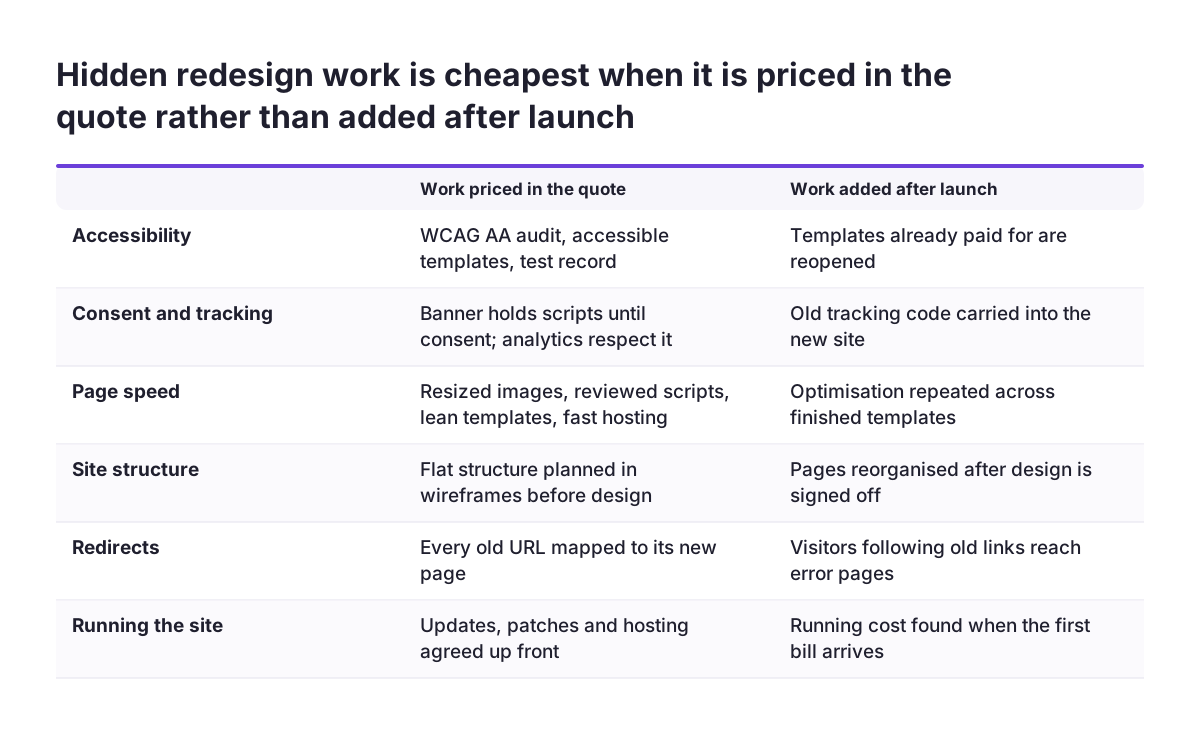
Accessibility work to WCAG belongs in the original redesign quote, because fixing it after launch means reopening templates you have already paid for. WCAG, the Web Content Accessibility Guidelines, is the standard used to judge whether people with disabilities can use a site. Level AA is the conformance level most organisations aim for.
In the UK, the Equality Act 2010 already expects businesses that serve the public to make reasonable adjustments for disabled people. That duty includes your website. If you also sell to consumers in the EU, the European Accessibility Act may apply too, so check with your own adviser. Either way, accessibility is not a feature to trim when the budget gets tight.
Accessibility costs money in three places:
- Audit: testing the current site and the new designs against WCAG criteria.
- Design and build: colour contrast, keyboard navigation, form labels, heading order and alternative text built into every template.
- Documentation: recording what was tested and what was fixed, so you can show your work later.
Accessibility built into the templates from the start costs less than accessibility retrofitted page by page. Ask your supplier which WCAG level they design and test to, how they test, and whether the accessibility audit appears as its own line in the quote.
Privacy-ready tracking and forms add design and build time
Privacy-ready tracking and forms add design and build time because the consent setup has to work before any marketing script fires. A redesign that simply copies the old tracking code across often carries old compliance problems into the new site.
The work usually includes three parts. First, a consent banner that blocks non-essential cookies until the visitor agrees. Second, analytics configured to respect that choice. Third, forms that collect only the data you need, say clearly what happens to it, and send it somewhere secure rather than to a shared inbox.
In the UK, some analytics used only to improve your own site can run without consent. That exception applies only if you explain the analytics clearly and give visitors an easy way to opt out. So the analytics setup needs deciding at design stage too.
Analytics deserves particular care during a redesign. If tracking is set up as an afterthought, your figures after launch will not match your figures before it. Then you cannot tell whether the new site performs better or worse than the old one.
Forms are also where a redesign often connects to other systems. If your enquiries should flow into your sales tools rather than an inbox, read why your contact form should not end in an inbox before you brief your supplier. Every connection to another system is development work, and it should appear in the quote rather than surface halfway through the project.
Page speed targets and the work behind them
Page speed is a redesign cost because a fast site comes from decisions about images, scripts, fonts and hosting, not from a final polish. A Zoho guide to redesigning a website notes that visitors now expect load times of less than 3 seconds.
Meeting that expectation takes deliberate work. Images need resizing and modern formats. Third-party scripts, such as chat widgets and tag managers, need reviewing, because each one adds weight. Templates need building lean, without loading code on pages that do not use it. Hosting needs to be fast enough to serve the result.
Speed and the other hidden costs are linked. Every tracking script you add for marketing slows the page a little. A consent setup that loads scripts only after agreement can help speed as well as compliance.
Ask your supplier for a speed target in writing, and how they will measure it before and after launch. A target without a measurement is a hope. If your current site is slow and you want to know where the time goes before committing to a rebuild, what to fix first on a slow website sets out the usual order.
Site structure that search engines and AI answers can read
Site structure is a cost because a site that machines can read needs planning before design starts. The Zoho redesign guide recommends a "flat structure", in which every page sits just a few links from the others. That planning usually happens in a wireframe, which the guide describes as an architectural blueprint for the site's structure, layout, information architecture and user flow.
Search visibility depends on that structure. The same guide points out that most people do not go past the first page of search results. Clear headings, sensible URLs and internal links help search engines understand what each page is about. Tools that build answers from search results draw on the same signals, so a well-structured page has a better chance of being quoted accurately.
Two further items often sit inside the structure work:
- Schema markup: code that gives search engines more context about your content, which can enable rich snippets in results.
- Author profiles: the Zoho guide notes they help you meet Google's quality guidelines on expertise, authoritativeness and trustworthiness.
Ask whether your quote includes information architecture, schema markup and an internal linking plan, or only visual design.
Redirects and content migration protect the traffic you already have
Redirects and content migration protect the search traffic your current site has already earned. When page addresses change in a redesign, every old URL needs a permanent redirect to its new equivalent. Without one, visitors and search engines who follow old links hit an error page.
Migration work is easy to underestimate. Someone has to list every existing URL, decide which pages stay, merge or go, and map each one to a destination. Titles, meta descriptions and internal links need carrying across too. Moving to a different platform adds more of this work, because the new system may store content differently.
Redirects also matter after launch. If you test two versions of a page against each other, known as A/B testing, the Zoho redesign guide advises using temporary 302 redirects for the test. Permanent redirects are for addresses that have moved for good.
Content is a related cost. Rewriting copy, rather than moving it unchanged, takes time and often a professional writer. Ask whether the quote covers content migration, how many pages it includes, who writes new copy, and who builds and tests the redirect map. If nobody owns the redirect map, rankings are at risk.
Hosting and maintenance after launch are part of the cost
Hosting and maintenance are part of website redesign cost because a site starts ageing the day it launches. The CMS, plugins and server software all need updates. Security patches cannot wait for the next redesign.
Suppliers handle the running cost in different ways. Harris Digital Web Design, for example, includes hosting for 12 months with each redesign, along with a free .co.uk or .com domain renewal, and states that it charges no monthly fees for website support or SEO. Other suppliers sell a monthly plan covering hosting, updates and support. Neither model is wrong, but they produce very different totals over three years.
The questions that reveal the real running cost are simple:
- What does hosting cost after any included period ends?
- Who applies CMS and plugin updates, and how often?
- Who fixes the site if an update breaks something?
- What does a content change or a new page cost after launch?
- Who owns the domain and the hosting account?
Compare quotes on the cost of building the site and running it for at least two years. A cheaper build with expensive or unclear maintenance can cost more overall.
How to compare website redesign quotes line by line
To compare website redesign quotes fairly, put them side by side on the same lines rather than the same total. At Svennis we write accessibility, consent, speed targets and the redirect map into the quote as separate lines, so you can see what each one costs before any work starts.
The table below lists the lines worth checking in every quote, and the question that shows whether each one is really included.
| Quote line | What it should cover | Question to ask |
|---|---|---|
| Accessibility | Audit, accessible templates, test record | Which WCAG level do you test to? |
| Tracking and forms | Consent setup, analytics, secure form handling | Do scripts wait for consent? |
| Speed | Image, script and template optimisation | What load time will you commit to? |
| Structure and SEO | Wireframes, schema markup, internal links | Who plans the page hierarchy? |
| Migration | Content transfer, redirect map, metadata | How many pages, and who tests redirects? |
| After launch | Hosting, updates, support | What does year two cost? |
A quote that leaves a line blank is not necessarily bad. It means you will pay for that work separately, do it yourself, or go without it. Knowing which, before you sign, is the point of the exercise.
Next steps before you ask for a redesign quote
The best way to control website redesign cost is to decide what the new site must do before you ask anyone for a price. A clear brief lets suppliers quote the same scope, which makes their numbers comparable.
Work through these steps first:
- List what is wrong with the current site: slow pages, hard-to-edit content, inaccessible forms, poor search visibility.
- Note accessibility to WCAG as a requirement, since the Equality Act 2010 expects reasonable adjustments for disabled visitors. If you sell to consumers in the EU, check whether the European Accessibility Act also applies.
- Export a list of your current URLs and mark the pages that bring in traffic or enquiries.
- Write down every tool your site connects to, including analytics, forms and booking systems.
- Decide who will maintain the site after launch, and what budget you have for running costs.
Then ask each supplier to quote against the line items in the comparison table above. If you want to judge whether the investment is worth it, when a website redesign pays off covers the business case. For what a redesign with us includes, and how to get a price, see our website redesign service.