XML sitemaps and robots.txt explained for business websites
What an XML sitemap and a robots.txt file each do, the mistakes that hide pages after a redesign, and how to check both before and after launch.
- Nº
- 39
- Published
- Read
- 12 min
- Category
- Notes
- Written by
- Revylio
XML sitemaps and robots.txt explained: one file invites crawlers, the other sets limits
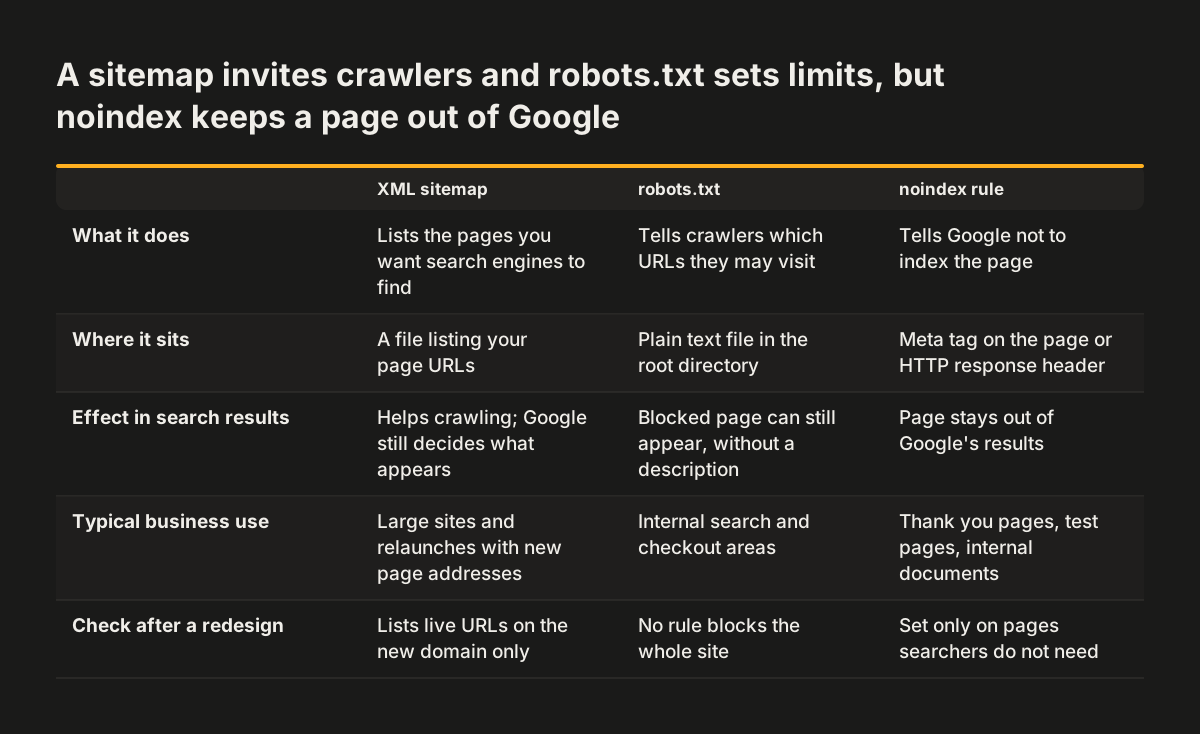
Here are XML sitemaps and robots.txt explained in one line each. An XML sitemap lists the pages you want search engines to find. A robots.txt file tells crawlers which URLs they may visit. Neither file decides on its own whether a page appears in Google, and both need checking whenever a site is redesigned.
Two terms come up throughout this guide. A crawler is a bot that finds pages by following the links on each page it visits. Indexing is how a search engine stores and organises the information it collects about those pages. Google's documentation says Googlebot and other web crawlers work by accessing URLs found in pages they crawled before.
The two files guide crawling from opposite ends. The sitemap points crawlers at the pages you consider important. The robots.txt file asks them to stay out of certain areas. When the two disagree, or when an old setting survives a relaunch, the right pages can quietly drop out of view.
The sections below cover what belongs in each file, the mistakes that hide pages after a redesign, and a checklist you can hand to your web team before launch day.
An XML sitemap is a list of the pages you want search engines to find
An XML sitemap is a file that gives search engines information about the pages, videos and other files on your site, and the relationships between them. That is Google's definition, from its Search Central guide to sitemaps. Despite the name, it is not a drawing of your site. It is simply a list of page links.
Search engines read the sitemap to crawl your site more efficiently. For each page, an entry can carry:
- the page URL
- the date the page was last modified
- how often the page is updated
- its relative importance compared with other pages
- any alternate language versions of the page
Specialised entries go further. An image entry can include the location of images on a page. A video entry can give the running time, the rating and the age-appropriateness rating. A news entry can include the article title and publication date.
A sitemap is a suggestion, not an instruction. Listing a page does not guarantee that it will be indexed. It only tells search engines that you consider the page worth their time.
The XML sitemap is also a different thing from the sitemap your designer draws when planning menus and page hierarchy. That planning work is covered in our guide to planning a website sitemap and navigation for a redesign. The XML file is the machine-readable output once the pages exist.
Which business websites need an XML sitemap, and which can manage without
Most small, well-linked business websites can manage without an XML sitemap, according to Google. Google can usually discover most of a site when its pages are properly linked. Properly linked means every page you consider important can be reached through the menu or through links placed on other pages.
Google defines a small site as about 500 pages or fewer. Only pages that you think need to be in search results count toward that total. Google adds a second condition: the site should be comprehensively linked internally, so Googlebot can reach every important page by following links from the home page.
A sitemap earns its place in three situations:
- Large sites. It is harder to make sure every page is linked from at least one other page, so Googlebot is more likely to miss new ones.
- New sites. Googlebot might not discover your pages if no other sites link to them yet.
- Media-heavy or news sites. Google can take additional sitemap information into account for video, images and Google News.
A freshly relaunched site often fits the second case, because many old URLs and inbound links no longer match the new structure. Having a sitemap costs little. Most content management systems create one for you; on WordPress, plugins such as Yoast and All in One SEO generate it. Google also publishes instructions for building one by hand.
robots.txt controls crawling, not whether a page appears in Google
robots.txt is a plain text file in your website's root directory that tells search engine crawlers which URLs they may access. Google says the file is mainly used to stop crawler requests from overloading your site. Google also says plainly that it is not a mechanism for keeping a web page out of Google.
The difference matters. robots.txt is a crawling directive rather than an indexing directive. A crawling directive governs whether a bot fetches a page. An indexing directive governs whether the page is stored and shown in search results.
Google's robots.txt introduction spells out the consequences:
- A page blocked by robots.txt can still appear in search results, but without a description.
- A disallowed page can still be indexed if other sites link to it.
- Blocking image, video or audio files does not stop other pages or users from linking to them.
Crawlers usually check the robots.txt file first when they visit a site. If crawling is allowed, Googlebot then follows internal links and reviews the XML sitemap to find more URLs. If the file is missing altogether, search engines generally assume there are no crawl restrictions. A missing robots.txt is therefore far less harmful than a wrong one.
Keeping a page out of Google needs noindex, a password or deletion
To keep a URL out of Google's search results, Google lists three methods. Each one works on the page itself rather than on the crawler's route to it.
- Password protection. Protect the files on the server so only signed-in users can open them.
- A noindex rule. Add a noindex meta tag to the page, or send noindex in the HTTP response header. Either tells Google not to index the page.
- Deletion. Remove the page entirely.
For a business website, the usual candidates are thank-you pages after a form, internal documents, test pages and the staging site where the redesign is built. A staging site is a private copy of the website used for building and testing before launch. Password protection suits a staging site best, because it keeps out search engines and curious visitors alike. Our guide to website security basics for business owners covers what to ask your web team about access to environments like this.
One more rule protects the pages you do want found. Do not use robots.txt to block resource files, such as CSS stylesheets and JavaScript, if Google needs them to understand the page. Blocked CSS or JavaScript can stop crawlers seeing how your pages actually appear.
A worked robots.txt example for a business website
A typical business website needs only a short robots.txt file. The example below is for a fictional company at www.example.com. It lets every crawler in, keeps them out of two areas that generate endless low-value URLs, and points them to the sitemap. Save it as a plain text file named robots.txt in the root directory, so it opens at https://www.example.com/robots.txt.
# robots.txt for www.example.com
# The rules below apply to every crawler
User-agent: *
Disallow: /internal-search/
Disallow: /checkout/

# Where crawlers can find the XML sitemap
Sitemap: https://www.example.com/sitemap.xml
The User-agent line names the crawler a group of rules applies to. Different search engines use different user agents, and the asterisk means all of them. Each Disallow line names a path crawlers are asked to avoid. Replace the two example paths with areas of your own site that offer nothing to a searcher, or remove them if you have none.
The Sitemap line tells crawlers where your XML sitemap lives. You can also submit the sitemap to search engines directly. With this line in place, crawlers find it anyway when they visit. Change the address to your own domain and to the file name your CMS produces.
Some files also carry a crawl-delay rule, which asks bots to wait between requests. Not every search engine follows it, so leave it out unless your server genuinely struggles.
Common robots.txt and sitemap mistakes that hide pages after a redesign
The most damaging mistake blocks the whole website on launch day. It often happens when a site moves from staging to the live server and nobody updates the robots.txt file. The staging version usually asks every crawler to stay out, so the new live site inherits that request.
Four other mistakes recur after relaunches:
- Blocked CSS and JavaScript. A new theme may store its styles and scripts in a folder an old rule disallows. Crawlers then cannot see how the pages look.
- Conflicting signals. A page listed in the sitemap but blocked in robots.txt sends mixed messages. The sitemap says the page matters, while robots.txt asks crawlers to stay away.
- A stale sitemap. A sitemap that still lists the old site's addresses points crawlers at pages that no longer exist, instead of the new ones you want found.
- robots.txt used to hide private pages. The blocked URL can still show in search results without a description. A noindex rule or a password is the correct tool.
Each of these mistakes is quiet. The site looks perfect in a browser, because people are not affected by robots.txt or sitemaps. Only crawlers notice, and the first sign for you is often a drop in visits weeks later.
Launch checklist for XML sitemap and robots.txt settings
The checklist below covers both files before and after a relaunch. Each row names the setting, what to check, and what goes wrong if nobody does.
| Setting | What to check | What goes wrong if skipped |
|---|---|---|
| robots.txt on the live site | Open /robots.txt on the live domain and confirm no rule blocks the whole site | The staging block carries over and crawlers are asked to avoid every page |
| Disallowed paths | Each Disallow line names an area that searchers do not need | Service pages or blog posts fall outside crawling |
| CSS and JavaScript | No rule covers folders that hold styles or scripts | Crawlers cannot see how pages appear |
| Sitemap line in robots.txt | The address points to the live sitemap on the new domain | Crawlers miss the sitemap or follow an old one |
| Sitemap contents | Only new, live URLs you want found; no old addresses | Crawlers are sent to pages that no longer exist |
| Sitemap versus robots.txt | No URL in the sitemap is disallowed in robots.txt | Conflicting signals about which pages matter |
| Private pages | Protected by password or noindex, not by robots.txt alone | The URL still appears in results without a description |
| Staging site | Password-protected, so no crawler can reach it | Test copies compete with the live site |
At Svennis we open the live robots.txt and sitemap in a browser in the first minutes after go-live, because a staging setting surviving the switch is the problem we see most often at relaunches.
Search engines and other crawlers do not all obey robots.txt in the same way
robots.txt is a request, not a lock. Google states that the rules in the file cannot force a crawler to behave in a particular way. Each crawler decides for itself whether to follow them.
Googlebot and other well-built crawlers follow the rules. Some crawlers do not. Google also notes three further limits:
- Some rules are supported only by some search engines.
- Different crawlers may interpret the same rule differently.
- Some crawlers do not understand certain rules at all.
Two practical conclusions follow for any business website. First, keep the file simple, using widely understood lines such as User-agent, Disallow and Sitemap. Unusual rules risk being read differently by different bots.
Second, never treat robots.txt as protection for anything confidential, whatever kind of bot you are trying to keep out. A crawler that ignores the file, whether it gathers pages for a search engine or for an AI tool, will fetch the page anyway. Content that must stay private needs a password on the server. robots.txt is for managing well-behaved crawler traffic, which is exactly what Google says it is for.
What sitemaps and robots.txt mean for a business in the UK and Europe
For a business in the UK or elsewhere in Europe, two points deserve extra attention: more than one search engine, and more than one language.
Google is not the only search engine your customers use. Submitting your XML sitemap through Bing Webmaster Tools can help Bing discover newly published pages more efficiently. That step matters most just after a relaunch, when every page address may be new. The Sitemap line in robots.txt also helps any crawler that visits find the file without a separate submission.
Many European companies run their site in several languages. Google's sitemap documentation confirms that a sitemap can record alternate language versions of each page. That gives search engines a clear map of which page answers which market. If you serve several countries, our guide to multilingual websites with URLs, hreflang and local pages explains how to structure those versions in the first place.
Smaller firms serving one town or region are usually below Google's threshold of about 500 pages. Good internal linking does most of the work for them. The sitemap is still worth keeping accurate, especially after a redesign, and it supports the work described in our guide to local SEO for a small business.
Next steps: check both files on your own website this week
You can check both files yourself in about ten minutes, without any special tools. Start with these steps:
- Type your domain followed by /robots.txt into a browser. Read every Disallow line and ask whether any covers pages customers need.
- Look for a Sitemap line. Open the address it gives and confirm the file loads.
- Scan the sitemap for old URLs, test pages or addresses on a staging domain.
- Pick three important pages, such as a service page, the contact page and a recent article. Confirm each appears in the sitemap and none is disallowed.
- List any private pages and ask your web team whether they are protected by password or noindex.
If a redesign is coming, put these checks in writing before work starts. Our website brief template for a business redesign gives you a place to record them, so launch-day settings become part of the agreed scope.
If you would rather have the whole relaunch handled, including sitemap, robots.txt and the checks above, see how our website redesign service approaches launch day.