
Website brief template for a business website redesign
A website brief template for a redesign, covering what most templates miss: accessibility, GDPR, page speed, search and AI answers, and hosting.
- Nº
- 13
- Published
- Read
- 12 min
- Category
- Notes
- Written by
- Revylio
Website brief template: the sections a redesign brief needs
A website brief template is a fill-in document you give a web designer or agency before any work starts. For a business redesign, it should cover goals, audience, budget, timeline and content. It should also cover five sections most templates leave out: accessibility, GDPR and cookie consent, page speed, search and AI readiness, and hosting after launch.
Miro describes a design brief as a bridge between a business and a design agency. It is the document that lets you state your needs and constraints in one place. A website brief does the same job, but a website is also a legal, technical and operational asset, so the brief has to say more than how the site should look.
Free templates are easy to find. Miro offers a design brief template, and Good Brief generates briefs once you pick a job type, such as Website, and an industry. A generated Good Brief contains a company name, a company description, a job description and a deadline. That is enough for design practice. It is not enough for a redesign of the site your customers use every day.
The sections below follow the order in which you would fill in a website brief. Each one says what to write and why the provider needs it. A copyable version of the full template comes near the end.
Goals, audience and approval: the core of every website brief
The core of a website brief is what the site must achieve, for whom, and who signs off. monday.com lists seven components of a creative brief: objectives, audience, messaging, deliverables, timeline, budget and success metrics. A website brief needs all seven.
Write one main goal for the site and make it measurable. "More enquiries" is a wish. "More quote requests from facility managers through the contact form" gives the designer a target. If a second goal exists, rank it below the first.
Describe the audience in concrete terms: their role, what they come to the site to do, and what they already know. Miro advises including the target audience because a design team makes different choices depending on who it needs to reach.
Name the person who approves
monday.com recommends that the final brief is approved by the primary stakeholder who holds budget and strategic authority. Put that person's name in the brief. A website brief without a named decision-maker invites approval by committee, and decisions slow down.
monday.com also separates two documents. A creative brief sets strategy, messaging and business goals. A design brief details the visual execution. A website brief for a redesign covers both, then adds the technical sections that neither document usually contains.
Budget and timeline belong in the website brief, stated plainly
A website brief should state a budget range and a target launch date, even if both are rough. Miro gives the reason: design agencies often juggle many projects at once. With a budget and timeline in hand, an agency can tell you early if either is unrealistic, while you still have time to make a contingency plan.
Deadlines slip more often than most plans admit. Wellingtone's State of Project Management 2026, cited by monday.com, found that only 36% of organisations consistently complete projects on time. A brief that states fixed dates, such as a product launch or a trade show, tells the provider which dates cannot move.
A range works better than a single figure. It lets the provider propose something realistic rather than something out of reach. If you are unsure what range to give, our post on what drives the price of a website redesign sets out the cost factors.
Ask for three things to be priced as separate lines:
- the build itself, including design, development and content migration;
- hosting, with what the plan includes;
- ongoing maintenance after launch.
Separate lines make quotes comparable. They also stop maintenance from disappearing into the build price and resurfacing as an unplanned cost six months later.
Scope, content and a list of what you do not want
The scope section of a website brief lists the pages, features and content the new site needs. Split it into essentials and nice-to-haves. That split lets a provider fit the quote to your budget without guessing what to drop.
Content needs an owner. State who writes the copy, who supplies photos and documents, and by when. State whether existing pages move across as they are, get rewritten or get removed. Missing content stalls redesigns more than design disagreements do.
Miro's design brief steps end with a list of do-nots. Include one. Name the colours, layouts, phrases or features you have ruled out, and why. A short do-not list saves a round of revisions.
If a site already exists
List the pages that bring in traffic and enquiries today. Then ask the provider for a redirect plan from every old URL to its new home. Our guide to website migration without losing Google traffic covers that plan step by step.
If you are a public authority
The Freedom of Information Act requires every public authority to have a publication scheme approved by the ICO. The ICO explains that the authority must also publish the information the scheme covers. The ICO has created a model scheme that all public authorities must use. If that applies to you, the brief should say where the scheme will sit on the new site. It should do the same for the guide to information and the schedule of fees.
Accessibility target: name WCAG 2.1 AA in the website brief
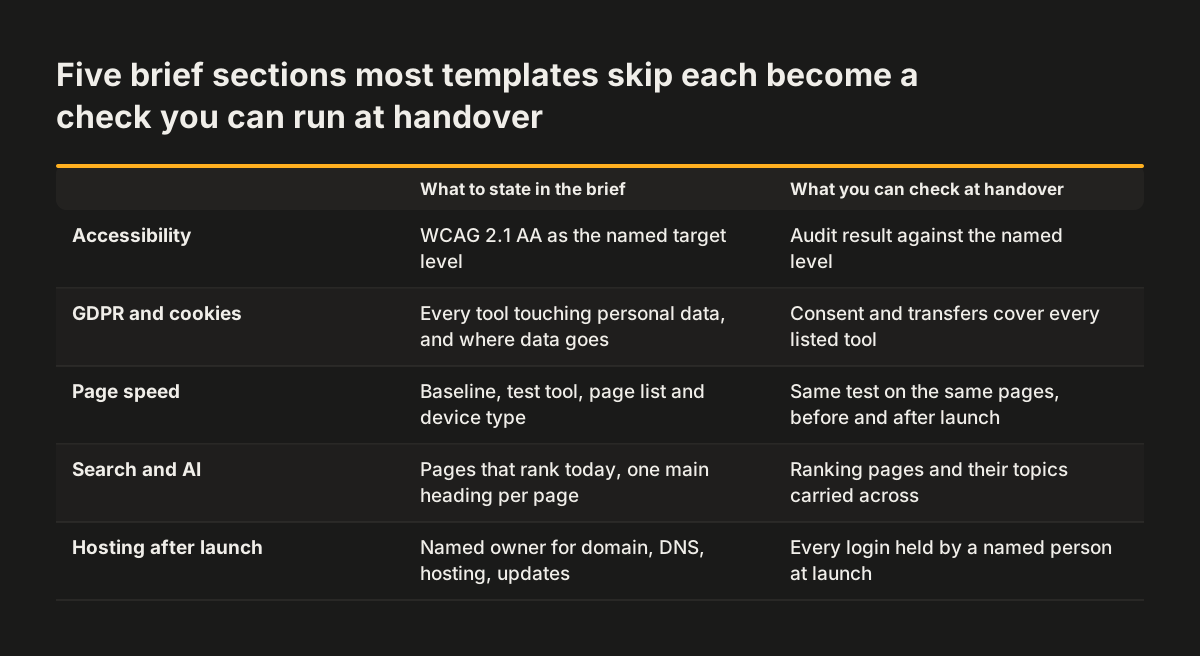
The accessibility section of a website brief should name the standard the site must meet, and the usual target is WCAG 2.1 AA. WCAG is the Web Content Accessibility Guidelines, the published standard for making web content usable by people with disabilities. Writing the level into the brief turns accessibility from a hope into a deliverable you can check.
Most templates skip this section entirely. The result is a site designed first and audited later, when fixes cost more because templates and components are already built. Stating the target up front lets the provider design colours, forms, navigation and interactive elements to meet it from the start.
Ask each provider to answer four questions in their proposal:
- How will you test the site against WCAG 2.1 AA, and when in the project?
- Who fixes the issues the testing finds, and is that inside the price?
- How will documents such as PDFs and downloadable forms be handled?
- How will our editors keep new content accessible after launch?
The fourth question matters as much as the first three. A site can launch compliant and drift within months as people add images without text alternatives or paste in unstructured text.
If you sell to consumers in the EU, the European Accessibility Act shapes what your site has to do. Our post on the European Accessibility Act for business websites and WCAG 2.1 AA explains who it covers and how to meet it.
GDPR and cookie consent: list every tool that touches personal data
The GDPR section of a website brief should list every tool on the site that collects or receives personal data, and where that data goes. Forms, analytics, chat widgets, video embeds, booking tools and newsletter sign-ups all count. A provider cannot build a compliant site around tools it does not know about.
In the UK, the ICO notes that the GDPR has been retained in UK law as the UK GDPR. It is read alongside the Data Protection Act 2018. If a tool sends data outside the UK, ask whether that is a restricted transfer. The ICO's guidance on international transfers includes an interactive tool, based on its three-step test, to help you decide. The same guidance covers the UK Extension, which is the UK's adequacy regulations for the US. It also covers safeguards such as the UK IDTA, the Addendum and UK BCRs.
Some new features may call for a data protection impact assessment, or DPIA, a structured review of the risks a type of processing creates. The ICO says its DPIA guidance is under review because of changes made by the Data (Use and Access) Act. Check the current version before you rely on it.
Cookie consent in the brief
For cookie consent, the brief should state three things:
- which consent tool the site will use, or that the provider should propose one;
- which tools must wait for consent before they load;
- who updates the consent settings when a new tool is added.
Page speed targets: agree how speed is measured before design starts
A website brief should state page speed as a measurable target, tested on named pages, in the same way before and after launch. "The site must be fast" cannot be checked at handover. A target with a tool, a page list and a device type can be.
Start with a baseline. Measure your current homepage, your main service pages and your contact page on a mobile connection, and attach the results to the brief. The provider then knows what it has to beat, and you can prove whether it did.
Speed problems on business sites usually come from a few repeat sources: large images, heavy fonts, and third-party scripts for tracking, chat or embedded video. The brief should say who decides which third-party scripts stay. Without an owner, scripts accumulate after launch and undo the work done during the build.
Put these points in the speed section:
- the pages to be tested and the device type, with mobile first;
- the measurement tool both sides will use;
- the target for each page, written as a number;
- who approves any new third-party script after launch.
If you want to put a value on the speed target, our post on what a slow website costs in enquiries shows how to find where a slow site loses enquiries.
Search and AI answers: brief the site for how machines read it
The search section of a website brief should ask for a site that search engines and AI assistants can read, quote and send visitors to. That means clear page structure, text that lives in the page rather than inside images, and pages that each answer one question well. A redesign that looks better but reads worse to machines loses traffic.
Write down what you rank for today and which pages earn that traffic. Those pages need special care in the redesign. Their topics, and ideally their URLs, should carry across.
Then ask each provider how it will handle these points:
- one descriptive heading structure per page, with a single main heading;
- page titles and descriptions written for each page, not generated in bulk;
- service and product pages that state facts plainly: what you offer, where, and for whom;
- redirects from every retired URL, tested before launch.
AI assistants increasingly summarise websites before people visit them. Pages that state their answers early and in plain words are easier for those tools to quote correctly. Our post on how AI assistants read your website lists what to fix first.
Keep this section of the brief short. The goal is not to write an SEO strategy. It is to make sure search and AI readiness are part of the build, rather than a clean-up project after launch.
Hosting and maintenance after launch: name an owner for each task
The hosting and maintenance section of a website brief names who owns each running task once the site is live. Most templates end at launch day. A business website keeps needing updates, backups, security patches and content changes, and someone has to own each one.
When Svennis receives a redesign brief with no named owner for hosting, we add an ownership list to the first workshop, covering domain, DNS, hosting account, site admin access and software updates. Settling it before design starts means launch day does not stall while someone searches for a login held by a former supplier.
The ownership list in the brief should cover these items:
- the domain name and its registrar account, held in your organisation's name;
- DNS settings, and who may change them;
- the hosting account, the plan and who pays for it;
- administrator access to the site, with at least one account held by your own staff;
- software and plugin updates, and how often they run;
- backups, where they are kept and how a restore is tested;
- monitoring of accessibility and speed after launch.
State what response you expect when something breaks, and who you call. If the build provider will not maintain the site, the brief should say so. The handover then needs documentation that another provider can work from.
The website brief template to copy, section by section
The website brief template below collects every section into one table you can paste into a document. The middle column says what to write. The right column says who in your organisation usually holds the answer, so you know whom to ask before you start.
| Section | What to write | Who usually answers |
|---|---|---|
| Main goal | One measurable goal, with a second ranked below it if needed | Decision-maker |
| Audience | Roles, what they come to do, what they already know | Marketing, sales |
| Decision-maker | Name of the person who approves the brief and the work | Leadership |
| Budget and timeline | Range, launch date, fixed dates that cannot move | Decision-maker, finance |
| Scope and content | Pages, features, essentials versus nice-to-haves, content owners | Marketing |
| Do-nots | What you have ruled out, and why | Marketing, leadership |
| Accessibility | WCAG 2.1 AA target, testing, fixes, editor training | Marketing, compliance |
| GDPR and cookies | Every data-collecting tool, transfers, consent tool and owner | Data protection lead |
| Page speed | Baseline, pages tested, tool, target per page | Marketing, IT |
| Search and AI answers | Pages that earn traffic, redirect plan, page structure | Marketing |
| Hosting and maintenance | Owner for domain, DNS, hosting, access, updates, backups | IT, operations |
monday.com recommends one to two pages for a creative brief. A website brief with the technical sections runs longer, but each section should still fit in a few short paragraphs or a list. If a section grows past a page, move the detail into an attachment.
Next steps: fill in, approve, send and revise the brief
Your next step is to fill in the website brief template with the people who hold the answers. Then get it approved before any provider sees it. A brief that changes after quotes arrive produces quotes that no longer match.
Work through it in this order:
- Draft the goal, audience and decision-maker sections yourself.
- Send the accessibility, GDPR, speed and hosting sections to the colleagues who own those areas.
- Attach your speed baseline and a list of the pages that bring in traffic today.
- Have the decision-maker approve the finished brief.
- Send the same brief to each provider, so every quote prices the same scope.
Expect more than one round of design. monday.com cites the 2025 BetterIdeas Project on this. It found that reaching a signed-off idea typically takes around five rounds of creative development. Rounds are normal. Changing the brief itself is a different matter.
monday.com advises revising a brief when fundamental parameters change, such as the target audience, the business objectives or the scope. Minor creative iterations do not justify a revision. Keep the brief as the source of truth that Miro describes, and record any change with a date and the approver's name.
You may want to see how a provider works from a brief like this. Our page on how we run a website redesign sets out the stages from brief to launch.