Writing service pages that bring enquiries, not just visits
How to build each service page around one buyer question, clear proof and a single next step, so more of your visitors send an enquiry.
- Nº
- 25
- Published
- Read
- 13 min
- Category
- Notes
- Written by
- Revylio
Service pages that bring enquiries answer one buyer question and ask for one next step
Writing service pages that bring enquiries comes down to three moves. Build each page around the one question your buyer is asking. Show proof that you can deliver. End with a single, clear next step.
A service page is a page that sells one specific service to one type of buyer, often someone close to a decision. That definition comes from Aquaria Digital. It is narrower than a homepage, and that narrowness is the point.
Many service pages miss that job. Aquaria Digital describes a pattern the author sees again and again:
- a generic headline about "quality solutions"
- a paragraph about the company's history
- a list of services
- a contact form at the bottom
That page talks about the business. It does not talk about the visitor's problem.
The service page often carries more weight than any other page. Content Goodies reports that 47% of online users visit a company's Services page before any other page when researching a company. That makes it the page where many buyers form their first view of you.
This guide covers structure, proof, price, the call to action and Google's people-first guidance. It ends with a worked example and a checklist.
One page per service gives each buyer a page that fits their need
Each main service needs its own page. Aquaria Digital defines a service page as one that sells one specific service to one type of buyer. A single page that lists every service cannot do that job for any of them. A dedicated page lets you name the service in the words people search for. It also lets you answer that buyer's questions without making them wade through other services. A plain list of services leaves the selling to the visitor. A service page has to do the selling itself. The usual structure is a services index that links to one page per service. The index helps a visitor choose. Each service page does the persuading. Links matter for discovery as well. Google's SEO starter guide says the vast majority of new pages Google finds each day are found through links. So link every service page from your navigation and from the services index. Use anchor text that names the service. Anchor text is the visible text of a link, and it tells people and Google what the linked page is about. Google also notes that organisation can affect crawling and indexing on sites with more than a couple of thousand URLs. Most business sites are far smaller. The principle still holds: a clear structure helps people first.
Start each service page from the buyer's question, in the buyer's own words
A buyer question is the single question a visitor brings to a service page, in the words they would use themselves. Write it down before anything else. Every heading and paragraph on the page should help answer it. Find the wording in what customers already say. Aquaria Digital recommends collecting customers' exact words before writing. Good sources are sales calls, emails, reviews, support tickets and competitor reviews. The author spends an hour on this for every page. The reason is simple: customer language converts better than marketing language because it feels familiar. Then lead with the problem. Describe it in plain terms before you talk about your process or your company. Leave out jargon and industry terms that your buyer would not use. Write to "you", the reader, more than about "we". Match the page to how people arrive. Aquaria Digital recommends matching the headline and offer to the ad, email or search result that brought the visitor. Message match builds trust. At Svennis, when we rebuild a service page during a
, we write the buyer question at the top of the draft first. We then strike out every paragraph that does not help answer it, and the company history is usually the first to go.
The five jobs every service page has to do for a buyer
A service page generates enquiries when it does five jobs, according to Aquaria Digital. They are:
- match the visitor's intent
- make the offer instantly clear
- prove credibility
- reduce perceived risk
- make contacting you easy
Each job maps to a part of the page. Intent and clarity sit in the headline and opening. Credibility comes from proof. Risk falls when the buyer can see the price and the process. Easy contact is the call to action and the form. Treat the five jobs as the skeleton of the page. Practical questions belong inside them: what the service includes, how long the work takes, how you price it and what the first step looks like. Give each one a short section with a literal heading. A visitor who scans only the headings should know whether you fit. A visitor who reads one section should get a complete answer. Aquaria Digital adds that answering common questions directly helps Google and
understand and cite your page. Direct answers serve the scanning buyer and the machine at the same time. An FAQ block near the end can pick up the questions that do not fit the main flow.
Proof that persuades a hesitant buyer is specific, named and honest
Proof shows a buyer that you can deliver. Content Goodies reports that online reviews affect purchasing decisions for 95% of consumers. It adds that reviews work better with a personal touch, such as the client's name and photo. Photos of finished work and any relevant licences or credentials add to that evidence. The strongest testimonials deal with doubt. Ask clients what worried them before they hired you, and whether that worry came true. "Great to work with" says little. "We worried the move would take our site offline, and it did not" answers a real fear. For visual work such as design or photography, explain each portfolio piece. Describe the problem you had to work around or the challenge you met. That turns a picture into evidence of judgement. Honesty matters to Google too. E-E-A-T stands for experience, expertise, authoritativeness and trustworthiness. These are the qualities Google's systems try to identify through a mix of factors. Of these, Google says trust is most important. Its guidance also says any form of deception, including fabricated creator profiles, makes a page untrustworthy. Never invent a testimonial, a client logo or a credential.
Price and process: tell buyers what the service costs and what happens next
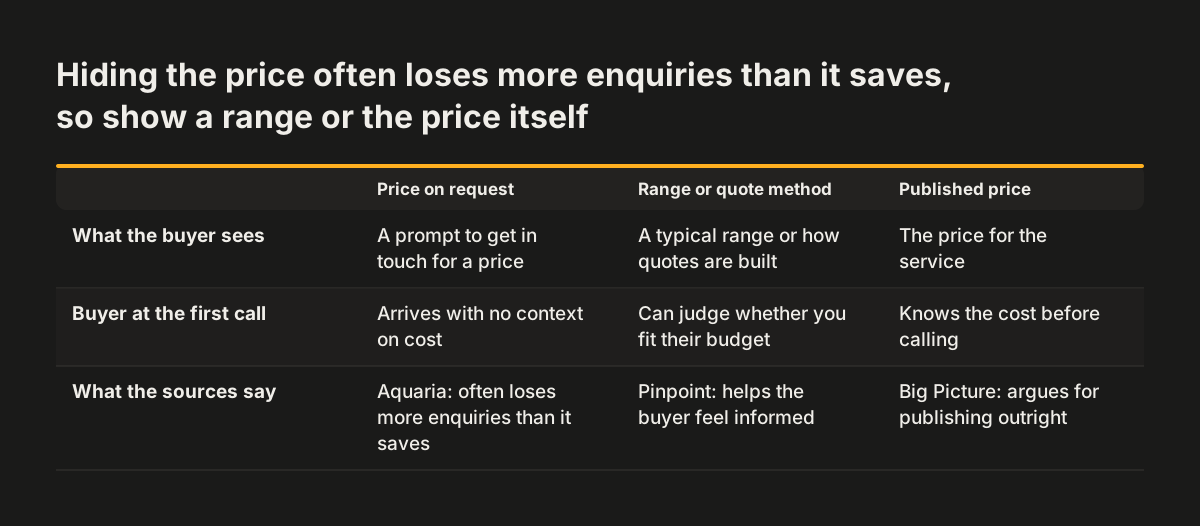
Buyers hesitate when they cannot see the cost or the route. Aquaria Digital states that avoiding the price question often loses more enquiries than it saves. You do not always need exact prices. A general range, or
a clear explanation of how you put a quote together
, still gives the buyer something to judge. Some businesses go further and publish prices outright. A buyer who has to call just to learn the rough cost arrives at that call with no context. Whichever approach you take, give the buyer enough to judge whether you are in their range. Process needs the same openness. Aquaria Digital says uncertainty about the process is a major reason people delay contacting a provider. It recommends explaining your process in three to five simple steps. Then add a "what happens next" section near the form. Aquaria Digital defines it as a section that shows exactly what follows a form submission. It covers how fast you respond and makes clear there is no obligation. The author reports seeing this simple addition noticeably increase form completions. A buyer who knows what to expect has one less reason to wait.
One clear next step, matched to how ready the buyer is
A call to action (CTA) is an element that guides visitors towards a desired action, such as contacting you or booking a service. Each service page needs one main CTA. Put it at the end of the page. Repeat it partway down for visitors who are ready early. Choose the action by how ready the buyer is. Aquaria Digital gives two examples:
- High-intent emergency services suit a click-to-call button.
- Considered B2B services often suit a short consultation booking.
For a consultation, a booking tool that lets prospects pick their own time for an introductory call removes a round of emails. We recommend one action, repeated where it helps, rather than several competing actions. "Book a call", "download our brochure" and "subscribe" on the same page split attention three ways. Pick the step that moves this buyer forward, and use the same wording each time it appears. The CTA has to work on every screen. Content Goodies states that mobile responsive design is essential for a good user experience on a Services page. Test the form and the call button on a phone before launch.
What Google's people-first guidance means for a service page
People-first content is content created primarily for people, not to manipulate search engine rankings. Google's
guidance on helpful, reliable, people-first content
says its automated ranking systems are designed to prioritise this kind of information. A service page built around the buyer's question already follows that guidance. Several points in Google's documentation settle common debates:
- Google says it does not have a preferred word count.
- Its SEO starter guide says content length alone does not matter for ranking.
- Google Search does not use the keywords meta tag.
- Keyword stuffing goes against Google's spam policies.
- E-E-A-T is not itself a specific ranking factor.
- Heading order does not matter to Google Search, though it still matters to readers.
Aquaria Digital suggests 800 to 2,000 words for a service page. Treat that as a range that fits most buyer questions, not a target. The real test is readability: if a keyword makes a sentence harder to read, cut the keyword. AI drafting needs care. Google says using automation, including AI generation, mainly to manipulate rankings breaks its spam policies. Its rater criteria treat large amounts of AI text without manual oversight as little to no effort. Google's core ranking systems also look to reward content that provides a good page experience. A slow page loses buyers before they read a word. Our guide to
what a slow website costs in enquiries
shows how to find that leak.
Worked example: rebuilding one service page step by step
Take a firm that offers office refurbishment and has one generic page listing all its services. Here is how the rebuild runs, using the settings from the sources above.
Research and structure
First, the firm gives refurbishment its own page, linked from the navigation and a services index. Next, someone spends an hour collecting customer words from sales emails, reviews and call notes. Say the phrase that keeps coming up is "can you do it without shutting the office?". That becomes the buyer question, and the headline echoes it.
Writing the sections
The page opens by describing the problem in the customer's terms. These are disruption, deadlines and cost. It then works through the five jobs in turn. The process becomes four steps: site visit, written plan, phased work, handover.
The proof section shows photos of finished offices. It adds a named testimonial from a client who feared downtime.
Price and next step
A short paragraph explains how quotes are built, so buyers know what drives the figure. Near the form, a "what happens next" block says who replies, how fast, and that there is no obligation. The single CTA is a short consultation booking, because refurbishment is a considered purchase. The same button appears partway down and at the end.
Checking the result
Before launch, the firm shows the page to five people who match its ideal client, for five seconds each. If they cannot say what the service is, the headline changes.
Service page checklist: each part, the question it answers and what goes there
The checklist below turns this guide into a template for one service page. Work through it row by row for each service. If a row has nothing in it, the page has a gap a buyer will notice.
| Page part | Buyer question it answers | What to put there |
|---|---|---|
| Headline and opening | Is this page for me? | The service named in customer words, matching the ad or search result that brought them |
| Problem | Do you understand my problem? | The problem in plain terms, before any mention of your company |
| Solution and scope | Will this fix it, and what do I get? | What the service includes and what changes for the buyer |
| Process | How does it work, and how long does it take? | Three to five simple steps with typical timings |
| Proof | Are you legit? | Named testimonials that address objections, photos of work, relevant licences or credentials |
| Price | Can I afford this? | A price, a range, or how you build a quote |
| What happens next | What happens if I get in touch? | Who replies, how fast, and that there is no obligation |
| Call to action | How do I get started? | One action matched to buyer readiness, partway down and at the end |
Read the finished page against the table before publishing. Then read only its headings in order. They should tell a buyer the whole story.
What this means for a UK or European business writing service pages
A UK or European business faces a few points that a generic guide skips. The first is location. Google's SEO starter guide says Google sees the information available where its crawler is based, which is usually the US. If your site changes service content based on the visitor's country, Google may mostly see the US version. Keep the core service, process and price information visible to everyone. The second is language. Customer words carry more weight than marketing words. A buyer in Manchester may describe the same need differently from a buyer in Dublin or Rotterdam. If you serve several markets, collect customer language from each one. Do not translate a single page word for word. The third is regional demand. Separate pages for each service give a
a clearer page to show for each need, named in the words local buyers use. Plain, well-structured copy also helps readers who use assistive technology. Our guide to
writing accessible content that stays accessible after launch
covers headings, link text and plain language in detail. Finally, be patient after publishing. Google says some changes show within hours, while others can take several months.
Next steps: rewrite one service page and measure the enquiries it brings
Start with the service page that should bring the most work. Rewriting one page well teaches you more than touching all of them lightly. Follow these steps:
- Write down the buyer question for that service, in customer words.
- Collect those words from sales emails, calls, reviews and support tickets.
- Draft the page against the checklist above, one row at a time.
- Add a "what happens next" block beside the form.
- Choose one call to action that fits how ready this buyer is.
- Run a five-second test with five people who match your ideal client.
Most business sites have too little traffic for A/B testing, which compares two versions of a page on live visitors. Aquaria Digital suggests other methods instead. These are five-second tests, customer interviews, call recordings and longer before-and-after comparisons. Compare enquiry rates for the eight weeks before and after a major copy change. To make that comparison reliable, you need to know where each enquiry came from. Our guide to
measuring what a website brings in, from first visit to closed deal
shows how to set that up. Once one page shows a change, apply the same structure to the next service.