Case study pages that win new clients and how to build them
Build case study pages that win new clients: a named client, a measured result, an approved quote and markup that search engines can read.
- Nº
- 28
- Published
- Read
- 11 min
- Category
- Notes
- Written by
- Revylio
Case study pages that win new clients carry three things
Case study pages that win new clients carry three things. They name the client. They state a specific result, quoted on the record with the client's written approval. They use a structure that search engines, AI answers and screen readers can all parse. A logo wall carries none of these, and this guide shows how to build each one.
A case study page is a page that tells the real-world story of how one client solved a specific challenge and what measurable result followed. The client, the challenge and the result are the core of the page. Everything else supports them.
Search engines reward the same qualities that buyers do. Google states that its automated ranking systems are designed to prioritise helpful, reliable information created to benefit people. A case study page with a real client and a real number fits that description. A page of logos and adjectives does not.
Logo walls show who you worked with, not what changed for them
A logo wall answers one question: who has hired you before. It cannot answer the questions a buyer actually brings to the page. What was wrong? What did you do? What changed, by how much, and who will say so?
Headlines carry most of the weight, so the result belongs in the headline. A reader who scans may never get past it. A logo gives that reader nothing. A headline with a named client and a figure gives them the whole case in one line.
Heyflow's case study listing shows the pattern well. One headline reads: "BOLT DMS doubled leads and unlocked £10M+ in pipeline for Excel Roofing using Heyflow." That single line names the agency, the client, the tool and two results. A reader who stops there still leaves with proof.
Trust is the deciding factor. Google says that of the aspects in E-E-A-T, which stands for experience, expertise, authoritativeness and trustworthiness, trust is the most important. A named client who agreed to be quoted is a trust signal. An unnamed logo is not. You can see how we present named projects with their outcomes on our Revylio work page.
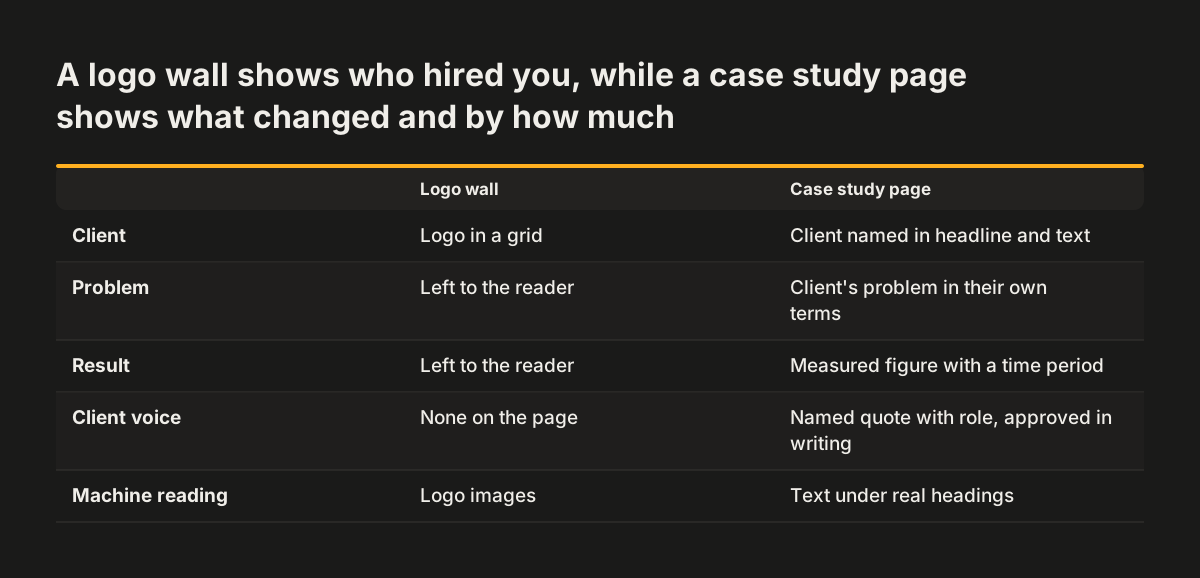
Four parts every case study page needs: problem, work done, result, named quote
Every case study page needs four parts in a fixed order: the client's problem, the work you did, the measured result and a named quote. The order follows the buyer's own questions, from what was wrong to who will vouch for the fix. A prospect can then follow the story without effort.
The four parts each answer a different buyer question:
- Problem: what the client could not do, in their terms, before you started.
- Work done: the specific changes you made, named as concrete actions.
- Result: the measured change, with the figure and the time it took.
- Named quote: one sentence from a named person at the client, with their role.
Keep each case study to one problem. Several problems on one page blur the result, and the buyer cannot tell which change produced which figure.
Name the change, not the buzzword. A page that leans on fashionable terms without saying how the client's work changed tells the buyer nothing. The structure here mirrors a good service page, which our post on writing service pages that bring enquiries covers in detail.
Measured results need a number, a starting point and a time period
A measured result on a case study page needs three facts: what was measured, how much it changed, and over what period. A bare percentage invites doubt. A percentage with a period and a named client invites a phone call.
The published examples that read as credible tie each figure to a named client and a named measurement. Heyflow reports that Book More Showings boosted real estate lead conversions by 150%, cut lead costs by 57% and halved lead funnel setup time. Each of those three figures says exactly what changed.
Show the result as text first, then as a chart if you like. A chart helps a scanning reader. The figure written out in a sentence is what a search engine, an AI answer or a screen reader can actually read.
Never round up, borrow a figure or imply a result you cannot show. Google states that any form of deception makes a page untrustworthy to users and to its automated quality systems. If the client will not release a number, describe the change in words and say what you measured. An honest smaller claim beats an impressive one you cannot defend.
Written client approval for the quote, the name and the figures
Written client approval is what turns a project into a publishable case study. Without it, you cannot name the client, quote their staff or print their figures. A client may hesitate to share specific data or to show competitors how they work, so expect that conversation.
Ask for permission before the project starts, not after it ends. A case study clause in the client contract does not oblige the client to approve every word. It sets the expectation that a case study will be written and reviewed together.
Plan for the approval to take time. The client's staff will want to read the page and may ask for edits. Build that review into your plan rather than chasing a client the week a new page goes live.
Approve the finished page, not a draft quote in an email. At Svennis, we ask the client to sign off the final page text, with their name, the quote and every figure exactly as they will appear, and we keep that written approval on file before the page is published. That habit means nobody has to remove a case study in a hurry after launch because a figure was never cleared.
Worked example: building a case study page from one published result
This worked example rebuilds a full case study page from one published headline. The headline comes from Heyflow's case study listing: "Book More Showings boosted real estate lead conversions by 150%, cut lead costs by 57%, and halved lead funnel setup time with Heyflow." Treat it as the result you would have in hand at the end of a project.
Lay the page out in this order:
- Headline: keep the client name and the strongest figure in it, as Heyflow does.
- Summary: two sentences stating the three results: conversions up 150%, lead costs down 57%, setup time halved.
- About the client: one paragraph on who they are and who they sell to.
- Problem: what was not working before, in the client's own words.
- Work done: the funnels and pages that changed, named specifically.
- Result: each figure written out, with what was measured and over what period.
- Quote: one sentence from a named person, used only with written approval.
- Next step: a link to contact you or to see related projects.
Steps 4, 5 and 7 need material the published headline does not contain. You collect it from the client. Never fill those gaps with assumptions, because the page then claims something nobody agreed to.
The result is a page a buyer can skim in the headline and verify in the body. Every claim on it traces back to the client.
Article structured data for a case study page
Article structured data helps Google read a case study page. Structured data is a standardised format for providing information about a page and classifying its content. Google's Article structured data documentation says this markup can help Google show better title text, images and date information in results. It has no required properties, only recommended ones, and the object must use one of three schema.org types: Article, NewsArticle or BlogPosting. Article fits a case study best.
The block below marks up one case study page. Paste it into the page's HTML head, or into the structured data field your content management system provides.
<script type="application/ld+json">
{
  "@context": "https://schema.org",
  "@type": "Article",
  "author": [
    {
      "name": "Firstname Lastname",
      "url": "https://www.example.com/about/firstname-lastname"
    }
  ],
  "datePublished": "2025-03-10T09:00:00+00:00",
  "dateModified": "2025-04-02T14:30:00+00:00",
  "image": [
    "https://www.example.com/images/case-study-16x9.jpg",
    "https://www.example.com/images/case-study-4x3.jpg",
    "https://www.example.com/images/case-study-1x1.jpg"
  ]
}
</script>
Change these lines for your own page:
- name: only the writer's name. Google says not to add job titles, honorifics or the publisher's name.
- url: a bio or "about me" page that uniquely identifies the writer. For several writers, give each one their own author entry.
- datePublished and dateModified: ISO 8601 dates with a timezone, or Google defaults to Googlebot's timezone.
- image: crawlable URLs that show the project, ideally in 16x9, 4x3 and 1x1, each at least 50,000 pixels when width is multiplied by height.
Google does not guarantee that markup produces a rich result. Check the page with the Rich Results Test, and note that Google says non-critical warnings do not affect eligibility.
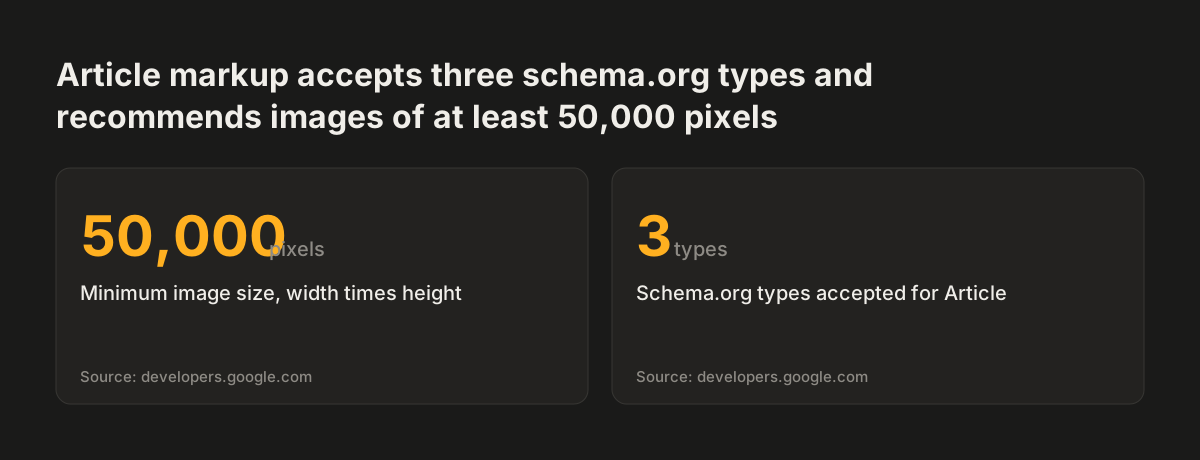
Source: developers.google.com
Readable structure for screen readers, search engines and AI answers
A case study page is readable by machines when its content is real text under real headings. The client's name, the problem, each figure and the quote should all sit in the HTML as text. A result baked into an image or a logo carousel is invisible to anything that cannot see pixels.
Three habits make the same page work for every kind of reader:
- Use a heading for each part, so a screen reader user can jump straight to the result.
- Write the quote as text with the person's name and role beside it.
- State each figure in a sentence, even when a chart repeats it.
Each section should make sense on its own. An AI answer or a search snippet often lifts one passage without the rest of the page. A result section that names the client and the measurement stands up when quoted alone. One that says "this improved by 40%" does not.
Write for the reader, not for a word count. Google states it has no preferred word count. It also says that using generative AI to produce large amounts of text without manual oversight represents little to no effort under its rater criteria. A short case study with one verified result is worth more than a long one padded with generic process description.
Case study page checklist before you publish
A case study page is ready to publish when every element below is in place. The table shows what each element gives a human buyer and what it gives a machine reading the page. Use it as a final check on the draft, line by line.
| Element | What the buyer gets | What machines read |
|---|---|---|
| Named client in the headline | Proof the work is real | A clear subject for the page |
| Result in the headline | The outcome without reading further | A quotable claim in the title |
| One stated problem | A situation they recognise | A focused topic |
| Specific work done | How you solve problems | Concrete terms, not buzzwords |
| Figure with period | A claim they can weigh | A number written as text |
| Named quote with role | A voice from the client | Attributed text, not an image |
| Written client approval | Confidence nothing is invented | No later removals or edits |
| Article structured data | Clear dates and images in results | Author, dates and images |
| Next-step link | An obvious way to get in touch | A link to related pages |
If a row is missing, fix that row before launch rather than publishing and returning later. Google says that adding or removing content to make a site seem fresh will not help rankings. A complete page at launch is the better plan.
Case study pages for UK and European businesses
For a UK or European business, the practical issues on a case study page are wording, currency and permission. Write in the language and spelling your buyers use. Give figures in the currency the client reported, as Heyflow's Excel Roofing headline does with its £10M+ pipeline figure.
Permission matters even more when you sell across borders. If your site runs in several languages, the client should approve the translated quote as well as the original. A quote that reads well in English can shift in meaning in another language, and the client's name sits beside it.
Put the case study clause into your standard contract. That way the conversation happens once, at signing, in the same document as the rest of the terms. It saves you asking a busy client for a favour months after the project ends.
Keep the evidence trail. Store the signed approval, the source of every figure and the date it was measured. If a client later questions a number, you can show where it came from.
Next steps for your case study pages
The next step is to audit the case studies you already publish against the checklist above. Open each one and check five things. Is the client named? Is there a figure with a period?
Then check the rest. Is the quote attributed to a named person? Is the approval on file? Is the text readable without images?
Then work through the gaps in this order:
- Pick your strongest recent project with a result the client will stand behind.
- Ask the client for written approval to name them, quote them and publish the figures.
- Write the page in the problem, work, result, quote order.
- Add Article structured data with the author, dates and images.
- Test the page in the Rich Results Test and with a screen reader.
Add a case study clause to your next client contract so the following page is easier. If your logo wall is the only proof on your site, replace it one named case study at a time.
To see how named projects and outcomes look on a finished site, browse the projects on the Revylio work page. If the pages that link to your case studies also need work, start with our guide to service pages that bring enquiries.