Structured data that describes your company and how to set it up properly
Which Organization and LocalBusiness properties to add, where to place the JSON-LD on your site, and how to test it before and after a redesign.
- Nº
- 34
- Published
- Read
- 11 min
- Category
- Notes
- Written by
- Revylio
Structured data that describes your company, in plain terms
Structured data that describes your company is a small block of labelled facts about your business, written in the schema.org vocabulary. It tells search engines who you are, what you do and where you operate. To set it up, choose the most specific type and add name, logo, contact details, address and profile links. Then place the block on your home page and test it.
Structured data in general is a standard format for giving information about a page and classifying its content. IONOS describes it as machine-readable semantic information added to HTML that defines what each piece of content means. Schema.org is the shared dictionary of labels. IONOS notes that Google, Bing, Yahoo! and Yandex initiated schema.org to standardise the semantic annotation of website content.
The type for a company is Organization. Schema.org defines it as "an organization such as a school, NGO, corporation, club, etc." Schema.org reports the type in use on more than 10 million domains, based on Google's monthly index aggregations for August 2026.
Google's documentation on Organization markup states the purpose plainly. Markup on your home page can help Google understand your administrative details and disambiguate your organisation in search results. Disambiguate means telling your company apart from others with similar names. Some properties can also influence which logo Google shows in results and in your knowledge panel.
Organization or LocalBusiness: choose the most specific type that fits
The type you choose decides which properties apply, so pick the most specific one that is true for your company. A type is the kind of thing you describe. Each type has its own labels, called properties, such as name or address.
Schema.org places Organization under Thing, and it lists more specific types beneath Organization. These include:
Corporation, for an incorporated companyLocalBusiness, for a business with premises customers visitOnlineBusiness, for a business that trades onlineNGO, for a non-governmental organisationGovernmentOrganization, for a public body
Google recommends the most specific subtype that matches you. Its own example: an ecommerce site should use OnlineStore rather than OnlineBusiness. Because LocalBusiness sits under Organization, it carries every company property and adds local details such as opening hours.
The two types also differ in what Google requires. Organization markup has no required properties, and Google recommends adding as many relevant ones as you can. LocalBusiness markup requires name and address, the physical location of the business. If your company fits more than one type, list them as an array. Google's local business documentation says additionalType is not supported for this.
A simple test helps you decide. If customers come to your premises, use LocalBusiness or one of its subtypes. If you serve clients remotely across a region, use Organization or Corporation and state the region with areaServed.
The properties to add: name, logo, contact details, address and sameAs
Most companies need the same small set of properties, each with a rule from Google or schema.org. The table lists them with the rule that applies. The last four rows matter mainly for LocalBusiness markup.
| Property | What it holds | Rule from the documentation |
|---|---|---|
name | Your company name | Required for LocalBusiness |
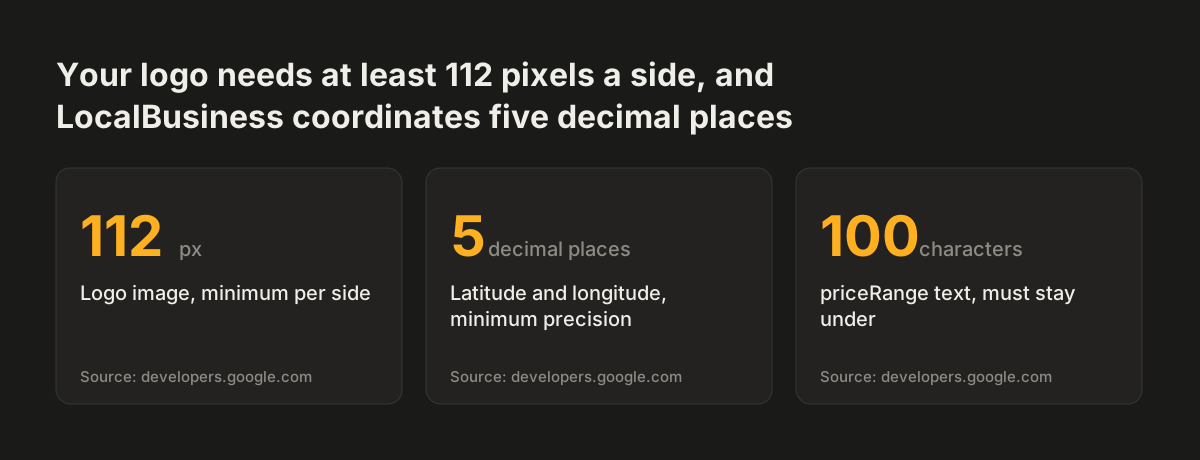
logo | URL of your logo image | At least 112x112px (Google) |
telephone | Your main phone number | Include country code and area code (Google) |
address | Physical location, as a PostalAddress | Required for LocalBusiness |
legalAddress | Registered address for legal and tax purposes | Can differ from where you operate (schema.org) |
sameAs | URLs of your profiles on other sites | For example social media or review profiles (Google) |
areaServed | Where you provide your services | Supersedes serviceArea (schema.org) |
knowsAbout | Topics your company knows about | Suggests possible expertise without implying it (schema.org) |
opens and closes | Opening hours | For 24-hour opening use 00:00 and 23:59 (Google) |
| Latitude and longitude | Exact position of the premises | At least 5 decimal places (Google) |
image | Photos of the business | Width times height of at least 50,000 pixels; ratios 16x9, 4x3 and 1x1 (Google) |
priceRange | Relative price level, such as "$$$" | Under 100 characters, or Google does not show it |
One property belongs on very few business sites. Google recommends aggregateRating and review only for sites that capture reviews of other local businesses. Testimonials about your own company do not qualify.
Source: developers.google.com
A worked example: Organization markup in JSON-LD for a home page
JSON-LD is the format to write company markup in. The name is short for JavaScript Object Notation for Linked Data. The labels sit as "label": "value" lines inside a script block, separate from the visible text of the page.
IONOS reports that Google considers JSON-LD the simplest markup format. The alternatives, Microdata and RDFa, place labels in the visible HTML instead.
The block below describes a fictional UK engineering firm that serves clients across the country. Paste it into the HTML of your home page, inside the head or the body. If your CMS offers a custom code field for that page, paste it there.
<script type="application/ld+json">
{
  "@context": "https://schema.org",
  "@type": "Corporation",
  "name": "Example Engineering Ltd",
  "logo": "https://www.example.co.uk/images/logo.png",
  "telephone": "+44 20 7946 0000",
  "vatID": "GB123456789",
  "iso6523Code": "0199:YOURLEICODE",
  "areaServed": "United Kingdom",
  "knowsAbout": ["Industrial ventilation", "Heat recovery systems"],
  "sameAs": [
    "https://www.linkedin.com/company/example-engineering",
    "https://www.youtube.com/@exampleengineering"
  ]
}
</script>
Change the values, not the labels. Set @type to the most specific type that fits you. The logo URL must point to a public image of at least 112x112px. Write telephone with the country code.
Replace the iso6523Code value with your own identifier, using prefix 0199: for a Legal Entity Identifier (LEI) or 0060: for a DUNS number. Use sameAs only for profiles you actually control.
The example leaves out an address because this firm serves clients remotely. If customers visit you, switch the type to LocalBusiness or a more specific subtype. Then add address as a PostalAddress, following Google's local business documentation field by field.
Where to place company markup on your site
Company markup belongs on one page: your home page, or a single page that describes your organisation, such as the about page. Google says you do not need to include it on every page. One clear block on one page is easier to keep correct than copies spread across templates.
The script can sit in the head or the body of that page. Before adding your own, check what your site already outputs. Some website builders and SEO plugins generate business markup automatically once you enter a name and location. Two blocks that describe the same company with different details send mixed signals, so keep one and remove the other.
Every fact in the markup should also be visible to visitors on the page. Google's guidelines require markup to describe content that people can see. In practice, your phone number, address and VAT number should appear in the footer or on the contact page. The markup then repeats them in labelled form.
Other pages carry their own markup types rather than repeating the company block. A careers page, for example, uses job posting markup, covered in our guide to job posting structured data that Google can read. Keep the regions in areaServed and the topics in knowsAbout consistent with what your service pages that bring enquiries actually offer.
Testing company markup before and after launch
Test company markup twice: once on the staging site before launch, and again on the live site afterwards. Each round catches different problems. Work through these steps in order:
- Run the page or the code through Google's Rich Results Test. It highlights errors and warnings in your markup. A warning still leaves the item valid, so add the missing fact only if it appears on your page.
- Run the same code through the Schema Markup Validator. It checks your JSON-LD against the full schema.org vocabulary, including properties Google does not use.
- Compare every value in the markup with the visible page. The phone number, address and company name must match character for character.
- Publish the page and wait. Google says it may take several days after publishing for it to find and crawl a page.
- Check Google Search Console after crawling to confirm Google has read the page.
Keep testing after launch whenever company facts change. A new phone number, a move or a rebrand changes the visible page. The markup must change with it. Stale markup that contradicts your contact page is worse than none.
Testing also protects you from a structured data manual action. A manual action is a penalty a Google reviewer applies to a page. If your page receives one for structured data, Google ignores the markup on that page. The page can still appear in search results.
What company markup does not do: it guarantees no display or result
Company markup guarantees no particular display in Google. Both Google pages on Organization and LocalBusiness markup say that Google does not guarantee features that use structured data will appear in results. A knowledge panel with your details may appear when someone searches for your business, but Google decides when. The markup helps Google understand facts it might otherwise have to guess.
The same caution applies to AI answer tools. Google says its AI features need no special markup. Other AI assistants have not confirmed whether they use structured data at all. What company markup offers here is clarity: your name, location, services and profiles stated once, in labelled form, consistent with your visible pages.
Some benefits of structured data depend on the result type. IONOS notes that rich snippets take up more space in results and stand out more, which it says leads to a higher click rate. Those snippets cover data types such as products, recipes, events and videos, not company facts. For a company block, the realistic gain is that Google identifies your business correctly.
Planning company markup into a redesign instead of adding it afterwards
Company markup is cheapest to get right during a redesign, because the redesign already decides the pages, templates and contact details it depends on. Added afterwards, it often describes a site that was built without it. The logo file, the about page and the footer may not hold the facts the markup needs.
A redesign brief can settle four things up front:
- One company facts sheet, owned by a named person
- The page that carries the markup, usually the home page
- A logo file of at least 112x112px at a stable URL
- Which plugin or template outputs the markup, so only one does
At Svennis we put a company facts sheet into the redesign brief and build the footer, contact page and markup from that one sheet. What goes wrong most often at clients is two markup blocks for one company, a plugin's and a hand-written one, that disagree.
Persuasion still belongs on visible pages. Markup states facts such as your name and address. Evidence that wins work, such as named clients and results, belongs on case study pages that win new clients, where buyers read it.
Company markup for businesses in the UK and the EU: registration, VAT and identifiers
UK and EU companies can add official identifiers that let Google and your customers check who you are. Three properties do most of the work.
Company registration
The companyRegistration property holds your official registration. Schema.org describes it as registration information from a body such as Companies House or a Chamber of Commerce, written as a Certification. Your registered office can go in legalAddress. Schema.org notes that it may differ from where you actually trade.
VAT number
Google calls the VAT code an important trust signal for users, because they can look up your business in public VAT registries. Add it with vatID if the number already appears on your site.
ISO 6523 codes
Schema.org recommends ISO 6523 codes over vatID or taxID where possible, because ISO identifiers are less ambiguous. An ISO 6523 identifier starts with a 4-digit International Code Designator, which names the scheme. The identifier itself follows, with dots, dashes and spaces removed, up to 35 characters. Common designators are 0199 for an LEI, 0060 for a DUNS number and 0088 for a GS1 Global Location Number. Google encourages iso6523Code with these prefixes instead of the older leiCode and duns properties.
For a UK company, write the phone number with +44 and the area code, as Google requires the country code. For a company in several EU countries, list each region you serve in areaServed.
Next steps for structured data that describes your company
You can set up company markup in an afternoon if your facts are in order. Most of the time goes on checking those facts, not on writing code. Work through these steps:
- Write a facts sheet: legal name, trading and registered addresses, phone in international format, VAT number, any LEI or DUNS number, and your profile URLs.
- Check that each fact is visible on your site, in the footer, the contact page or the about page.
- Choose the most specific type, using the test in this guide: premises customers visit point to LocalBusiness.
- Adapt the JSON-LD example above and place it on your home page or about page only.
- Remove any duplicate block from a plugin or theme.
- Test with the Rich Results Test and the Schema Markup Validator, then recheck after Google crawls the page.
- Update the markup whenever a fact on the facts sheet changes.
If your current site cannot show these facts cleanly, the fix may be larger than a code block. Our guide on when a website redesign pays off and when to fix the site in place helps you decide which route fits.