
Testing page changes without hurting rankings during a website redesign
How to test page layouts, templates and content on a business site the way Google accepts, with canonical tags, 302 redirects and monitoring after launch.
- Nº
- 44
- Published
- Read
- 12 min
- Category
- Notes
- Written by
- Revylio
Testing page changes without hurting rankings: the short answer
Testing page changes without hurting rankings comes down to following Google's own testing rules. Googlebot must see what your visitors see. Alternate test URLs carry rel="canonical". Test redirects use 302, not 301.
Tests end promptly. Before a redesign goes live, you compare crawls of the old and new site, and after launch you watch indexing and traffic.
Website testing is trying out different versions of a website, or a part of it, and collecting data about how users react to each version. That is how Google's guidance on A/B testing for Search defines it. The same guidance sets the limits that keep a test from being read as an attempt to deceive search engines.
Those limits matter most during a modernisation project. You may be changing templates for accessibility, trimming scripts for speed and rewriting content at the same time. Each of those changes can be tested. The risk to your search visibility comes from how you run the test, not from the fact that you test.
This guide explains each rule in plain terms. It then walks through one worked example, gives a decision table and ends with the checks to run after launch.
A/B tests, multivariate tests and redesigns defined
Four terms come up in every conversation about testing a business website. Google and SEO practitioners use them in specific ways, so it helps to pin them down before you plan anything.
- A/B testing is testing two or more variations of a change, such as two versions of a services page.
- Multivariate testing is testing more than one type of change at a time. It looks for the impact of each change and for any combined effect between them.
- A website redesign is a change to how a site looks and is built.
- A website migration is a change to where the pages live, such as new URLs, a new domain or a move from http to https.
The difference between a redesign and a migration decides which rules apply. A redesign that keeps every URL can be tested page by page with A/B tests. A migration moves pages permanently, so it needs permanent redirects and a different kind of monitoring.
Many modernisation projects are both at once. You get a new template and a new URL structure in the same launch. In that case, test the template changes first and treat the URL move as its own step. Google's site move guidance advises planning changes one after the other, not everything at the same time.
Cloaking is the testing mistake that can remove your site from Google
Cloaking is showing one set of URLs to Googlebot and a different set to humans. Google states that cloaking is against its spam policies, whether or not you are running a test. Infringing those policies can get a site demoted or removed from Google search results.
"Cloaking counts whether you do it by server logic or by robots.txt, or any other method."
That sentence closes the obvious loopholes. You cannot detect Googlebot on the server and send it the old page. You cannot block the test variant in robots.txt so that only humans see it. Both count as cloaking.
Cookies add a quieter trap. Google notes that Googlebot generally does not support cookies. It therefore only sees the content version available to browsers that do not accept cookies. Many testing tools use a cookie to decide which variant a visitor gets.
So check what a cookie-less visit returns on every page you test. That version should be a complete page that real visitors also receive, not a stripped-down shell. If the cookie-less version is the original design, Googlebot keeps seeing the original until you finish the test and update the page for everyone.
Split tests on two URLs need rel="canonical" and a 302 redirect
A split test across two URLs sends some visitors from the original page to a variation page at a different address. Google gives two rules for this set-up. Put rel="canonical" on the alternate URL, and use a 302 redirect from the original.
Why rel="canonical" and not noindex
The canonical tag tells Google that the original page is the one to index and rank. Google recommends rel="canonical" over a noindex meta tag because it more closely matches your intent. It also warns that using noindex instead can sometimes have unexpected bad effects.
Why 302 and not 301
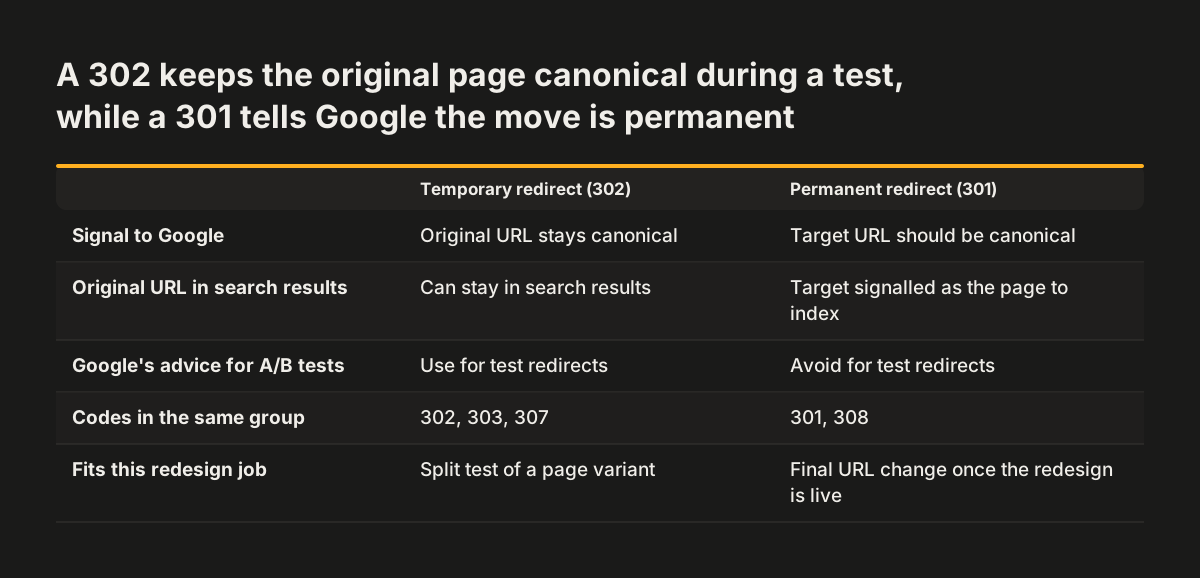
A redirect's status code tells Google how long the move will last. According to Google's redirects documentation, a permanent redirect (301 or 308) signals that the target should be canonical. A temporary redirect (302, 303 or 307) does not, so the old URL can stay in search results.
That is exactly what you want during a test. The original page keeps its place in search while some visitors see the variation. A 301 would tell Google to replace your proven page with an experiment.
Google also says JavaScript-based redirects are fine for tests. That helps if your testing tool redirects in the browser rather than on the server.
Small design changes rarely affect rankings, larger ones need more care
Small changes rarely move rankings. Google's testing guidance says changes such as button size, colour or call-to-action text often have little or no impact on a page's search result snippet or ranking. You can test changes of that scale with a normal A/B tool and the rules above.
Many accessibility and speed fixes sit in this category. Raising the contrast of a button, enlarging a tap target or rewording a vague link are visual or wording changes. Test them for conversions, then roll the winner out.
Larger changes deserve more caution because they touch what Google reads:
- a new template that changes headings, page structure or internal links
- rewritten body copy on pages that already rank
- removed or merged pages
- new URLs for existing content
For these, a short A/B test tells you how visitors react. It does not tell you how the page will rank once the change is permanent. Pair the test with a crawl comparison before launch and monitoring afterwards. If you are still deciding whether the site needs a full rebuild, our post on when a website redesign pays off helps you choose between rebuilding and fixing in place.
End each test promptly and remove every test element
A test that runs too long becomes a risk in itself. Google says that if it finds a site running an experiment for an unnecessarily long time, it may treat this as an attempt to deceive search engines. It may then take action.
Google adds that this is especially true when one content variant goes to a large percentage of users. A test that sends most visitors to variant B for months looks like a permanent site that Google is not allowed to see properly.
Set an end condition before the test starts. That could be a set number of form submissions per variant, or a fixed period agreed with whoever owns the page. When the condition is met, act on it.
Ending a test properly means two things:
- Update the live page so every visitor, and Googlebot, sees the winning version at the original URL.
- Remove all elements of the test as soon as possible, including alternate URLs, testing scripts and test markup.
Leftover test scripts also slow pages down. Removing them is part of the speed work, not an afterthought. To decide what "winning" means, measure enquiries rather than clicks alone, as described in our guide to measuring what a website brings in.
Worked example: testing a new services page layout
Take a services page at /services/ that ranks well and brings in enquiries. The redesign team has built a new, more accessible layout with clearer headings and a shorter form. They want proof that it converts at least as well before it replaces the original.
- Build the variant at its own URL. The new layout goes live at
/services-b/, with the same core content as the original. - Add the canonical tag. The
/services-b/page carries rel="canonical" pointing to/services/. It does not carry noindex. - Redirect a share of visitors with a 302. The testing tool sends part of the traffic from
/services/to/services-b/using a 302 or a JavaScript redirect. - Check the cookie-less view. Open
/services/in a browser with cookies blocked. You should see the original page, complete and working. - Set the end condition. Agree in advance how many completed forms per variant will settle the question.
- Roll out and clean up. If the new layout wins, publish it at
/services/for everyone. Remove/services-b/, the redirect rule and the testing script.
Nothing in this sequence asks Google to rank the variant. The original URL keeps its signals throughout. When the winner moves to that URL, Google simply recrawls an improved page at an address it already trusts.
Crawl comparisons before launch catch template and content errors
A crawl comparison is a check of the old live site and the new staging site with the same crawler settings. You then compare the results field by field. A crawler is a tool that follows every internal link and records what each page returns. The comparison shows what the redesign changed for search engines, page by page.
Compare at least these fields for every URL:
- HTTP status code
- page title and main heading
- canonical tag
- any noindex instruction
- internal links pointing to the page
Status codes deserve the closest look. Google's documentation on HTTP status codes says indexed URLs that start returning a 4xx are removed from the index. Google's site move guidance adds a warning about redirects. Redirecting many old URLs to one irrelevant destination, such as the home page, might be treated as a soft 404.
At Svennis we run both crawls before a launch date is agreed. The error we find most often is a canonical tag on the new template still pointing at the staging address. Catching it in a spreadsheet costs minutes, while catching it in Search Console after launch costs weeks of recrawling.
Keep the staging site private while you test. Google's guidance says private content needs password protection, and robots.txt alone does not keep a page out of Google. If URLs change, follow our guide to website migration without losing Google traffic.
Which testing method to use for each type of page change
The right method depends on what the change touches. Use this table to match each type of change to a test and to the safeguard that protects your rankings.
| Type of change | How to test it | What protects rankings | When it ends |
|---|---|---|---|
| Button size, colour, call-to-action text | A/B test on the same URL | Googlebot sees a complete page without cookies | When the agreed result is reached |
| New layout for one page | Split test on a second URL | rel="canonical" to the original, 302 or JavaScript redirect | Promptly, then remove the test URL and scripts |
| Several changes on one page at once | Multivariate test | Same rules as A/B, no special version for Googlebot | Promptly, especially if one variant gets most traffic |
| New template across the site | Crawl comparison of live and staging | Status codes, canonicals and noindex checked before launch | At launch, followed by monitoring |
| New URLs or a new domain | Redirect map checked by crawl | Permanent 301 or 308 redirects to the matching page | Redirects kept for at least a year |
The last row is the only one where a permanent redirect is correct. A migration is meant to last, so Google should treat the new URL as canonical. Every row above it is a test, and tests use temporary signals.
After launch, monitor indexing, traffic and page speed for months
Monitoring after launch tells you whether the changes held their ground in search. Expect some movement at first. Google says the visibility of content in Search may fluctuate temporarily during a site move, and that this is normal.
Give the numbers time. Google says most pages on a small to medium-sized site usually take a few weeks to move to their new URLs, and larger sites take longer. If rankings did drop sharply, Google's traffic-drop guidance says it may take months for its systems to recognise an improvement.
Use these checks in Google Search Console:
- Submit a sitemap of the old URLs, which Google suggests so you can watch the redirects being processed.
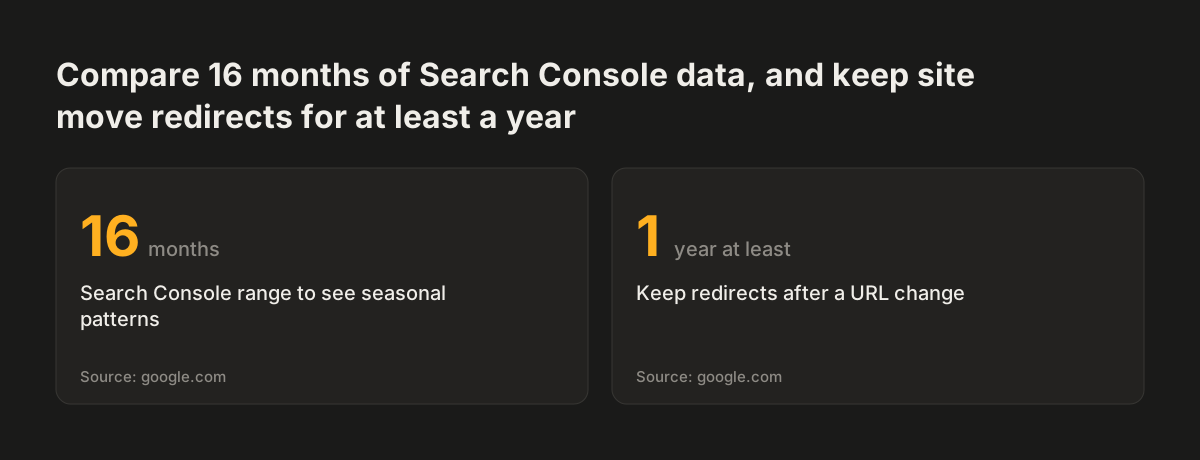
- Compare clicks over a 16-month range, the period Google's traffic-drop guide suggests for seeing seasonal patterns.
- Re-run the speed and accessibility checks you ran before launch on the same pages.
One independent consultant's published example shows how to read the result fairly. The client's site went from 3.24 clicks per day from Google before the rebuild to 4.07 from April to August 2026, a 26% rise. Search Console had only partial data for the 68-day migration window, so those months were left out of both averages. Excluding the transition period gives you a like-for-like comparison.
Source: google.com
What this means for a UK or European business website
A business website in the UK or elsewhere in Europe often runs a cookie consent banner. That affects testing in a practical way. If your testing tool waits for consent before it sets a cookie, visitors who decline see the default version, just as Googlebot does.
The default version therefore carries more weight than many teams assume. It is what crawlers index and what a share of your real visitors use. It must be complete, fast and accessible on its own, not a fallback nobody checks.
Accessibility fixes are a common reason to change templates on European sites. Treat them like any other page change. Test conversions on the visual fixes, then confirm with a crawl that headings, titles and canonicals survived. Our guide to testing website accessibility against WCAG 2.1 AA covers the accessibility side of that check.
Domain changes need one more step. A business moving from one domain to another, for example from a country domain to a .com, uses the Change of Address tool in Search Console. Google says you only need that tool when moving from one domain or subdomain to another. A redesign that keeps the same domain does not need it.
Next steps for testing changes on your own site
You can start protecting your rankings this week, before any redesign work begins. The steps below follow the order of the risks.
- Export 16 months of Search Console data so you have a baseline to compare against after launch.
- Crawl your current site and save the results, including status codes, titles and canonical tags.
- List the changes you plan, and mark each one as a small change, a template change or a URL change, using the table above.
- For any split test, confirm that the variant URL has rel="canonical" to the original and that the redirect is a 302.
- Agree an end condition for every test before it starts, and a date to remove the test code.
- Keep the staging site behind a password and crawl it before launch.
- After launch, keep any URL redirects in place for at least a year.
If you want a team to plan the tests, run the crawl comparisons and monitor the site after launch, see how we approach website redesign. It covers how accessibility, speed and search checks fit into one project.