
Managed WordPress hosting in the UK: what it should include for your business
Managed WordPress hosting in the UK should keep your site fast, accessible and compliant after launch. What hosts include, and what to check first.
- Nº
- 41
- Published
- Read
- 10 min
- Category
- Notes
- Written by
- Revylio
Managed WordPress hosting in the UK should look after the site, not only the server
Managed WordPress hosting in the UK should keep your site accessible, fast and compliant after launch. Keeping the server running is only part of the job. Check how far the provider's care goes before you sign.
Managed WordPress hosting is a hosting plan where the provider takes care of the setup, security and performance of your WordPress site for you. That is how one UK host defines its managed plans. The definition is sound, but it leaves open how much of your website the provider actually watches.
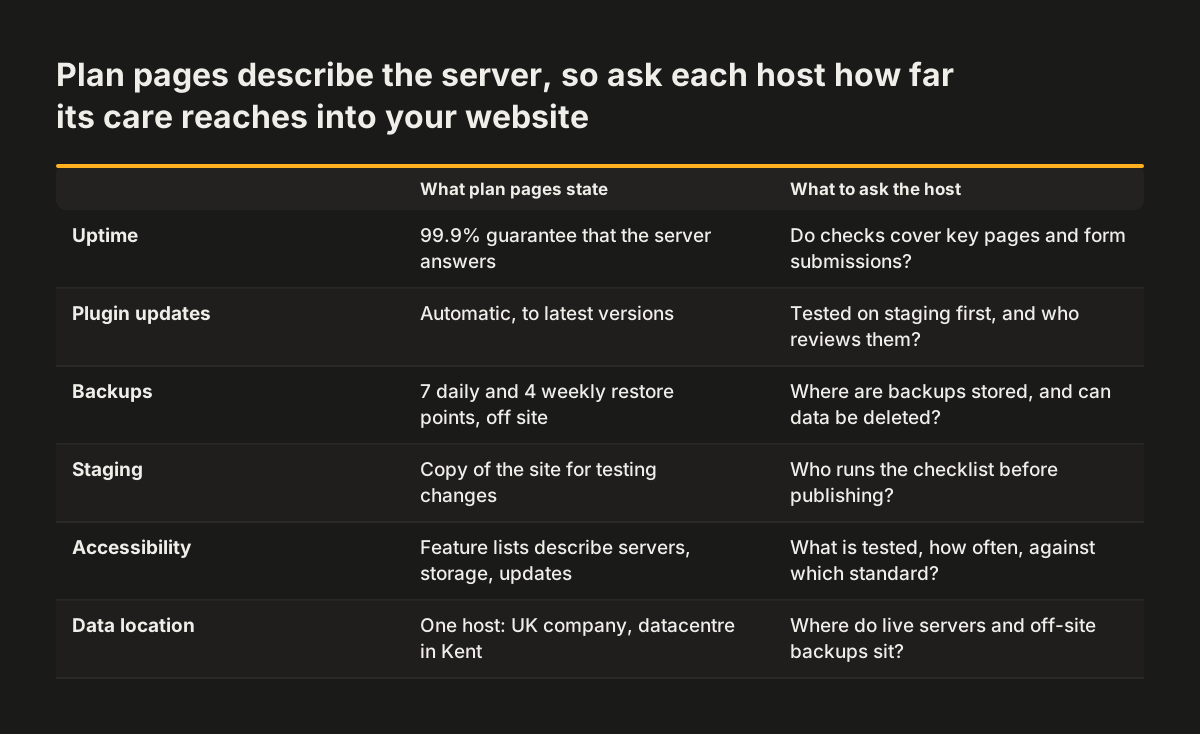
Most plan pages describe the server layer in detail: uptime guarantees, SSL certificates, backups, firewalls and plugin updates. Those features matter. They do not tell you what happens to the pages your visitors use when something changes underneath them.
So put three questions to any host before you choose:
- After an update, who checks that your contact forms still send?
- Who checks that the cookie banner still blocks tracking until a visitor consents?
- Who checks that pages still work by keyboard and with a screen reader?
If the answer to all three is "you do", you are buying server hosting with a managed label. That may still suit you. You just need to plan and budget for the rest yourself.
Standard managed WordPress features: uptime, SSL, backups and updates
UK managed WordPress plans usually bundle the same core features. Two UK hosts in our research show what to expect as a baseline, and they give you a yardstick for any quote you receive.
The baseline features, as those hosts describe them:
- Uptime guarantee. Both hosts advertise a 99.9% uptime guarantee.
- SSL certificates. One host includes free SSL from Let's Encrypt on all installations.
- Backups. The same host keeps restore points on a 7 daily and 4 weekly basis, stored off-site.
- Plugin updates. The other host states it updates plugins automatically to their latest versions.
- Firewall. That host also protects sites against WordPress-related exploits through a server firewall.
- Staging. Both describe a staging environment for testing changes before they go live.
- Support. One host advertises 24/7 live support.
Treat this list as the floor. A plan without off-site backups, SSL or a staging copy is weaker than what the market already offers. A plan with all of them still covers mainly the server and the WordPress software. It does not yet promise anything about how your pages perform, read or handle personal data.
Uptime guarantees measure the server, not whether your website works
A 99.9% uptime guarantee promises that the server answers requests almost all the time. In a 30-day month, 99.9% still allows about 43 minutes of downtime. That figure is useful for comparing hosts, and it is the number most plans lead with.
Uptime does not measure whether your website does its job. A server can be up while your enquiry form fails silently, a page template breaks on mobile, or a plugin conflict hides your booking button. Every one of those failures counts as "up" in the host's figures.
Ask a prospective host what it monitors beyond the server responding. Useful answers include:
- checks that key pages return the expected content, not just a response;
- test submissions of your contact or quote form;
- alerts when page load times rise, not only when the site goes down.
If the host monitors none of these, set up your own checks or agree them with whoever maintains the site. A broken form costs you enquiries for as long as nobody notices. A server outage, by contrast, usually gets noticed within minutes.
Automatic plugin updates close security holes and can break the site
Automatic plugin updates are the main security benefit of managed WordPress hosting. WordPress sites depend on plugins, and plugins carry vulnerabilities. One UK host cites a widely used migration plugin, installed on over 2 million sites, where all versions up to and including 6.97 contained a cross-site scripting (XSS) vulnerability. XSS is a flaw that lets an attacker inject script into pages your visitors load.
Updating quickly closes holes like that one. The same update can also change how the plugin outputs its HTML. A form plugin update can drop a field label. A theme update can reset a colour you changed for contrast. A consent plugin update can switch back to default settings.
On the sites we look after at Svennis, we re-run keyboard, contrast and consent checks on a staging copy after plugin updates, because an update that fixes a security hole can also quietly undo an accessibility fix or reset a cookie banner. Those regressions rarely trigger an error, so nobody spots them without a deliberate check.
Ask a host whether updates run on staging first, and who reviews the result. Some hosts also suggest moving the login page away from the default yourdomain.com/wp-admin and yourdomain.com/wp-login.php addresses. Our guide to website security basics for business owners lists the other questions to put to your web team.
Staging environments let you test changes before visitors see them
A staging environment is a copy of your site on the server where you test changes without affecting the live site your visitors see. Both UK hosts in our research include one. The feature only helps if someone uses it with a checklist.
A staging copy is the right place to test plugin and theme updates, new page templates and changes to forms or tracking. Before you publish from staging to live, run these checks on the staging copy:
- Submit every form and confirm the message arrives.
- Load the site in a private window and confirm no tracking fires before consent.
- Tab through the main pages with the keyboard and confirm focus stays visible.
- Check that the main pages load as quickly as the live versions do.
- Spot-check text contrast on buttons and links.
Ask the host whether staging is included on your plan or only on higher tiers. Ask too whether pushing from staging to live is one action or a manual copy. A one-click push makes careful testing more likely, because the safe route is also the quick route.
Speed on managed WordPress hosting depends on memory, shared servers and caching
Managed WordPress hosting speed depends on the resources your plan gives PHP, the software that builds each page. WordPress sets its own memory limit to 64MB by default, according to one UK host. A host that tunes this and similar settings for WordPress is doing real performance work, so ask what the limits on your plan are.
Many entry-level managed plans run on shared servers. All three WordPress plans from one UK host are listed as shared-hosting based. That host describes its plans as suitable for different traffic levels:
| Plan | Websites | SSD storage | Suitable for visitors |
|---|---|---|---|
| WP-Basic | 1 | 10 GB | 15,000 |
| WP-Advance | 3 | 20 GB | 50,000 |
| WP-PLATINUM | Unlimited | 100 GB | 250,000+ |
Visitor figures like these are guidance, not a speed promise. Your own pages, images and plugins matter just as much. A content delivery network (CDN), which serves copies of your files from locations nearer your visitors, also helps. Another UK host lists 7 CDN points of presence covering all continents.
Measure before you commit. Our guide to choosing website hosting by response time explains what to test on a trial account.
Data location and backups: GDPR questions to ask a UK WordPress host
A WordPress host stores and processes the personal data your site collects, so its answers shape your position under UK GDPR. Form submissions, comments, order details and server logs all sit on its servers and in its backups. You need to know where they are and who can reach them.
Some UK hosts state their location plainly. One says it is a UK-registered company with its datacentre in Kent. That gives you a clear answer for the live site. Backups need the same clarity, because they hold copies of the same personal data.
Questions to put to any host:
- Where are the live servers, and where are the off-site backups stored?
- How long are backups kept, and can you delete data from them on request?
- Which staff and subcontractors can access your site files and database?
- Does the CDN cache any pages that contain personal data?
- Does the host's contract include the data processing terms UK GDPR requires?
You need those data processing terms in writing whenever a host handles personal data for you.
Retention matters in practice. A schedule of 7 daily and 4 weekly restore points, as one host offers, means personal data can survive in backups for several weeks after you delete it from the live site. Make sure your privacy notice reflects how long that really is.
Accessibility after launch needs checks that a hosting plan may not include
Website accessibility can slip after launch even when nobody touches the design. Plugin updates, new content and new pages all change the HTML your visitors receive. A hosting plan that updates software but never checks the output can let a compliant site drift out of compliance.
The hosting feature lists we reviewed describe servers, storage, backups and updates. Ask any host directly whether accessibility checks are part of the managed service. If they are, ask what is tested, how often, and against which standard. If they are not, decide who owns that work.
In the UK, the Equality Act 2010 requires businesses that serve the public to make reasonable adjustments for disabled people. Meeting WCAG 2.1 AA is the usual way to show your website does so. If you sell to consumers in the EU, the European Accessibility Act may apply as well. If you publish an accessibility statement, it should describe the site as it is today, not as it was at launch. A statement that claims conformance while an update has broken keyboard access is worse than an honest list of known issues.
A practical split works well for most businesses. The host keeps the software patched. Whoever maintains the site runs a short accessibility check on staging after each update, and a fuller review a few times a year.
Comparing managed WordPress hosting prices: VAT, introductory discounts and plan tiers
Managed WordPress hosting prices in the UK vary widely, and the headline figure often hides the real cost. Read three things on every price page: whether VAT is included, how long any discount lasts, and what the "managed" label covers at that tier.
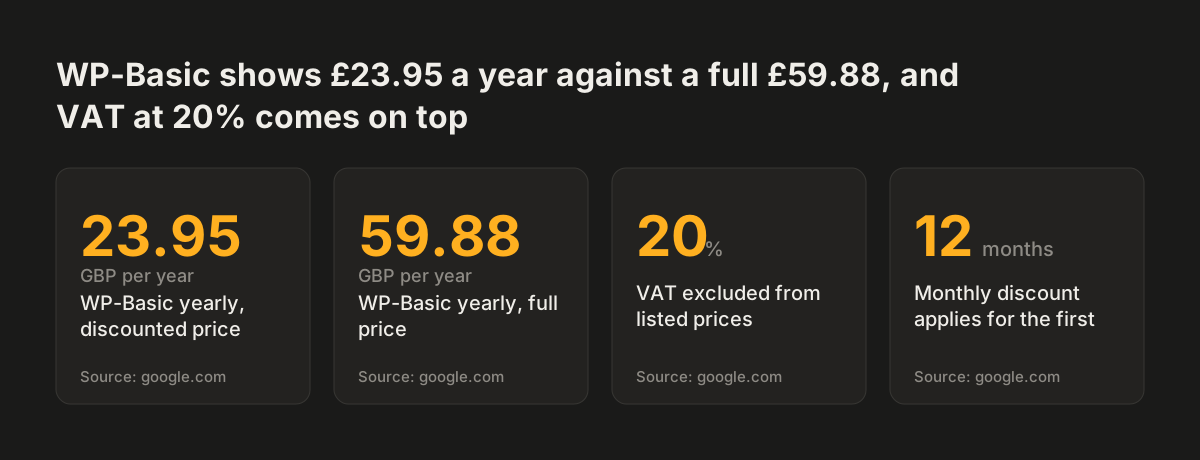
One host states that all its WordPress prices exclude VAT at 20%. The same host shows WP-Basic at £4.49 a month against a standard £4.99, with the 10% discount for the initial 12 months only. Its yearly prices show 60% off, so compare the renewal price, not the first-year price.
Range matters too. Another UK host lists a Personal WP1 plan at £7.00 a month and a Managed WP10 plan at £100.00 a month. Both carry the WordPress name. They are clearly different services, so ask what the higher price buys in hours of human attention, not only in storage and visitor limits.
Guarantees reduce the risk of choosing wrongly. One host offers a 45-day money-back guarantee on its WordPress hosting. That is long enough to run speed tests, try a staging push and see how support responds to a real question.
Source: google.com
Next steps: checking a managed WordPress host before you switch
You can check a managed WordPress host in a week, before you move your site. Work through these steps in order:
- List what your site must keep doing: forms, bookings, consent, keyboard access, page speed.
- Ask each host which of those it monitors, and which stay with you.
- Confirm where live servers and backups sit, how long backups are kept, and who can access them. Put a written data processing contract in place with the host before you move any personal data.
- Check whether updates go through staging first, and who reviews them.
- Compare renewal prices including VAT, not first-year discounts.
- Test response times and a staging push during a trial or money-back period.
Write down who owns each task once you choose. Hosting, updates, accessibility checks and consent settings can sit with the host, with your web team or with you. Problems start when each party assumes another has it covered.
If the hosting question has turned into doubts about the site itself, read our guide on when a website redesign pays off and when to fix the site in place before you decide.