Accessibility statement example for a business website, annotated part by part
An annotated accessibility statement example for a business website: what each part says, how to state conformance honestly and how to keep it current.
- Nº
- 19
- Published
- Read
- 13 min
- Category
- Notes
- Written by
- Revylio
An accessibility statement example has six parts: scope, abilities, status, problems, contact, testing
An accessibility statement example for a business website has six working parts. They are who runs the site and what it covers, what users can do, the compliance status against a named WCAG version, the known problems, how to get help, and how and when you tested. The sections below annotate each part with wording you can adapt.
An accessibility statement is a page that tells people how accessible your website is. It helps them understand whether they can use the site and how to get help when something does not work. That definition comes from the University of Cambridge template, which also says it is good practice to add a statement to every website.
The W3C Web Accessibility Initiative adds a useful point about the audience. Statements are primarily for users, who usually open them when they hit a problem. A statement is not a technical assessment or a declaration of conformity, although it should refer to the testing behind it to make it credible.
The example wording in this post uses placeholders in square brackets. The Department for Education template uses the same convention and asks you to replace every bracketed item with your own details. Treat each placeholder as a question about your site that you must answer with evidence, not with a hopeful guess.
Public sector templates are the source of most accessibility statement examples
Most published accessibility statement examples follow a UK public sector pattern, because public bodies have to publish one. GOV.UK states that publishing a statement is one of the things public sector organisations must do to meet the accessibility regulations. The W3C notes a similar duty for public bodies in countries that implement the EU Web Accessibility Directive.
The GOV.UK sample accessibility statement has changed several times since it was first published on 17 May 2019. In April 2020 it was updated in line with the EU model statement. In October 2023 it gained options for the new success criteria in WCAG 2.2. On 30 September 2024 its references to WCAG 2.1 were removed.
For a business website, these templates are valuable for their structure rather than their legal references. The legal wording in them names the Public Sector Bodies (Websites and Mobile Applications) (No. 2) Accessibility Regulations 2018. A private company should not copy that name onto its own page as if it applied.
The University of Cambridge shows a cleaner approach. Its template says the public sector regulations do not apply to the university, and that it commits to comply with them voluntarily. A business can borrow that honesty. What the European Accessibility Act itself asks of a commercial site is covered in our guide to the European Accessibility Act for business websites and WCAG 2.1 AA.
Opening lines of the statement: who runs the site and which domains it covers
The opening of an accessibility statement names the owner and draws the boundary of what the statement covers. A typical business version reads like this:
This accessibility statement applies to [www.example.com]. It does not apply to [shop.example.com], which has its own statement. This website is run by [Company name]. We want as many people as possible to be able to use it.
Annotation: scope. Name every domain and subdomain the statement covers, and the ones it does not. The GOV.UK statement does this plainly: it applies to content on www.gov.uk and not to content on service.gov.uk subdomains. If your booking system or customer portal sits on another domain, say so here.
Annotation: commitment. The W3C lists three things every statement should contain as a minimum. These are a commitment to accessibility for people with disabilities, the standard you apply, and contact information. The second sentence of the example covers the commitment in plain words.
Annotation: responsibility. Say who is accountable when several teams publish to one site. GOV.UK states that each department and agency publishing on it is responsible for making sure its content meets the regulations. A business with separate brands or country teams can use the same sentence structure to name an owner for each.
The capability list: what users can do on your site, stated at the level you tested
The capability list tells a disabled visitor, in concrete terms, what the site supports. The Department for Education template uses this pattern:
You should be able to: - zoom in up to [300%] without the text spilling off the screen - navigate most of the website using just a keyboard - listen to most of the website using a screen reader (including the most recent versions of JAWS, NVDA and VoiceOver)
Annotation: the zoom figure. The published templates disagree on this number, which shows it is a claim about a specific site. The Cambridge template and the GOV.UK statement say 300%. The Department for Education template and the UK Parliament statement say 400%. Write the figure you have actually checked on your own pages, at your own breakpoints.
Annotation: named tools. Only name a screen reader if someone has used it on your site. Listing JAWS, NVDA and VoiceOver because a template does is a promise you cannot keep.
Annotation: the word "most". The template says "most of the website" on purpose. If your checkout or a key form fails with a keyboard, the word keeps the list honest, and the known problems section explains the gap. The Department for Education template also points users to AbilityNet for advice on making their own device easier to use.
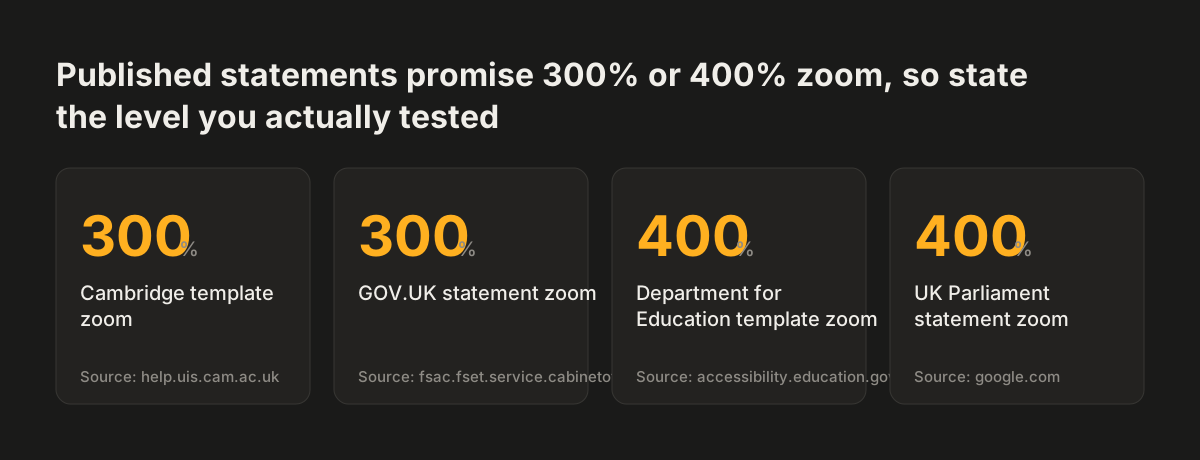
Source: help.uis.cam.ac.uk, fsac.fset.service.cabinetoffice.gov.uk, accessibility.education.gov.uk, google.com
Compliance status: choose one option and name the WCAG version you measured against
The compliance status is the single sentence that says how far the site meets a named standard. GOV.UK updated its sample in December 2023 to clarify that public sector bodies select one option for this wording, which the regulations require of them. Two common forms are:
This website is fully compliant with the WCAG version [2.2] AA standard. This website is partially compliant with the Web Content Accessibility Guidelines version [2.1] AA standard, due to the non-compliances listed below.
Annotation: "partially" is normal. Large, well-resourced organisations publish partial compliance openly:
| Organisation | Standard named | Status stated |
|---|---|---|
| Government Digital Service (GOV.UK) | WCAG 2.1 AA | Partially compliant |
| Citizens Advice | WCAG 2.1 AA | Partially compliant |
| British Business Bank | WCAG 2.2 AA | Partially compliant |
| UK Parliament | WCAG 2.2 AA | Partially compliant |
| Roche | WCAG 2.2 AA | Partially conformant |
Annotation: the version. Name the version your audit used, not the newest one. The Cambridge template asks for WCAG 2.1 Level AA on all pages and WCAG 2.2 Level AA where possible. If you tested against WCAG 2.1 AA, write 2.1. Claiming "fully compliant" with a version you never tested against is the fastest way to lose a user's trust.
Known problems: describe each failure in plain words, then name the WCAG criterion
The known problems section lists what does not work yet, written so a user can recognise the issue. The W3C advises plain language over the language of developers and lawyers. Its example: write "videos do not have captions" rather than "WCAG Success Criterion 1.2.2 was not met".
The Cambridge template asks for both. You describe the issue in plain language, then say which success criterion it affects. The GOV.UK statement does this well:
Some tables in content do not have row headers when needed. This means screen readers will not read the tables correctly. This fails WCAG 2.1 success criterion 1.3.1.
Published statements show the kind of entries a business site is likely to need:
- Citizens Advice says interactive elements and form controls do not meet the 3:1 contrast requirement against a white background.
- Citizens Advice says many of its forms cannot be used with just a keyboard.
- The British Business Bank says some Welsh content has no lang attribute, failing success criterion 3.1.2.
- UK Parliament says audio description is not available for videos.
Annotation: add a plan where you have one. Citizens Advice says its move to a new content management system will fix many listed issues, followed by an external audit. It also gave a date for an accessible colour palette: July 2024. A dated plan is useful, but it ages.
A deadline that has passed without an update tells users the statement is not maintained. Keeping new content from adding fresh entries here is the subject of our guide to writing accessible content that stays accessible after launch.
Disproportionate burden and exemptions: keep them separate from problems you will fix
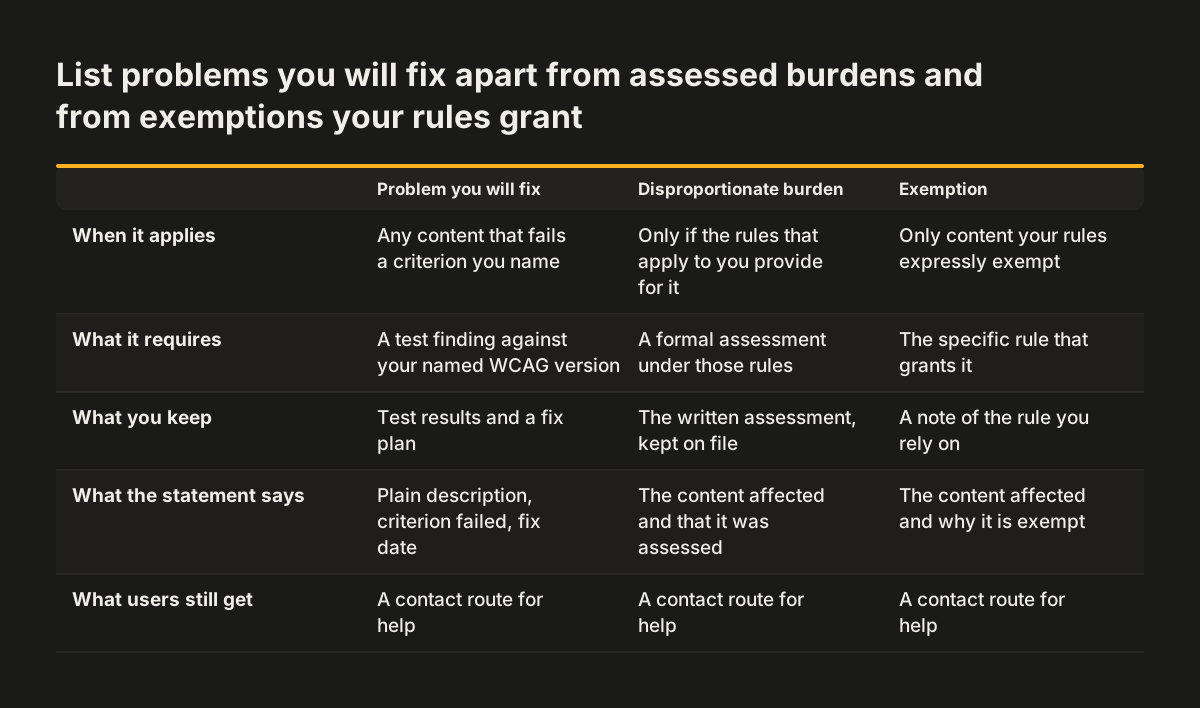
The GOV.UK guidance splits problems into three groups. These are content that does not comply, problems you have judged a disproportionate burden to fix, and issues that are exempt. Keeping the groups apart stops a user mistaking a choice for an oversight.
A disproportionate burden is content that would take a lot of time or money to fix but would not make the site much easier to use. That is the Citizens Advice definition. UK Parliament applies it to auditing and fixing all legacy sites, fixing all PDFs and adding manual captions to live streams. The GOV.UK statement applies it to old platforms that were being moved to new arrangements.
Annotation: you do not have to use it. Citizens Advice states it plans to fix every problem found, so its disproportionate burden section does not apply. Writing that sentence is often more credible than claiming a burden you cannot justify.
Annotation: exemptions belong to a law. The UK public sector regulations exempt PDFs and other documents published before 23 September 2018, unless they are essential to providing services. That exemption is specific to those regulations. A business should only list exemptions that its own applicable rules actually grant, and say which rules those are.
Third-party tools and PDFs in the accessibility statement: name them and say what you do about them
Third-party tools and documents belong in the accessibility statement, because users meet them on your site whoever built them. Embedded forms, booking widgets, chat tools and charts are where many business sites fail, and you cannot always fix the code yourself.
The British Business Bank shows how to be candid about this. Its statement names Dotdigital as its embedded form solution. It says the tool's accessibility is generally good but does not meet every WCAG 2.2 AA criterion. It also explains that the tool was chosen mainly for ease of implementation and operational flexibility. Citizens Advice does the same for a third-party data visualisation service whose charts do not all meet accessibility standards.
Annotation: say what you will do. The Cambridge template commits to reporting issues beyond the owner's control to the software provider. That one sentence turns a limitation into an action.
Annotation: count your documents. The British Business Bank lists 4 PDF documents that are not correctly tagged and 10 that lack a meaningful title. Specific counts tell a user how large the problem is. The GOV.UK and UK Parliament statements both say many of their documents are PDFs that are not accessible, which is honest but less useful. If your contact form sends data on to another system, check that the form a visitor actually sees is covered too.
Contact details, response times and the complaints route in an accessibility statement
The contact section tells users how to ask for help and how fast you will answer. It is the part most people open the statement to find. A business version can read:
If you need information on this website in a different format, like accessible PDF, large print, easy read, audio recording or braille, contact us at [email] or [phone]. We'll consider your request and get back to you in [5] business days. If you find a problem not listed on this page, or think we are not meeting accessibility requirements, contact [name or team] at [email].
Annotation: the response time. Five days is the common figure. The Cambridge template says 5 business days, UK Parliament aims for 5 working days, and Roche promises five business days. Only publish a number your team will meet every time, including during holidays.
Annotation: more than one channel. Shopify offers email, phone and support forms. A single web form is a poor choice when the form itself may be the barrier.
Annotation: the complaints body. The UK public sector templates send unhappy complainants to the Equality Advisory and Support Service. They name the Equality and Human Rights Commission as the enforcer of the public sector regulations. The template's reference to the public sector regulations does not apply to a business, so name your own complaints route first. If you point users to outside help, the Equality Advisory and Support Service advises anyone in England, Scotland and Wales with a discrimination problem.
Testing method and dates keep an accessibility statement honest over time
The testing section explains how you know what the statement claims, and when you last checked. The Department for Education template asks for three dates: when the statement was prepared, when it was last reviewed and when the website was last tested.
This statement was prepared on [date]. It was last reviewed on [date]. This website was last tested on [date] by [internal team or external auditor], using both manual and automated testing tools on desktop and mobile devices.
Annotation: describe the method. GOV.UK and Citizens Advice both used the Website Accessibility Conformance Evaluation Methodology (WCAG-EM) to choose a sample of pages. The British Business Bank tests weekly with a Digital Quality Management platform and had an independent RNIB review in February 2025. UK Parliament combines automated tools with third-party suppliers and involves people with accessibility needs in user testing.
Annotation: watch the gap between dates. When we checked it, the Citizens Advice statement showed a last review on 20 November 2023 and a last test from December 2019 to January 2020. As a general rule, a review that is not backed by a fresh test cannot show what has changed on the site since.
At Svennis we write the statement after the audit is finished, and we copy each failing item from the audit report into the known problems list with its page and criterion. Drafting before testing is how statements end up claiming more than the site delivers. Our guide to testing website accessibility with tools and manual checks covers the audit itself.
Next steps: draft, publish and review your own accessibility statement
Writing your own accessibility statement takes a short, ordered list of tasks. Work through them in this order:
- Test the site first, against the WCAG version you will name, and keep the findings.
- Draft the six parts using the example wording above, replacing every bracketed placeholder with evidence.
- Sort the findings into problems you will fix, any disproportionate burden and any exemptions your rules grant.
- Agree a response time and a named owner for accessibility contacts before you publish.
- Link the statement from the footer and other prominent places, such as the help menu, sitemap and about page, as the W3C suggests.
- Set a review date and put it in the statement.
Use the same link name on every page, so users recognise it. The W3C page on developing an accessibility statement includes a generator whose output you can download and customise.
A fixed review cycle stops the page going stale. UK Parliament prepared its statement in May 2025 and set its review for May 2026. A yearly review tied to a fresh test is a reasonable default for a business site.
If the audit shows more problems than a statement can honestly carry, fixing them may belong in a wider rebuild. Our website redesign service builds accessibility in from the start. Our website brief template helps you write accessibility targets into the brief.
Sources
- Sample accessibility statement, GOV.UK
- Fully compliant accessibility statement template, Department for Education
- Accessibility statement, GOV.UK (Government Digital Service)
- Accessibility statement template, University of Cambridge
- Developing an Accessibility Statement, W3C WAI
- Accessibility statement, British Business Bank
- Accessibility statement, UK Parliament
- 5 Exemplary Accessibility Statement Examples, Accessible Web
- Accessibility statement, Citizens Advice