Multilingual websites for several countries: plan URLs, hreflang and local pages
How to plan a multilingual website for the UK, Romania, Germany and Italy: URL structure, hreflang, translation review, local legal pages and accessibility.
- Nº
- 22
- Published
- Read
- 12 min
- Category
- Notes
- Written by
- Revylio
Multilingual websites for several countries need more than translation
Multilingual websites for several countries need four things beyond translated text. Each language and country version needs its own URL. Hreflang tags must tell search engines which version serves which audience. Trust and legal pages must be adapted per market. Every version must meet the same accessibility standard.
A multilingual website for several countries is a site that offers its content in more than one language and adapts each version to a specific market. Translation changes the words. Localisation is the wider job of adapting each version to its market: dates, numbers, currencies, tax details and legal text included.
The case for doing this properly is about buying decisions. Weglot cites research by Common Sense Advisory showing that 3 out of 4 customers will not make important purchasing decisions if they do not understand the language. The same Weglot article notes that only 25% of internet users are native English speakers. An English-only site therefore asks most of the web to read in a second language before it buys.
This guide follows one example throughout: a company that sells to the UK, Romania, Germany and Italy. The same steps work for any set of markets.
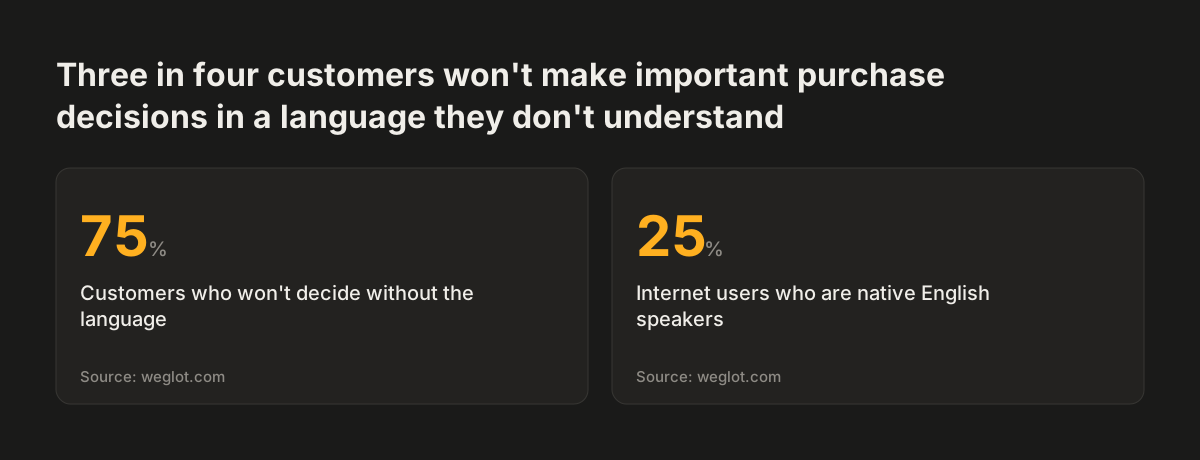
Source: weglot.com
Language versions and country versions are separate decisions
A language version and a country version are two different things, and a multilingual site for several countries has to decide both. A language version answers "which words does the visitor read?" A country version answers "which prices, rules, delivery terms and contact details apply to the visitor?"
The working unit for both decisions is the locale. A locale is a pair of language and country, written as a code such as fr-CA for French as used in Canada. Search engines, browsers and your content management system all work with locales, so your plan should list them before anyone writes a page.
For the UK, Romania, Germany and Italy, the language and country happen to line up one to one. That makes the plan simple, but you still need to choose what happens at the edges. A German speaker in Austria, an Italian speaker in Switzerland and a Romanian speaker living in the UK will all reach your site.
The answer is a locale fallback. A locale fallback is the rule that sends a visitor to the closest version you have. Write that rule down for every locale you do not serve. Applied to the example, a visitor with an Austrian German locale should land on the German version, not the English one.
URL structure: subfolders, subdomains or country domains
The URL structure is the first technical decision for a multilingual site, because every other step depends on it. There are three common options. The table below sets out what each one means in practice for the team that runs the site.
| Structure | Example | What it gives you | What it asks of you |
|---|---|---|---|
| Subfolders | example.com/de/ | All versions on one domain | Country targeting handled inside one site |
| Subdomains | de.example.com | A separate host name for each version | Each subdomain set up and maintained on its own |
| Country-code domains (ccTLDs) | example.de | A domain that belongs to the country | A domain to register, renew and run for each market |
A ccTLD is a country-code top-level domain, the ending such as .de or .it that belongs to one country. Large brands use them. The Worldwide Interpreting and Translation review of multilingual websites that set the standard notes that IKEA redirects customers to region-specific domains such as ikea.com.au and ikea.fr.
For a business entering four markets, subfolders are usually the practical choice. One domain means one hosting setup, one security certificate and one place where links from other sites build authority. Country domains make sense when each market has its own team, budget and marketing, and can carry the extra cost.
Hreflang tells search engines which version belongs to which market
Hreflang is a tag that tells search engines which language version of a page should appear for each audience. Strapi describes hreflang tags as the way to guide search engines on language and regional targeting. Without them, a search engine has to guess whether your German page or your English page is the right result for a searcher in Munich.
Hreflang works best when every version carries the same complete set. Give each locale its own URL, and have each version list itself plus all its alternates. If the German page points to the Italian page, the Italian page should point back to the German page. Planning the set once, for all versions together, keeps the pairs consistent.
The x-default value marks the version for visitors who match none of your locales. For a four-market site, x-default usually points to your English version. That gives visitors from other countries a clear place to land instead of a version written for a market they are not in.
Search engines do not all behave the same way. The Worldwide Interpreting and Translation review notes that Google, Baidu and Yandex rank pages differently, so check how your target markets search before relying on one engine's habits. AI assistants read your site through the same pages and signals, which our post on how AI assistants read your website covers in more depth.
Worked example: one site for the UK, Romania, Germany and Italy
A worked example makes the plan concrete. Take a company at example.com that sells in the UK, Romania, Germany and Italy and chooses subfolders. Each page on the site gets four language versions, and each version lists all four in its hreflang set.
| Market | Language | URL of the services page | Hreflang value |
|---|---|---|---|
| United Kingdom | English | example.com/en-gb/services/ | en-GB |
| Romania | Romanian | example.com/ro/servicii/ | ro-RO |
| Germany | German | example.com/de/leistungen/ | de-DE |
| Italy | Italian | example.com/it/servizi/ | it-IT |
| Everyone else | English | example.com/en-gb/services/ | x-default |
Set the example up in this order:
- List every page that will exist in all four languages, and every page that will exist in fewer.
- Give each page a URL in each language, with the slug written in that language.
- Add the full hreflang set to every version: itself, the three alternates and x-default.
- Check that each pair points both ways before launch.
At Svennis we write the URL map and the hreflang pairs into the website brief before any page is translated. Adding them after launch means checking every page in every language by hand, and that is where pairs go missing. Our website brief template has room for this map.
Language detection and the language switcher
Language detection decides where a visitor lands, and the language switcher lets the visitor correct it. A multilingual site needs both, because detection will sometimes guess wrong. A British engineer working in Bucharest may want English, whatever the browser says.
The Worldwide Interpreting and Translation review notes that Apple's website detects a user's location and displays content in the appropriate language. Detection is a helpful first guess. The manual choice is the part that matters most: detection suggests, the visitor decides.
Three rules make the switcher work for the example site:
- List languages in their native names, not flags: English, Română, Deutsch, Italiano.
- Remember the visitor's chosen language across pages, sessions and checkout.
- Send visitors without a matching version to the closest one, using your locale fallback rule.
Flags are a poor guide because a flag stands for a country, not a language. A Romanian speaker in Moldova or a German speaker in Switzerland does not see their own flag, but reads their own language name at once.
Translation quality needs a human review step
Machine translation alone is not safe for a business website. The Worldwide Interpreting and Translation review warns that direct translations can lead to errors, loss of meaning or even offensive phrases. Linguaserve advises avoiding free machine translators, because their errors can damage your brand's reputation.
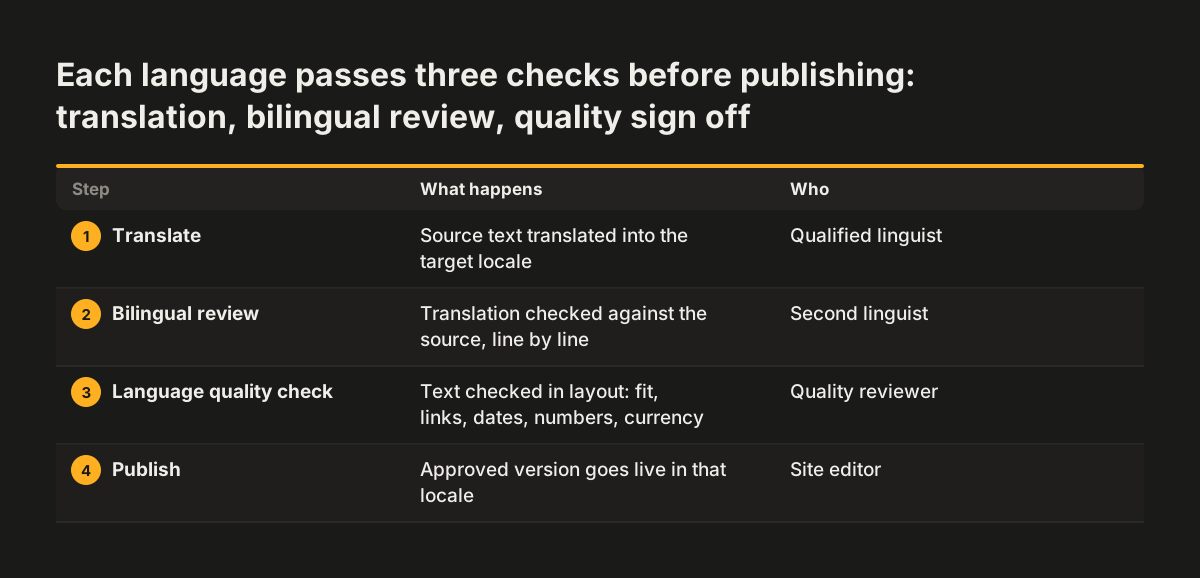
A review workflow fixes this. A qualified translator produces each language version, and a second person checks it against the source. A final check then looks at the text in the live layout: fit, links, dates, numbers and currency. Large publishers mix people and tools too. The same review notes that the BBC combines human translators with AI tools for rapid localisation of breaking news.
Two habits keep four language versions consistent over time:
- A controlled list of terms. Write your own list of service names and their approved translations. Strapi notes that Lokalise, for example, provides terminology management for quality control.
- One source of truth. The Worldwide Interpreting and Translation review notes that Microsoft uses a centralised CMS so all language versions update at the same time when new features launch.
Tools exist at every scale. Strapi's overview of tools for multilingual websites notes that Weglot translates into over 100 languages and works with WordPress, Shopify and Squarespace, while Drupal and Joomla offer built-in multilingual support. Whichever tool you choose, keep the human review step.
Local legal and trust pages for each market
Legal and trust pages are the pages a multilingual site most often leaves in one language, and they are the pages a cautious buyer reads before committing. Terms, cancellation rules, privacy information and delivery details all belong in this group. A visitor who reads your services page in Italian and then meets your terms in English has a reason to hesitate.
Trust content travels best in the reader's language. The Worldwide Interpreting and Translation review notes that Airbnb translates customer reviews into different languages to build trust and familiarity. Local habits matter beyond words too. Weglot describes how Shock Doctor offers several payment methods on its European site, including Bancontact, which is mainly used in Belgium.
For the example site, plan these pages per market from the start:
- A privacy notice in each language that covers the UK GDPR for everyone whose data you handle. Add the EU GDPR as well once you sell to people in the EU, which usually also means naming an EU representative.
- Cookie information and consent under PECR in the UK and the local cookie rules in each EU country, with each language version reviewed rather than machine translated.
- Company details on every language version: your registered company name, company number, registered office address and the part of the UK where the company is registered.
- Terms of business and any cancellation or refund terms.
- Contact details, with the address and phone number that apply to that market.
- Prices, dates and numbers written in the local format.
Have a person who knows each market check these pages before launch. The wording carries legal weight, so the translation review applies here more than anywhere else on the site.
WCAG 2.1 AA accessibility applies to every language version
Accessibility has to hold in every language version, not only in the one the design team tested. A site that meets WCAG 2.1 AA in English can fail in German if a longer label breaks a button, or in Romanian if image descriptions were never translated. Our guide to the European Accessibility Act and WCAG 2.1 AA explains the standard itself.
Translation changes text length, and text length changes layout. Test menus, buttons and forms with the longest real strings in each language before launch. Leave room in the design for labels that grow, rather than fixing widths around the English text.
For the example site, check these items in each of the four versions:
- Image descriptions, form labels and error messages exist in that language.
- Buttons and menus still fit and stay readable with the longer text.
- The language switcher can be reached and used without a mouse.
- Downloadable documents exist in that language and meet the same standard.
Accessibility also depends on how the text is written after launch. Our post on writing accessible content for your website gives editors in every language the same rules to follow.
What a four-market site means for a UK company
A UK company that adds Romanian, German and Italian versions is moving from one market's habits to four. The English version stays en-GB, written for British readers, and does not double as the version for everyone. Treat it as one locale among four, with x-default pointing to it for visitors from elsewhere.
The markets differ in size and in what the sources say about them. Linguaserve lists the UK and Germany among the significant players in e-commerce, and notes that German is one of the most widely spoken languages in the European Union. The sources give no comparable figures for Romania or Italy, so check your own analytics to see how many visitors already come from each.
English still has a role. Linguaserve calls English the lingua franca of business and notes that many people use it as a second language. That is a reason to keep a strong English version, not a reason to skip the others. Weglot's figure that only 25% of internet users are native English speakers is the counterweight.
For a UK company, the practical consequence is staffing. Each locale needs someone who can review translations, answer enquiries and keep the legal pages current in that language. Plan that before you plan the design.
Measure each language version as its own market
A multilingual site should be measured per locale, because a single site-wide figure hides a weak market behind a strong one. If German visits rise while Italian enquiries fall, the total may look flat and nobody acts.
These measures show whether each version pays its way:
- Organic sessions by locale.
- Conversion rate by language, including checkout or enquiry completion.
- Customer satisfaction by region.
- Time to publish a new page in every language.
- Translation memory reuse rate.
Translation memory is a stored set of approved translated sentences that a translation tool reuses on new content. A rising reuse rate means each new page costs less to translate. Strapi notes that Transifex, for example, offers machine translation with translation memory.
Set these up in your analytics before launch, with each locale tagged separately. Our post on measuring what a website brings in shows how to follow a visit through to a closed deal, and the same method works per language.
Next steps to plan your multilingual site
The next step is a written plan, before any design or translation starts. Five decisions cover most of it, in this order:
- List your locales, for example en-GB, ro-RO, de-DE and it-IT, and choose the fallback for everyone else.
- Choose the URL structure: subfolders, subdomains or country domains.
- Map every page to its URL in each language, with the full reciprocal hreflang set.
- Name the reviewer for each language, and the legal and trust pages each reviewer owns.
- Set up per-locale measures in your analytics.
Put these decisions in your brief so any agency quotes against the same scope. Write down which pages exist in which languages, because that list drives cost more than the design does.
If your current site cannot carry four language versions cleanly, a rebuild may be simpler than patching. Our website redesign service covers multilingual structure, accessibility and the privacy and cookie pages each market needs, ready for your own legal review.