
Duplicate pages and canonical URLs after a website redesign
How duplicate pages split search signals after a redesign, and how canonical tags, redirects and consistent internal links tell Google which URL to show.
- Nº
- 40
- Published
- Read
- 12 min
- Category
- Notes
- Written by
- Revylio
Duplicate pages and canonical URLs: the short answer
Duplicate pages and canonical URLs decide which address Google shows when the same content sits at several URLs. After a redesign, fix duplicates in three ways. Permanently redirect old and variant URLs. Add a rel="canonical" tag naming the preferred URL. Point every internal link at that one address.
A few terms first. Duplicate content is the same, or very similar, content reachable at more than one URL, as Women in Tech SEO's guide to canonicalisation puts it. A canonical URL is the address Google picks as the most representative of a set of duplicate pages. Canonicalisation is the process of signalling which version you prefer, so that search engines show that one to users.
The signals you send are hints, not orders. Google weighs them against each other and against what it finds on the site. When the signals agree, your preferred address is far more likely to be the one people see in results.
This guide covers where duplicates come from after a redesign, how Google ranks your signals, how to write the canonical tag, and how to find duplicates on your own site. It ends with a checklist you can hand to your web team.
Where duplicate URLs come from after a redesign
A redesign creates duplicate URLs because the new site rarely replaces every old address cleanly. Old pages stay live, servers answer on several hostnames, and marketing tools add parameters. Each variant can look like a separate page to a search engine.
The common causes of duplicate pages, as listed by the sources in this guide, are these:
- HTTP and HTTPS versions of the same page.
- www and non-www versions of the same page.
- UTM parameters added by email and social campaigns.
- Tracking parameters such as
gclid,fbclidorsrsltid. - Pagination series, where a long list is split across numbered pages.
- Product pages that differ only by size or packaging.
- Old URLs from the previous site that still return the page instead of redirecting.
A redesign tends to add the last cause on top of all the others. If the old site used one URL pattern and the new site uses another, both can stay reachable for months. A version with and without a trailing slash is a small example of the same problem: two addresses, one page.
Most of these duplicates are not deliberate. They come from server settings, content management defaults and campaign links. That is why they need a check before launch, not a fix after traffic drops. A content audit before a website redesign gives you the list of old URLs to start from.
Why duplicate URLs split search signals and let Google choose for you
Duplicate URLs split signals because links, shares and visits spread across several addresses instead of building up on one. Google then has to decide which address represents the content. If you give no canonical URL, Google works out for itself which version is best to show in Search.
Google's own choice may not match yours. It may pick the old URL you meant to retire, or a version with a campaign parameter in it. The canonical tag does not settle the matter on its own either. Both Women in Tech SEO and digitalcommerce.com describe it as a hint, not a directive, and Google can assign a different canonical URL when other factors weigh in.
Google also applies some preferences of its own. According to the Google Search Central documentation on consolidating duplicate URLs, it chooses HTTPS pages over HTTP pages when the two are identical. Under mobile-first indexing, Google prioritises the mobile version of a page over the desktop version. It also typically chooses a web page over a PDF or other file of the same content.
The practical lesson is that every signal should point the same way. A redirect, a canonical tag, the sitemap and your internal links all need to name the same address. Mixed signals hand the decision back to Google.
How Google ranks the signals: redirects, canonical tags, sitemaps
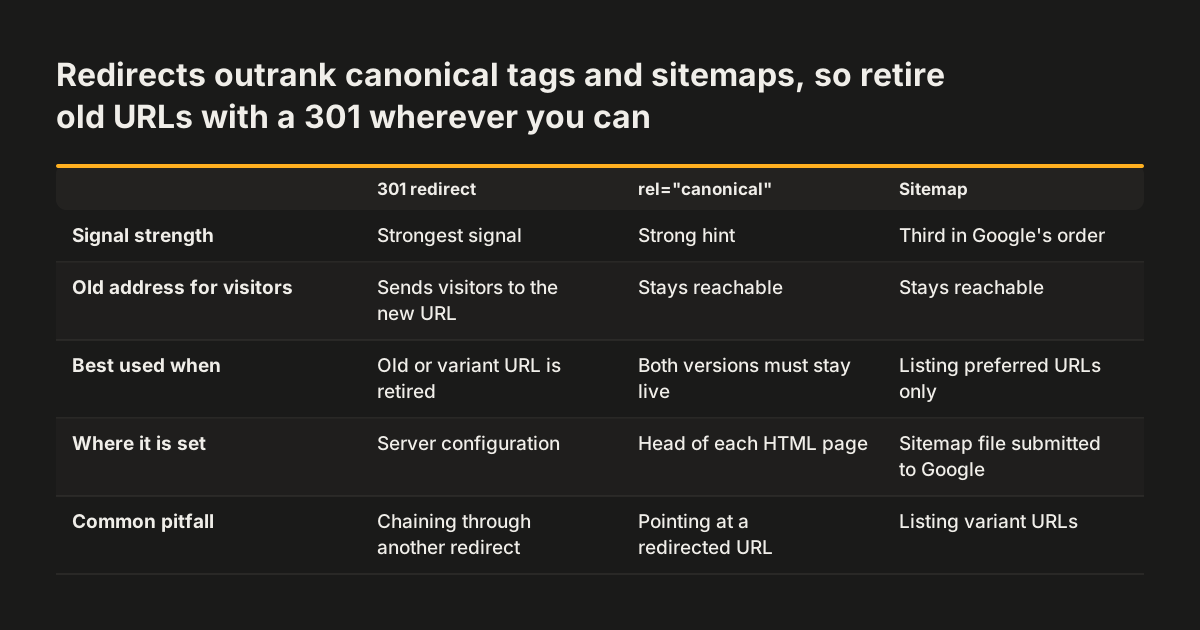
Google ranks redirects as the strongest canonical signal, then the rel="canonical" link annotation, then inclusion in a sitemap. The Search Central documentation lists them in that order, by how much each can influence Google's choice. Using two or more methods together makes it more likely that your preferred URL appears in results.
Redirects
A redirect is a server instruction that sends anyone requesting one URL to another. A 301 is a permanent redirect, and Google states that all methods of permanent redirect have the same effect on Search. A 302 is a temporary redirect, which the Holostenko article on digitalcommerce.com calls a weaker canonical signal. The same author says he has never seen Google use a 301-redirected URL as the canonical version.
The rel="canonical" annotation
The rel="canonical" link element is an HTML tag that tells search engines which URL is the main version of a piece of content. Google follows the annotation as defined in RFC 6596. Use it when both addresses must stay reachable, such as a page with a tracking parameter.
Sitemaps
An XML sitemap is a file listing the URLs you want search engines to find. Google calls sitemap inclusion a weak signal. All pages in a sitemap are suggested as canonicals, and Google decides which are duplicates based on how similar their content is. List only preferred URLs, never the variants.
Writing the rel="canonical" tag so Google accepts it
Google accepts the rel="canonical" link element only when it sits in the <head> section of an HTML page. Canonical tags placed in the body are ignored. The tag works only for HTML pages, not for files such as PDFs.
The snippet below is a canonical tag for a single page. Paste it inside the <head> of the page's HTML template, or enter the URL in the canonical field your content management system provides.
<head>
  <!-- replace PREFERRED_URL with the full preferred address of this page -->
  <link rel="canonical" href="PREFERRED_URL">
</head>
The only part you change is the href value. Replace PREFERRED_URL with the full preferred address, with the protocol, the hostname and the path exactly as you want it shown. Do not include a URL fragment, the part after a #, because Google generally does not support fragments.
When the tag on a page names that same page, it is called a self-referencing canonical. Self-canonicalisation means every page carries a canonical tag pointing to its own URL. Digitalcommerce.com notes that WordPress, like most modern website platforms, handles self-canonicalisation by default. On Shopify, the same source says there is no direct way to set a custom canonical without installing an app. Check how your platform behaves before you choose it; our post on choosing a CMS for your redesign covers what to ask.
For PDFs and Word documents, the canonical goes in the HTTP header instead of the page. Women in Tech SEO points out that this requires access to your server configuration file, so plan it with whoever runs your hosting.
Choosing the right fix for each duplicate: a decision table
The right fix for a duplicate URL depends on whether the old address still needs to work for visitors. If nobody needs it, redirect it. If it must stay reachable, keep it and add a canonical tag. The table compares every method the sources discuss, including three that should never be used for canonicalisation.
| Method | Strength as a canonical signal | Use it when | Watch out for |
|---|---|---|---|
| 301 permanent redirect | Strongest | An old URL, HTTP or non-www variant is retired | Point straight to the final URL, not to another redirect |
| 302 temporary redirect | Weaker | A move really is temporary | Do not use it for permanent moves after a redesign |
| rel="canonical" in the head | Strong hint | Both versions must stay reachable, such as parameter URLs | HTML pages only; ignored in the body |
| rel="canonical" HTTP header | Hint | PDFs and other non-HTML files | Needs server configuration access |
| Sitemap inclusion | Weak | Always, listing preferred URLs only | Google still judges duplicates by content similarity |
| noindex | Not a canonical method | A page should never appear in Search | Blocks the page from Search completely |
| robots.txt disallow | Not a canonical method | Controlling crawling, not duplicates | Google can still index the URL without its content |
| URL removal tool | Not a canonical method | Urgent removal of content | Hides every version of the URL from Search |
For most redesigns the combination is simple. Redirect every retired address, give every live page a self-referencing canonical, and keep the sitemap to preferred URLs.
Worked example: one service page reachable at five addresses
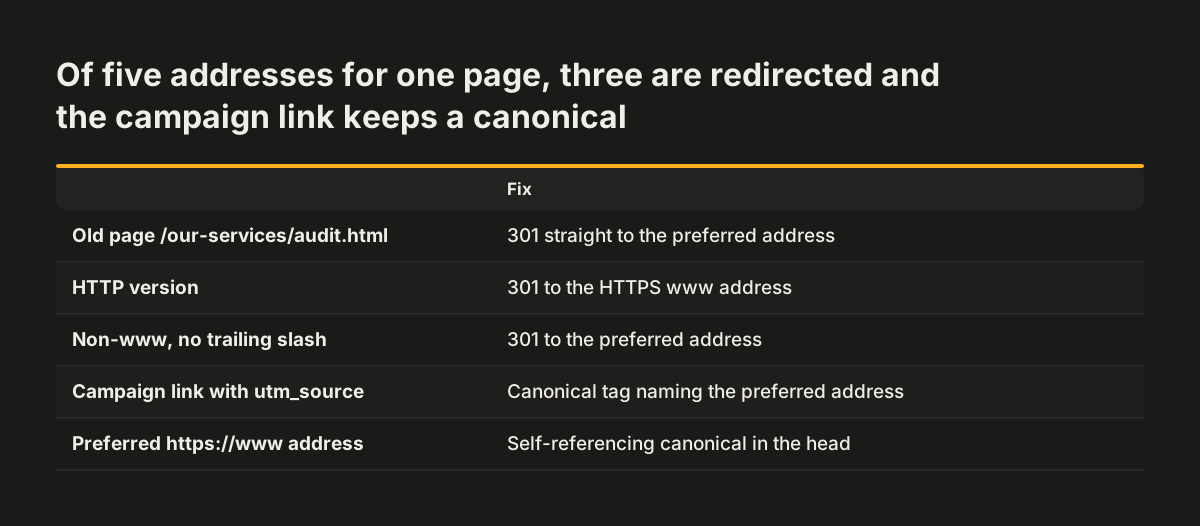
Take a service page called "Website audit" on a company site after a redesign. The preferred new address is https://www.example.com/services/website-audit/. A crawl shows the same content answering at four more addresses:
http://example.com/our-services/audit.html, the old page from the previous site.http://www.example.com/services/website-audit/, the HTTP version.https://example.com/services/website-audit, without www and without the trailing slash.https://www.example.com/services/website-audit/?utm_source=newsletter, a campaign link.
Each variant gets the fix that matches its role:
- Redirect the old
.htmlpage with a 301 straight to the preferred address. - Redirect all HTTP and non-www requests with a 301, site-wide, at server level.
- Pick one trailing slash convention and redirect the other form to it.
- Leave the UTM version reachable, because the newsletter link must still work. The self-referencing canonical on the page names the clean address.
- Change every menu, footer and in-text link to the exact preferred address.
- List only the preferred address in the XML sitemap.
At Svennis we build the redirect map from a crawl of the old site, not from the new sitemap, because the forgotten addresses are the ones that keep competing. After launch we check the old list again and confirm every address lands in one hop on a page whose canonical names itself.
Finding duplicate pages on your own site
You find duplicate pages by comparing what Google has indexed with what you meant to publish. Three checks cover most sites, and none needs special software.
Search with the site: command
The Holostenko article suggests the search command site:site.com 'keyword', with your domain and a phrase from one page. If several URLs appear for the same phrase, you have duplicates. Look in particular for indexed URLs carrying gclid, fbclid or srsltid parameters.
Read the Page indexing report in Search Console
Google Search Console labels duplicates for you. "Duplicate without user-selected canonical" means duplicate content with no canonical specified. "Alternate page with proper canonical tag" means Google found the duplicate and respected your canonical, so that label is usually good news. Digitalcommerce.com notes that these reports list only up to 1,000 URLs, so large sites need a crawl as well.
Compare sitemap and index counts
Compare the number of pages in your sitemap with the number Google has indexed. In one example on digitalcommerce.com, the sitemap held 1.3K pages while 1.56K were indexed. A gap in that direction means Google indexed addresses you never listed, and many will be variants.
Mistakes that undo canonical tags and redirects
The most common mistake is a canonical chain. A canonical chain is a canonical tag pointing to a URL that itself has another canonical or a redirect. Women in Tech SEO warns that such conflicting signals can make Google abandon the hint altogether.
Other mistakes come from reaching for the wrong tool:
- Using noindex to pick a canonical. Google advises against it within a single site, because noindex blocks the page from Search completely.
- Blocking duplicates in robots.txt. Google can still index a disallowed URL, only without its content, and it cannot read the canonical tag on a page it may not crawl.
- Using the URL removal tool. Google says this hides every version of the URL from Search, including the one you want.
- Canonicalising a paginated series to page one. Google advises giving each page its own canonical. Pointing all pages to the first can hinder discovery of the items linked from later pages.
Pagination is easy to underestimate. Digitalcommerce.com shows a single shop category with 32 paginated URLs. If all 32 named page one as canonical, the products on pages two to 32 would lose a route for being found.
Platform defaults can also work against you. Digitalcommerce.com notes that on Shopify, noindex and nofollow go together by default. Check these settings before launch rather than after.
Duplicate URLs for a European business with several markets
A European business selling in several countries usually has more duplicate risk than a single-market site. Each country domain or language folder can answer on HTTP and HTTPS, with and without www. Each one can also collect campaign parameters from its own local marketing.
The rules in this guide apply to every version separately. Every country or language version needs its own HTTPS redirect rules, its own self-referencing canonicals and its own clean sitemap. Google prefers HTTPS for identical pages, but relying on that preference alone leaves the decision to Google.
Canonical tags and hreflang do different jobs. A canonical names the preferred address for one piece of content. Hreflang tells search engines which language or country version to show to which visitor. Planning both at once avoids pages that contradict each other, and our post on multilingual websites for several countries covers the URL structure and hreflang in detail.
Republished content needs a decision too. Press releases and articles shared with partners in other markets count as syndication. Women in Tech SEO reports that Google's updated documentation does not recommend the canonical element for syndication partners, and that the most effective solution is for partners to block indexing of the syndicated copy.
Next steps before and after your relaunch
The next step is to agree one preferred address format and check every URL against it before launch. Use this order with your web team:
- Export every URL from the old site, including PDFs, and keep the list.
- Decide the preferred format: HTTPS, www or non-www, and one trailing slash convention.
- Map each old URL to one new URL and set 301 redirects, with no chains.
- Confirm every HTML page carries a self-referencing canonical in the head.
- Set canonical HTTP headers for PDFs that duplicate web pages.
- Rewrite internal links to the exact preferred addresses.
- Submit a sitemap containing only preferred URLs.
- After launch, check the Page indexing report and repeat the site: search on key pages.
Internal links are the step most often skipped, and they are the one you control completely. Plan the new structure in our guide to planning a website sitemap and navigation, so menus link to final addresses from the start.
If you would rather have the redirect map, canonicals and launch checks handled as part of the rebuild, see how our website redesign service covers migration.
Sources
- Google Search Central: Consolidate duplicate URLs with rel="canonical" and other methods
- digitalcommerce.com: Canonical Tag for SEO: Kill Duplicate Content, Save Your Rankings
- Evgen Holostenko: rel="canonical" and duplicate pages: What it is and how to use it?
- Women in Tech SEO: Dealing with Duplicate Content: Canonicalization in Detail