Landing pages for Google Ads campaigns that load fast, stay accessible and handle consent
How a Google Ads landing page should match the ad, load fast, stay accessible and handle cookie consent, and what Google counts as landing page experience.
- Nº
- 31
- Published
- Read
- 14 min
- Category
- Notes
- Written by
- Revylio
Landing pages for Google Ads campaigns must match the ad, load fast and show one next step
Landing pages for Google Ads campaigns work when they repeat the promise of the ad, load quickly on a phone and show one obvious next step. Accessibility to WCAG 2.1 AA and properly handled cookie consent belong in the first build. Each of these can lose a paid click before the visitor reads the offer.
A Google Ads landing page is the page a person reaches after clicking your ad. Its single job is to turn that click into an enquiry, a booking or a sale. As one agency guide puts it, landing pages play a big part in turning clicks into customers.
The page differs from an ordinary page on your site in one important way. You pay for every visitor who arrives. A home page can afford to serve many audiences at once. A campaign landing page serves one search, one ad and one action, and every second of confusion is paid for.
The rest of this guide covers what Google measures, how to match the page to the ad, how to make the next step obvious, and the three technical checks that decide whether the visitor can act at all: speed, accessibility and consent. It ends with a worked example, a pre-launch checklist and next steps.
Landing page experience is one of three Quality Score components in Google Ads
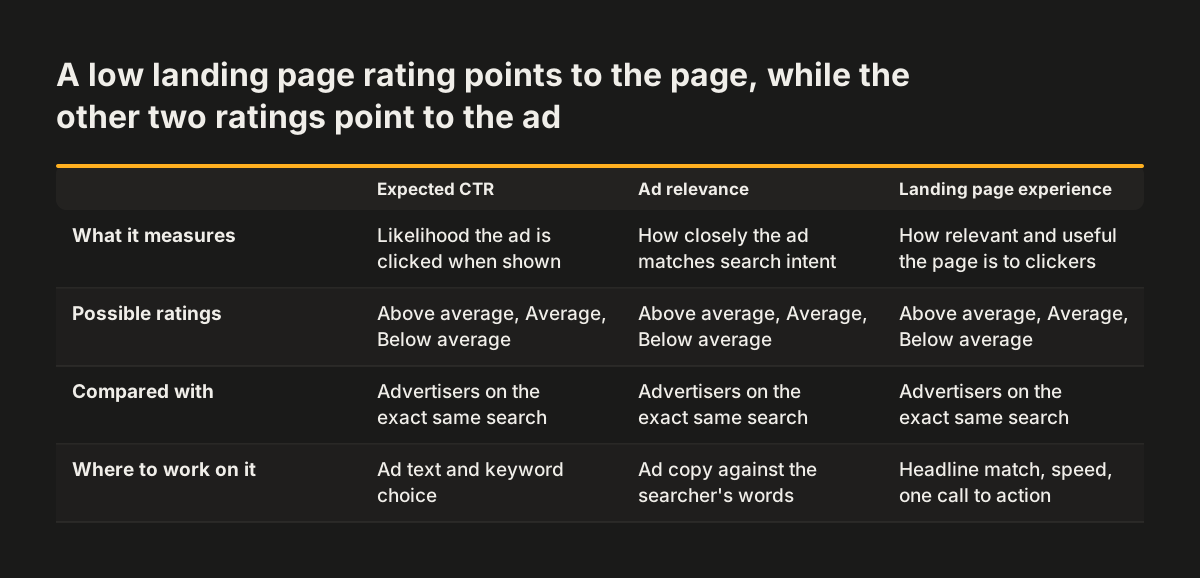
Google Ads judges your landing page through landing page experience, one of the three components of Quality Score. Google defines landing page experience as how relevant and useful your landing page is to people who click your ad.
Quality Score is a diagnostic tool that gives you a sense of how well your ad quality compares to other advertisers. According to Google Ads Help on Quality Score, it runs on a scale from 1 to 10 and is shown at the keyword level. It combines three components:
- Expected clickthrough rate (CTR): the likelihood that your ad will be clicked when shown.
- Ad relevance: how closely your ad matches the intent behind a user's search.
- Landing page experience: how relevant and useful your landing page is to people who click your ad.
Google rates each component as Above average, Average or Below average. The rating compares you with other advertisers whose ads showed for the exact same search over the last 90 days. A Below average landing page rating therefore means your page does worse than the pages your competitors send the same searcher to.
Google also says that information from any of its crawlers may be used to assess ad quality. In practice, the page you link from the ad is read and assessed, not only the ad text. Some factors are not captured by Quality Score at all, including the device used, the user's location, the time of day and assets.
Quality Score is a diagnostic signal, not a number to optimise directly
Google states plainly that Quality Score is not a key performance indicator and should not be optimised or aggregated with the rest of your data. It also says Quality Score is not an input in the ad auction. Treat the score as a symptom that points to a problem on the page, not as the goal.
Third-party guides often describe the score differently. One agency guide claims Quality Score heavily affects campaign performance, including Ad Rank and cost per click. Ad Rank is the score that decides where your ad appears on the search results page. Where a guide and Google's own help page disagree on how the auction works, rely on Google.
The practical advice does not change either way. A page that is slow, irrelevant or hard to use loses visitors you have paid for. The same agency guide notes that poorly designed or irrelevant landing pages waste ad budget and decrease Return On Ad Spend (ROAS), the revenue you earn for each unit of ad spend. That holds whatever the score says.
Some quick fixes also do nothing to the score. Google notes that Quality Score is based on historical impressions for exact searches of your keyword. Changing keyword match types will therefore not change Quality Score. The lever that remains under your control is the page itself.
Matching the landing page headline to the ad copy and search intent
The landing page headline should repeat what the ad promised, in close to the same words. Flux Creative's guide advises that the headline match both the ad copy and user intent. A visitor who clicked an ad for one service and lands on a general overview has to search again, and many will not.
The same guide warns that users who do not immediately find what they are after are more likely to leave. That is why one landing page per ad group theme usually beats one shared page for every campaign. If an ad group targets a specific service in a specific area, the page should name that service and that area at the top.
What to put below the headline
Below the headline, answer the questions a buyer asks before they act. What exactly do you offer, for whom, and what happens after they get in touch? Our guide to writing service pages that bring enquiries covers that structure in detail. A short client result, built the way we describe in case study pages that win new clients, gives the reader evidence close to the decision.
Keep the page honest
Honesty matters here as much as relevance. Google's guidance on helpful content says any form of deception makes a page untrustworthy to users and to its automated quality systems. Of the qualities Google looks for, it calls trust the most important. Do not promise a price, a timescale or an outcome on the page that the business cannot deliver.
Making the next step obvious with one call to action and a short form
A landing page should offer one next step, place it where the visitor sees it first and remove anything that competes with it. A call to action is the button or link that asks the visitor to act, such as "Request a quote" or "Book a call".
Flux Creative's guide makes three recommendations that apply to almost every campaign page:
- Place the call to action prominently above the fold, the part of the page visible before scrolling.
- Ask only for essential information in the form, to reduce friction.
- Remove unnecessary navigation links or external links that might lead users away.
Each form field is a small cost to the visitor. Ask yourself what you need to reply to the enquiry, and drop the rest. A sales team can collect the remaining details in the first conversation.
Removing the main navigation can feel risky, because visitors lose the route to the rest of the site. The trade-off is deliberate. A visitor who arrived from an ad has already told you what they want. A full menu invites them to wander away from the offer you paid to show them. Keep a link to your privacy information and contact details, and let the page do one job.
Once the page is live, test it. The same guide suggests regularly testing variations of headlines, calls to action, designs and layouts, and using tools such as Google Analytics and heat maps to understand how visitors behave.
Page speed decides whether a paid visitor ever sees the offer
A slow landing page loses paid visitors before the first line of the offer appears. The click is already billed, so every visitor who leaves during loading is budget spent for nothing. Flux Creative's guide also states that Google is looking for great user experiences and that slow pages can lead to poor ad rankings and higher costs.
Speed matters beyond the ad account too. Google's Search guidance says its core ranking systems look to reward content that provides a good page experience. If your campaign page is also indexed, the same work helps it in organic results.
Campaign pages have a particular speed risk. They tend to collect extras over time: a video header, a chat widget, several tracking tags and a consent tool. Each one adds weight to a page that should be the lightest on your site. When you brief a campaign page, decide up front which of these it genuinely needs.
Test the page the way your visitors will meet it. Most paid search traffic for local services arrives on phones, often away from fast office connections. Load the page on a mid-range phone over mobile data, with the consent banner showing, before the campaign goes live. If the offer and the call to action are not readable within a moment or two, fix the page before you spend on clicks.
Accessibility to WCAG 2.1 AA keeps every paid visitor able to act
An accessible landing page lets every visitor complete the next step, including people who use a keyboard, a screen reader or screen magnification. WCAG, the Web Content Accessibility Guidelines, is the international standard for this, and level AA is the level most organisations work to.
On a campaign page, accessibility comes down to whether the one action works for everyone. A paid visitor who cannot use your form costs the same as one who converts. Check these points on every campaign page:
- Can someone reach and submit the form using only the keyboard?
- Does every form field have a visible label, not only grey placeholder text?
- Do error messages say what went wrong and how to fix it?
- Is the headline text readable against its background, including over images?
- Can the consent banner be read, operated and closed without a mouse?
Campaign pages are often built quickly in a separate page builder or by a different supplier than the main site. That is where accessibility slips, because the page never goes through the checks the main site received. The fix is to apply the same standard to campaign templates as to the rest of the site.
Copy matters as much as code. Plain headings, short sentences and descriptive button text help everyone scan the page faster. Our guide on writing accessible content for your website shows how to keep new campaign copy accessible after launch.
Cookie consent that does not hide the offer or break your tracking
A cookie consent banner on a landing page has two jobs: to record the visitor's choice correctly and to stay out of the way of the offer. A consent banner is the notice that asks visitors to accept or refuse cookies and similar tracking before those tags run.
The first risk is visual. A banner that covers the lower half of a phone screen can hide the headline, the call to action or the form. The visitor then has to deal with a legal question before they can see what they clicked for. At Svennis we review every campaign page on a phone with the consent banner still open, before the ads go live. The fault we find most often is a banner that hides the call to action, so a visitor who has not yet chosen cannot see the offer.
The second risk is in measurement. Conversion and analytics tags should follow the visitor's choice. When they do, your reports may show fewer tracked visits than the clicks Google Ads bills you for. That gap is expected, and it is better than tracking people who refused.
Plan consent with your tracking, not after it. List the tags the page truly needs, decide which ones wait for consent, and test both paths. Accept everything, then refuse everything, and check that the form still submits and the page still works in each case.
Worked example: reading the landing page experience rating for one keyword
Suppose you run a campaign for an emergency plumbing service, and one ad group targets the keyword "emergency plumber". You want to know whether the landing page is holding the keyword back. Google Ads Help describes what each part of the Quality Score report tells you, and the steps below follow it.
| Step | What you see | What it means for the page |
|---|---|---|
| 1. Open the keyword's Quality Score | A score from 1 to 10 | A general signal only, not a target to chase |
| 2. Read the three component ratings | Landing page experience rated Below average | Your page does worse than competitors' pages for the exact same search over the last 90 days |
| 3. Compare with ad relevance | Ad relevance rated Above average | The ad fits the search, so the gap sits on the page |
| 4. Check for a dash instead of a score | A dash in the Quality Score column | Not enough exact-match searches yet; wait for data before judging the page |
| 5. Segment the table by day after a fix | Daily score changes over time | Shows whether the rating moved after you changed the page |
In this example the ad fits the search but the page does not. The likely causes are the ones covered above. The headline might not mention emergency call-outs, the phone number might sit below the fold, or the page might load slowly on mobile. Fix one thing at a time and record the date. Segmenting by day then shows whether the rating responds.
Pre-launch checklist for a Google Ads landing page
Run through this checklist before any Google Ads campaign sends traffic to a new landing page. Each row names the check and what you lose if you skip it. The match and next-step rows reflect Google's definition of landing page experience and the agency guidance cited above. The speed, accessibility and consent rows reflect how campaign pages lose visitors in practice.
| Area | Check before launch | What fails if you skip it |
|---|---|---|
| Match | Headline repeats the ad's promise and the searcher's words | Visitors do not recognise the offer and leave |
| Next step | One call to action, visible before scrolling on a phone | Visitors read but do not act |
| Form | Only the fields you need to reply | Visitors abandon the form halfway |
| Exits | No main menu or external links competing with the offer | Paid visitors wander off the page |
| Speed | Offer readable quickly on a phone over mobile data | Clicks are billed but the page is never seen |
| Accessibility | Form usable by keyboard, labelled fields, readable text | Some visitors cannot complete the action at all |
| Consent | Banner does not hide the offer; tags follow the visitor's choice | The offer is hidden, or tracking ignores refusals |
| Honesty | Claims on the page match what the business delivers | Trust drops with visitors and with Google's quality systems |
Keep the table with the campaign brief. When a new ad group needs a new page, the same checks apply.
What this means for a business advertising to customers in Europe
For a business advertising to customers in the European Union, accessibility and cookie consent are legal questions as well as conversion questions. The European Accessibility Act brings accessibility requirements to many business websites, and GDPR governs how you handle personal data, including the details people type into your form.
A campaign landing page is easy to overlook in a compliance review. It often sits outside the main site, in a page builder or on a subdomain, and is built in a hurry before a campaign starts. That makes it the page most likely to miss the accessibility checks and consent setup the main site received.
Treat campaign pages as part of the website, not as temporary marketing assets. Three habits help:
- Build campaign pages from one approved template that already meets WCAG 2.1 AA.
- Use the same consent setup on campaign pages as on the main site.
- Link every campaign page to the same privacy information as the main site.
The advice in this guide does not replace legal advice on your specific obligations. It does mean that the work which wins paid visitors also covers much of what a compliance review will ask about.
Next steps for your Google Ads landing pages
Start with the landing page that receives the most paid clicks today. A small improvement there pays back faster than any new page. Work through these steps in order:
- Open the Quality Score report for that page's main keywords and note the landing page experience ratings.
- Put the ad and the page side by side and check that the headline repeats the ad's promise.
- Load the page on a phone over mobile data, with the consent banner showing, and check that the offer and call to action are visible.
- Complete the form using only the keyboard.
- Accept, then refuse, cookies, and confirm the form still submits each time.
- Fix one issue at a time, note the date and segment the Quality Score table by day to see whether the rating moves.
If several pages fail these checks, the template is the problem rather than the individual pages. Rebuilding one accessible, fast, consent-ready template is usually cheaper than patching each page. If you plan to bring in outside help for that, our checklist for choosing a web design agency for accessible, compliant sites lists the questions to ask before you sign.