
Content audit before a website redesign and how to run one
Sort every page into keep, rewrite, merge or delete before your redesign, checking traffic, accessibility, privacy and AI readiness.
- Nº
- 16
- Published
- Read
- 13 min
- Category
- Notes
- Written by
- Revylio
Content audit before a website redesign: what it is and why it comes first
Run a content audit before a website redesign so you know which pages to keep, rewrite, merge or delete before anyone designs a template. The audit protects the pages that earn visits and enquiries. It also stops outdated, inaccessible or risky pages from moving across to the new site.
A content audit is a full review of the existing content on a website: its pages, images, documents, videos and components. Content Science calls it a key first step before a website redesign or a new content strategy. The audit starts with a content inventory, which is a list and description of every content asset on the site.
Content Science describes four steps. You set your goals, build the inventory, audit the content quantitatively and then audit it qualitatively. A quantitative audit looks at performance data, such as pageviews, average time on page and link clicks. A qualitative audit judges the content itself, for example whether it reflects your brand voice or meets Google's quality standards.
This guide adds three checks that a business site needs before relaunch: accessibility, exposure to personal data, and how easily a search engine or AI assistant can quote a page. If you have not yet decided whether a full rebuild is right, first read how to tell whether your site needs a redesign or a repair.
Build the content inventory: every URL, document and owner
The content inventory lists every page, document and media file on your site, with one row per item. Without the inventory, the audit only covers the pages people remember. Those are rarely the pages that cause problems.
On a small site, a crawler can produce most of the inventory. A crawler, or spidering tool, follows every link on your site and records each URL it finds. For larger sites, Content Science advises building the inventory from several sources: a spidering tool, reports from your CMS and analytics platform, and manual review. Give every item a unique identifier. If you use a CMS, the content ID does the job.
Record who is responsible for each page. Washington State University's web team separates three roles. The owner decides which content goes on the page. The author writes the content. The web editor adds and updates it in the CMS.
The University of Edinburgh's prospective student team asked seven questions about each site in its audit:
- What is it?
- Where is it?
- Who owns it?
- What is its purpose?
- How big is it?
- How often is it updated?
- How good is the content?
The answers can surprise you. That Edinburgh audit found prospective student content spread across 2972 pages on 26 central websites, managed by over 65 editors from 12 teams across 6 departments. The team reported that the spread made information difficult to find and led to frequent student task failures.
Measure traffic over a full year before you judge a page
Use at least a full year of analytics data before you decide a page is unused. Washington State University recommends a one-year timeframe in Google Analytics to see the full scope of traffic. A shorter window can make a seasonal page look dead.
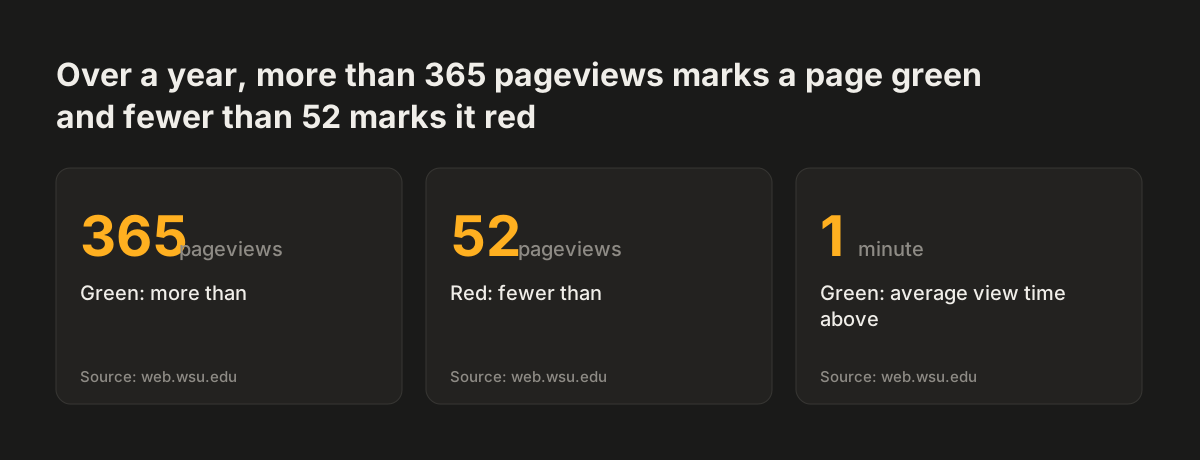
The WSU content inventory template turns pageviews into colours. It highlights pages with more than 365 pageviews in green, roughly one view per day. It highlights pages with fewer than 52 in red, roughly one view per week. It also marks pages green where average view time exceeds 1 minute.
Traffic data settles arguments. When Essex County Council audited an old version of its intranet, many pages had 0 views over the previous year. The author wrote that this made conversations with stakeholders easier when they decided what to carry over to the new intranet.
Low traffic alone is not a reason to delete. Bounce rate, the percentage of visitors who do not click anywhere else on your site, tells you whether a visited page leads anywhere. A rarely viewed page may still be a document you are required to publish. Volume is not the goal either. JONES notes that Google officials have said a higher page count does not necessarily mean higher rankings, and that many poor-quality pages can damage rankings.
Source: web.wsu.edu
Check accessibility page by page, including documents and media
Give every row in the inventory an accessibility result, because a page with errors cannot move to the new site unchanged. Washington State University's web team will not publish websites with errors or "No Data" in the Accessibility column of its template. The rule covers published, password-protected and private pages alike.
Media needs its own check. The WSU guidance sets these rules:
- Audio-only content must have a transcript.
- Video-only content must have an audio description of the visual content.
- Multimedia must have synchronised captions and audio descriptions, and should have a transcript.
Readability belongs in the same pass. WSU advises aiming content at the lower secondary education level, 6th to 9th grade in US terms. Long sentences and unexplained jargon usually push a page into the rewrite pile.
Automated tools speed up the first sweep. Edinburgh used Silktide, an automated testing tool, to assess the quality and accessibility of its content. Content Science names SiteImprove and Acrolinx for checking content against standards for SEO, accessibility and plain language. Tools find the obvious faults; a person still has to read the pages that matter most.
Once pages are rewritten, they have to stay accessible after launch. Our guide on writing accessible content that stays accessible after launch covers the habits your editors will need.
Flag GDPR exposure on old pages: forms, documents and personal data
Mark every page that collects or shows personal data, so the redesign does not carry old privacy problems onto a new site. Old sites accumulate forms, uploads and documents that nobody has looked at in years. The audit is the cheapest moment to find them.
Add these columns to your inventory for each page:
- Does the page have a form, and which fields does it ask for?
- Where does each submission go, and who reads it?
- Does the page link to documents that contain names, contact details or other personal information?
- Does the page embed content or scripts from another company?
At Svennis, we add a form column to the inventory before a single page is sorted, listing each form's fields and destination. That column routinely uncovers forgotten forms still sending personal details to an unread inbox, which we then retire or rebuild.
Be careful in the other direction too. Essex County Council's audit set out to avoid migrating outdated content. It also set out to avoid deleting an important document that legally needed to be there. Ask the page owner before you remove any policy or statutory document. If a form stays, plan where its data should go on the new site. Our post on why a contact form should not end in an inbox explains the options.
Judge each page for search and AI answers: one topic, current facts, no duplicates
A page is ready to be quoted by a search engine or an AI assistant when it covers one topic and states current facts. It also needs no competing twin elsewhere on the site. Two near-identical pages split the answer between them. An outdated page gives the wrong one.
Duplicates are the first thing to find. Content Science describes Screaming Frog SEO Spider as a tool that finds broken links, duplicate content and other issues that can affect SEO. Edinburgh's audit linked content spread directly to duplicate content, inefficient content management, what the team called CMA compliance risk, and student dissatisfaction.
For the qualitative read, a set of fixed criteria keeps reviewers consistent. ContentWRX scores content across six dimensions, which work well as column headings in your own spreadsheet:
- Discovery
- Accuracy
- Polish
- Relevance
- Usefulness
- Influence
Check the page title and summary as well. The WSU template marks titles under 75 characters green and excerpts under 155 characters green. If no excerpt is entered, WordPress uses the first part of the page instead. An empty excerpt therefore turns a weak opening line into your summary.
Finally, check who the page speaks to. Essex audited its Local Offer website, which offers information for children and young people with special needs and disabilities. Much of that content was aimed at professionals. It should have been aimed at parents and young people. A page written for the wrong reader answers the wrong question.
Keep, rewrite, merge or delete: the decision table for every page
Give every row in the inventory exactly one of four verdicts: keep, rewrite, merge or delete. Essex County Council sorted its content into keep, cut and improve. This guide splits improve into rewrite and merge, because merging changes your URLs and rewriting usually does not.
| Verdict | Use it when | Evidence from the audit | What happens to the old URL |
|---|---|---|---|
| Keep | The page performs and passes every check | Steady traffic over a year, no accessibility errors, current facts, a named owner | Stays; if the address changes, redirect it to the new one |
| Rewrite | The topic is still needed but the content fails a check | Traffic, but accessibility errors, wrong audience, outdated facts or hard reading | Stays at the same address, or redirects to its new one |
| Merge | Two or more pages cover the same topic | Duplicates flagged by the crawler, overlapping titles, split traffic | Weaker pages redirect to the merged page |
| Delete | Nobody needs the page and no rule requires it | Little or no traffic for a full year, no owner, no legal need | Redirects to the closest relevant page |
Plan every redirect in one place. A redirect chain happens when there is more than one redirect between the original URL and its destination. A redirect loop happens when a chain keeps redirecting back to one of its own steps. JONES notes that tools such as Screaming Frog can identify these loops. Point each old URL straight at its final page.
Worked example: auditing a small business site with the WSU template and Screaming Frog
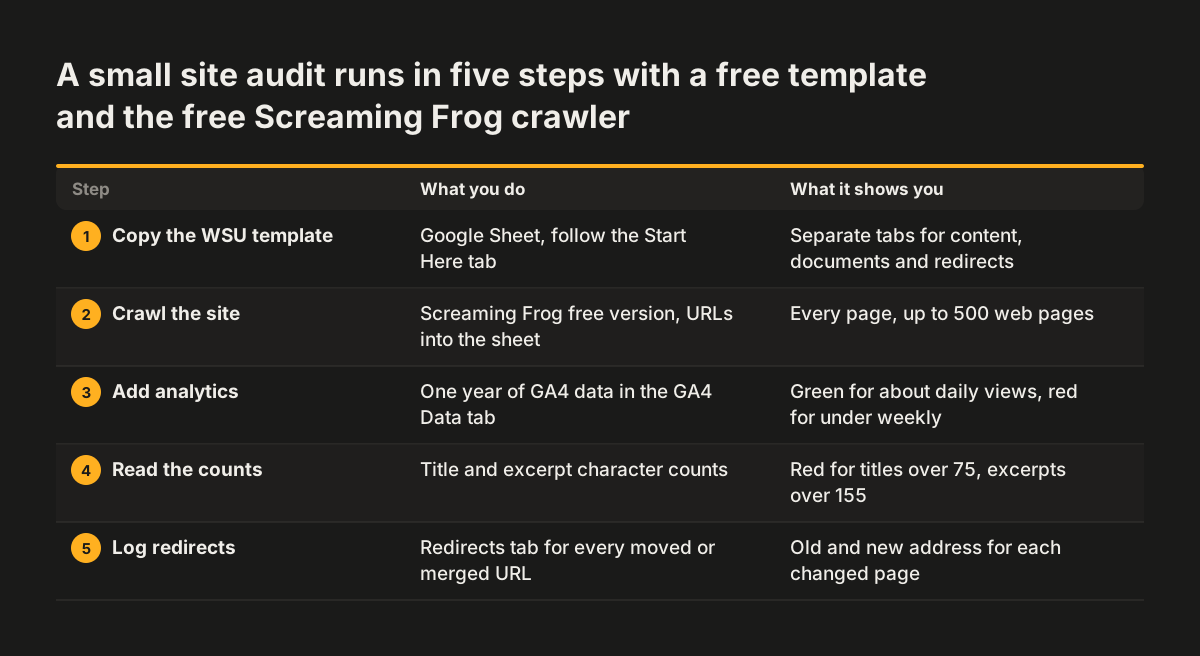
A small business site can be audited with a free spreadsheet template and a free crawler. This example uses Washington State University's content inventory template and guidance with the free version of Screaming Frog, which indexes up to 500 web pages.
- Copy the WSU Google Sheet. It has 8 tabs: Content, Start Here, Export URL, GA4 Data, Documents, Redirects, Updates and Formulas. Follow the Start Here tab.
- Crawl your site with Screaming Frog and bring the list of URLs into the template.
- Export one year of Google Analytics data into the template. Pages above 365 pageviews turn green; pages below 52 turn red.
- Read the title and excerpt counts. Titles over 75 characters and excerpts over 155 characters show red.
- Fill the Accessibility column for every row until no "No Data" remains.
- Add your own columns for forms and personal data, owner and verdict.
- Record every merged or deleted URL, with its new destination, in the Redirects tab.
Now read the rows together. A service page that is green on views but red on accessibility is a rewrite. Two pages describing the same service with overlapping titles are a merge. An old news post that is red on views, with no owner and no legal reason to exist, is a delete with a redirect.
You do not have to follow the template to the letter. The Essex author adapted a published content audit guide to suit his needs rather than following it exactly. Add the columns your business needs and drop the ones it does not.
How long a content audit takes, and how much to read closely
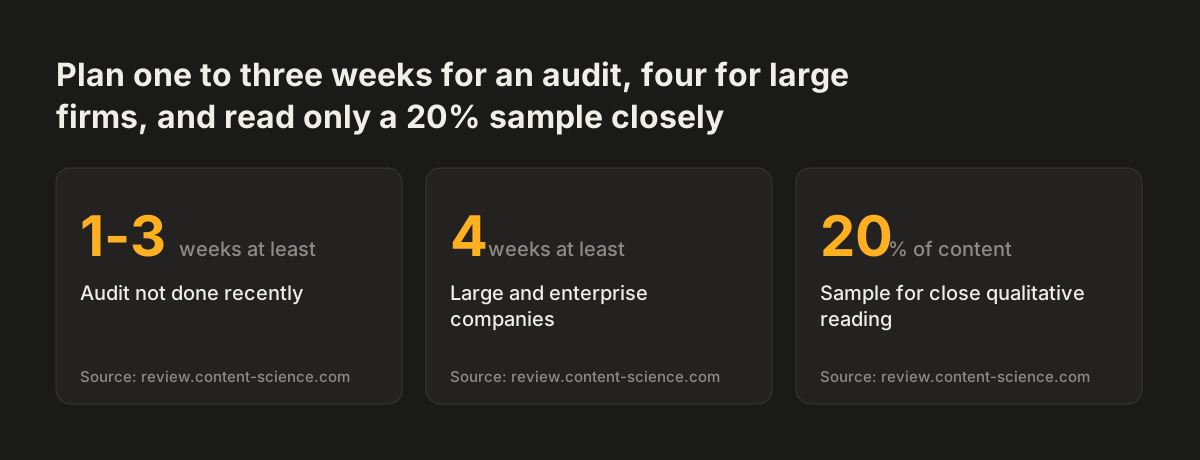
Expect a content audit to take one to three weeks at least if you have not analysed your content recently. That estimate comes from Colleen Jones in The Content Advantage, quoted by Content Science. She advises large and enterprise companies to expect at least four weeks.
You do not need to read every page in depth. For the qualitative audit, Content Science recommends a 20% sample that covers both common examples and critical ones, such as content that supports sales for a priority product or service. The automated checks cover every page; the close reading covers the sample.
Decide early what data you will collect, or the audit grows without end. Edinburgh prioritised its audit criteria with a MOSCOW scale:
- Must: data that is essential to capture.
- Should: data you really should gather if it is available.
- Could: data that is nice to have but not essential.
- Won't: data that is out of scope.
After launch, the audit does not have to be a one-off. Content Science says that for most organisations a content audit once a year is enough. Keeping the inventory up to date makes each yearly pass shorter. The size of the site you carry forward also affects what the rebuild costs, which our post on what drives the price of a website redesign explains.
Source: review.content-science.com
What a content audit means for a UK or European business
For a UK or European business, a content audit is where legal and compliance questions meet content decisions. The two public examples in this guide both come from British organisations, and both met that overlap.
Essex County Council's audit had to balance two risks. It wanted to avoid migrating outdated content to the new websites. It also wanted to avoid deleting documents that legally needed to be there. Any business that publishes terms, policies or regulated information faces the same balance.
The University of Edinburgh's audit linked duplicated and scattered content to compliance risk, not only to poor findability. When the same information appears on several pages, one copy usually goes out of date. That stale copy is the one a visitor, a regulator or an AI assistant may find.
Check how your pages behave on phones as part of the same audit. JONES reports that at least 60 percent of Google searches happen on mobile devices. A page that passes on a desktop screen but fails on a phone belongs in the rewrite pile.
Put accessibility and personal data in the audit spreadsheet from the start. Fixing them during the audit costs a column and a decision. Finding them after launch means reopening pages you thought were finished.
Next steps: turn the audit spreadsheet into a redesign brief
The output of a content audit is a list of verdicts that the redesign team can build from. Work through these steps in order:
- Copy an inventory template and crawl your site.
- Export a full year of analytics data and add it to the inventory.
- Add columns for accessibility, forms and personal data, owner and verdict.
- Read a 20% sample closely, including every page that supports sales.
- Give every row one verdict from the decision table and log each redirect.
- Rewrite the keep pile before design testing starts.
The last step matters more than it looks. Essex rewrote most of the content in its keep pile before the Local Offer went into Beta, so the team could test and iterate on real content. Designers who work with final text make fewer wrong assumptions about page length and structure.
Then carry the verdicts into your brief. Our website brief template for a business redesign has room for the page list, the redirect plan and the accessibility requirements. When you are ready to have the new site built on that foundation, see how Revylio handles website redesign, from audit to launch.
Sources
- Essex County Council: Nice content you've got there. Would be a shame if I were to… audit it!
- Washington State University: Content Inventory, Audit, & Management
- University of Edinburgh: How to tackle a content audit
- JONES: How To Audit Your Existing Website (free template)
- Content Science Review: How to Start a Content Audit