
Consent Mode and analytics under cookie consent: a setup guide for business websites
How Google Consent Mode passes cookie choices to GA4, what basic and advanced mode change in your reports, and how to check your setup works.
- Nº
- 29
- Published
- Read
- 12 min
- Category
- Notes
- Written by
- Revylio
Consent Mode keeps some analytics after a visitor refuses cookies
Consent Mode and analytics under cookie consent can work together on a business website. You need two things for that: the right order on the page and the right defaults. Consent Mode is a Google feature that takes the choice a visitor makes in your cookie banner and passes it to Google tags. The tags then adjust what they store and send.
A correct setup gives you full GA4 data for visitors who accept. For visitors who refuse, you get limited or modelled data instead. A faulty setup goes wrong in one of two ways. It may set cookies before anyone has agreed. Or it may throw away measurement you were entitled to keep.
Consent Mode is not a banner. Google's help page on consent mode says it "does not provide a consent banner or widget" and only interacts with one. Google's developer guide adds that Consent Mode does not store anyone's choice. That job belongs to your consent management platform (CMP), the tool behind your banner that records each visitor's choice.
This guide covers the consent layer only. To track an enquiry from first visit to signed contract, see our guide to measuring what a website brings in.
The four Consent Mode signals and what each one controls
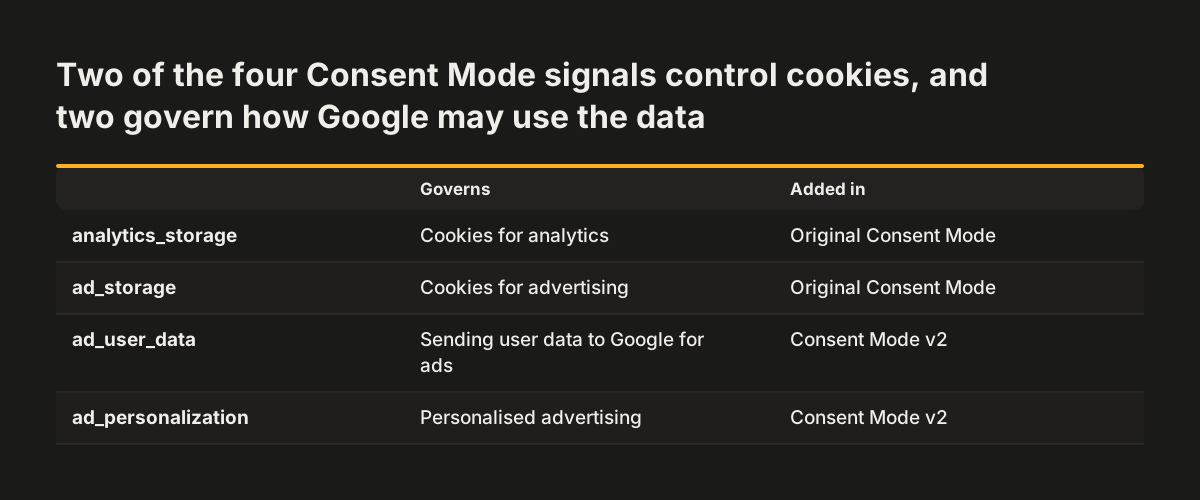
Consent Mode v2 passes four consent signals to Google tags, and each is set to granted or denied. Two of the signals control cookies. The other two concern how Google may use the data for advertising.
Here are the four signals and what each one governs:
- analytics_storage controls cookies for analytics. Google says that when it is denied, no Analytics cookies are set, accessed or read from the device.
- ad_storage controls cookies for advertising. Google's developer guide says that when it is denied, no new advertising cookies are set.
- ad_user_data is one of the two advertising signals added in v2, and covers user data sent to Google for advertising.
- ad_personalization is the other v2 addition, and covers personalised advertising.
The last two signals arrived with v2. Google's developer guide says Consent Mode users must send them in addition to ad_storage and analytics_storage. DataGuard describes them in the same way, as two parameters added alongside the two older ones.
No signal has a value until you set one. Google's developer guide states that no consent state is set by default, so every setup needs a default command. The worked example later in this guide shows one. DataGuard argues that analytics_storage and ad_storage should default to denied, in line with the GDPR principle of privacy by default.
Basic and advanced Consent Mode differ in when tags load and what a refusal sends
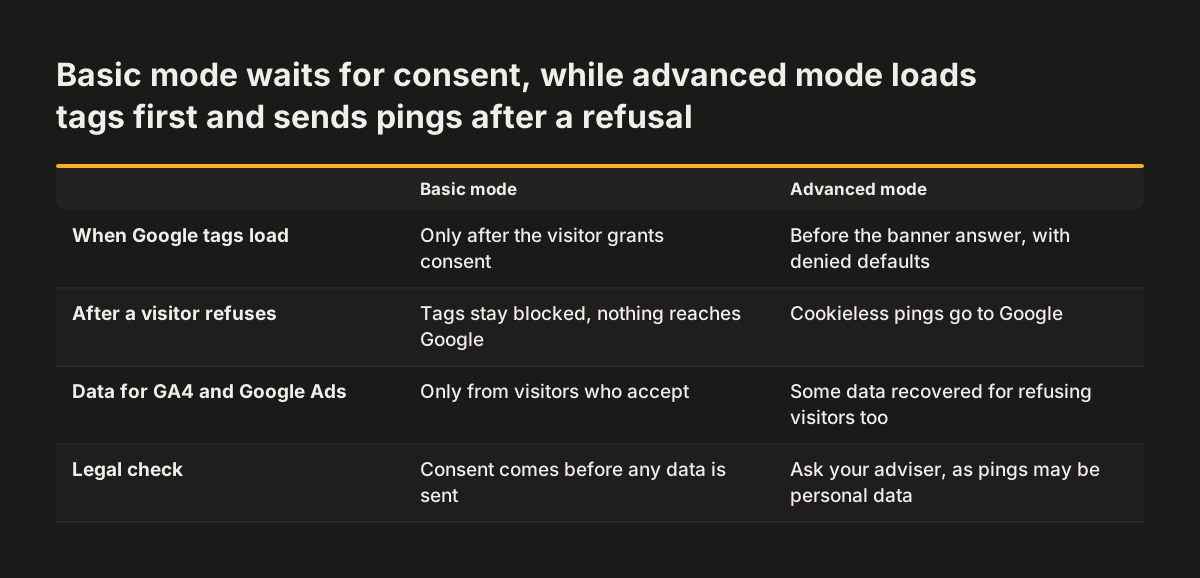
The difference between basic and advanced Consent Mode comes down to one decision. Do Google tags load before the visitor has answered the banner? In a basic implementation, Google tags stay blocked until consent is granted. In an advanced implementation, the tags load first with denied defaults. If the visitor then refuses, they send cookieless pings.
Basic implementation
Google's help page describes basic mode as blocking Google tags until users consent. If the visitor refuses, DataGuard notes that no data is collected and no cookie-free pings are sent. Google's help page sets out the cost. You get no modelled data in GA4 to fill the gaps. Conversion modelling in Google Ads also falls back on a general model.
Advanced implementation
In advanced mode, a refusal still produces cookieless pings. Google defines these as GA4 events with coarse details that cannot directly identify a person. They may include the user agent, screen resolution and IP address. Google says Analytics does not store or log IP addresses.
DataGuard lists more of the ping contents. These include a timestamp, the referrer, ad-click signals such as the GCLID in the URL, and the consent status. Google's developer guide adds that the full page URL is still sent. In return, Google fills the gaps in GA4 with conversion modelling and behavioural modelling.
Two settings shape the ad data in advanced mode:
- ads_data_redaction: when it is true and ad_storage is denied, Google redacts the ad-click identifiers that Google Ads and Floodlight tags send.
- url_passthrough: when ad_storage is denied, it passes ad-click information between pages in URL parameters.
Choosing advanced Consent Mode is a legal judgement, not a technical default
Whether advanced Consent Mode is lawful for your site is a question for your data protection adviser, not your developer. Opinions differ on how far the pings go. DataGuard, a compliance software company, considers advanced mode not compliant with data protection rules. Its reason is that the ping data can be personal data processed without consent.
Three points hold whichever mode you choose:
- DataGuard notes that Consent Mode does not replace a regular cookie banner but must link to it.
- DataGuard also notes that obtaining consent remains the website operator's responsibility.
- Google's developer guide says Consent Mode does not store consent choices, so your CMP must.
Basic mode is the conservative choice, because nothing is sent until the visitor agrees. Advanced mode recovers some data for Google Ads and GA4 without consent, in DataGuard's words. Write the decision down, with who made it and why. The next person to touch the tags will then know the reasoning.
The banner still has to give a real choice in either mode. A commenter on Reddit's r/GoogleAnalytics puts it plainly: users must be able to opt out of being tracked in GA, "even if anonymous".
GA4 reports after a consent banner: fewer sessions and modelled estimates
Expect GA4 to count fewer visitors once a compliant banner and Consent Mode go live. Google's help page says that when analytics_storage is denied, no Analytics cookies are set, accessed or read from the device. Visitors who refuse are therefore no longer measured in the usual way. A lower session count does not by itself mean fewer real visitors.
When modelling fills the gap
What fills the gap in GA4 depends on your implementation. In advanced mode, Google says it fills data collection gaps with conversion modelling and behavioural modelling. In basic mode, Google tags stay blocked until consent, so you get no modelled data in GA4. When tags are blocked, Google Ads conversion modelling falls back on a general model.
When the consent framework blocks modelling
Your choice of banner can also stop modelling. Google says this happens when visitors refuse through a CMP that uses the IAB Europe Transparency and Consent Framework (TCF). In that case, GA4 cannot model the missing data. Check which framework your CMP uses before you rely on modelled figures.
A commenter on r/GoogleAnalytics notes that GA4 without Consent Mode is less accurate. Even with Consent Mode, GA4 shows a partial picture of refusing visitors. Read GA4 for direction, and compare periods that used the same consent setup.
Worked example: setting denied defaults with gtag before any Google tag loads
Take a business website that runs GA4 and a Google Ads campaign and serves visitors in the UK and the EU. It uses a consent management platform (CMP) that supports Consent Mode v2. The first job is the default command. It tells every Google tag to treat all four signals as denied until the visitor answers the banner.
The snippet below sets those defaults. Paste it into your site template so it runs on every page. Place it above the gtag.js or Google Tag Manager snippet. Google warns that consent defaults will not work if the consent code runs out of order.
<script>
  // Consent Mode defaults: must run before gtag.js or Google Tag Manager
  window.dataLayer = window.dataLayer || [];
  function gtag(){dataLayer.push(arguments);}
  gtag('consent', 'default', {
    'ad_storage': 'denied',
    'ad_user_data': 'denied',
    'ad_personalization': 'denied',
    'analytics_storage': 'denied',
    'wait_for_update': 500
  });
</script>
Two parts of this snippet are the ones you would change:
- The four denied values. These are the defaults. DataGuard recommends denied for privacy by default, so leave them unless your adviser decides otherwise for a region.
- The wait_for_update value of 500. It gives your CMP 500 milliseconds to call gtag('consent', 'update', ...) before tags fire. Google uses this figure in its own example. If your CMP loads slowly, adjust this number.
Two further steps complete the setup. First, the CMP sends the update command when the visitor accepts, which switches the relevant signals to granted. A commenter on r/GoogleAnalytics describes switching this on for Cookiebot in Google Tag Manager with one button. Second, decide whether one default fits all your visitors.
Region-specific defaults are Google's recommendation, because privacy laws are regional. Google lets you name a region, using ISO 3166-2 codes, in the default command, and the more specific region wins. For the wider planning, see our guide to multilingual websites for several countries.
Seven Consent Mode setup mistakes that break compliance or measurement
Most broken Consent Mode setups fail quietly. The site looks normal, but cookies are set too early or data is lost for no reason. The table below lists the mistakes the sources point to. For each one it shows what breaks and how you can spot it.
| Mistake | What it breaks | How to spot it |
|---|---|---|
| Default command placed below the tag snippet | Compliance: Google says out-of-order consent code means the defaults do not work | Page source shows the consent code after gtag.js or the Tag Manager snippet |
| No default command at all | Compliance: no consent state exists until one is set | Page source has no gtag('consent', 'default', ...) command |
| Defaults set to granted | Compliance: tags can store cookies before the visitor answers | Analytics cookies appear in the browser before you touch the banner |
| Consent Mode with no banner behind it | Compliance: Google says Consent Mode does not provide a banner, it only interacts with one | No CMP loads on the page, or the banner offers no refusal |
| Only ad_storage and analytics_storage sent | Measurement: v2 requires ad_user_data and ad_personalization as well | Search the page source and CMP settings for the two v2 signals |
| Legacy ga.js, analytics.js or conversion.js tags | Measurement: Google says to move to gtag.js or Google Tag Manager | Search the page source for those file names |
| One default for every visitor everywhere | Compliance or measurement, depending on the default chosen | Look for region settings in the default command |
The first four mistakes are compliance risks, because tags can act before the visitor chooses. The next two mostly cost you measurement, especially Google Ads features. The last one cuts either way. A granted default for everyone breaks the rules where consent is required. A denied default for everyone loses data in places where the law allows more.
How to check Consent Mode works: page source, browser cookies and GA4
You can check Consent Mode yourself with your page source and your browser's cookie storage. Two facts from Google make the check possible. Consent defaults fail if the consent code runs out of order. And with analytics_storage denied, no Analytics cookies should be set on the device.
Run the check in this order:
- Open your site in a private window, and leave the banner alone.
- View the page source and confirm that the default consent command sits above the gtag.js or Tag Manager snippet.
- Check the browser's cookie storage before you answer the banner. No Analytics cookies should be present.
- Refuse all cookies, browse two pages, and check the cookie storage again.
- Open a new private window, accept all cookies, and confirm that Analytics cookies now appear.
- Repeat the check on a landing page, a form page and the thank-you page.
At Svennis we run this check in a clean browser profile after every banner or tag change. A plugin or template update can move the consent code below the tags without anyone noticing.
After the check, note the date of the change in your reporting. A later drop in GA4 sessions can then be read against the new setup rather than taken as lost traffic.
What Consent Mode means for a business in the UK or the EU
For a business with visitors in the UK or the EU, Google advertising is the clearest reason to set up Consent Mode. Google's developer guide says Google is strengthening enforcement of its EU user consent policy. The same guide says Consent Mode users must send ad_user_data and ad_personalization as well as the two older signals.
The position for a site that runs GA4 alone is less clear-cut. A UK-based poster on r/GoogleAnalytics wrote that they had read a lot of articles and could not find a definitive answer. One commenter replied that if you run any Google campaigns, you need Consent Mode. Another said you need it if your site has GA4 or Google Ads tracking.
If you run Google Ads, you need a consent banner. In the UK, cookies used only to collect statistics for improving your site can be set without consent. The conditions are that you explain them clearly, give an easy way to object and do not share the data for other purposes. Whether your GA4 setup meets those conditions is a question for your adviser.
Where you do run a banner, DataGuard notes that Consent Mode does not replace it but must link to it. DataGuard also argues that GDPR's privacy by default points to denied defaults for analytics_storage and ad_storage.
Consent Mode does not settle your cookie rules, which in the UK sit in PECR, or your duties under the UK GDPR and the EU GDPR. Obtaining consent remains your responsibility as the website operator, in DataGuard's words. Your banner wording, your cookie categories and your records of consent still sit with your CMP and your own policies. Consent Mode only passes the result of that work to Google.
Next steps: audit your consent setup before the next campaign or relaunch
Start with a short audit of the consent setup you already have. Do it before your next Google Ads campaign or site relaunch. Work through these steps in order:
- List every tag on the site, and look for legacy ga.js, analytics.js or conversion.js files.
- Confirm that your CMP supports Consent Mode v2 and sends all four consent signals.
- Agree basic or advanced mode with your data protection adviser, and write the decision down.
- Place the default command above the tag snippets, with region settings if you serve several countries.
- Run the browser cookie check, and note the date of the change in your GA4 reporting.
If you are planning a new site, write the consent requirements into the technical part of your brief. The developer can then build them in from the start. The website brief template gives you a structure to add them to.
Your audit may show that the tags, banner and templates all need rebuilding together. If so, Revylio's website redesign service can rebuild them together, with the consent setup built in from the start.