



Choosing website hosting by response time and what to measure before you switch
How to choose website hosting by server response time: what TTFB measures, the thresholds, how to test a host from your visitors' location, what to ask.
- Nº
- 37
- Published
- Read
- 12 min
- Category
- Notes
- Written by
- Revylio
Choosing website hosting by response time means measuring TTFB first
Choosing website hosting by response time means testing how quickly a candidate server starts answering a page request before you sign. You test from where your visitors are. The number to compare is Time to First Byte. Uptime figures and plan specifications cannot tell you this number, so you measure it yourself.
Time to First Byte (TTFB) is a metric that measures the time between starting to navigate to a page and the moment the first byte of the response begins to arrive. That definition comes from web.dev's guide to Time to First Byte. The gap happens before the browser can show anything. A slow first byte delays everything that follows it.
This guide covers what TTFB contains and the thresholds web.dev publishes. It then explains how hosting, caching and a CDN change TTFB, and which questions to ask a host before you sign. It does not repeat the basics of page speed and Core Web Vitals. For those, read what a slow website costs in enquiries and how to find the leak.
Time to First Byte is the sum of five request phases
Time to First Byte is made up of several steps, and your host controls some of them. According to web.dev, TTFB measures the elapsed time between startTime and responseStart. It is the sum of these request phases:
- Redirect time.
- Service worker startup time, if the site uses a service worker.
- DNS lookup, the step that finds the server for your domain name.
- Connection and TLS negotiation, which sets up the encrypted connection behind HTTPS.
- The request itself, up to the first byte of the response.
web.dev states that reducing latency in connection setup time and on the backend can lower your TTFB. The backend is the server and the software that builds the page. A host affects both. It decides where the server sits and how much capacity the server has to build your page.
Some phases belong to you rather than the host. A redirect chain adds time before the final page request even starts. A fast host cannot recover time lost to redirects your own site creates. When you test a host, test the final address of a page, not an old link that redirects to it.
TTFB thresholds: 0.8 seconds or less is good, above 1.8 seconds is poor
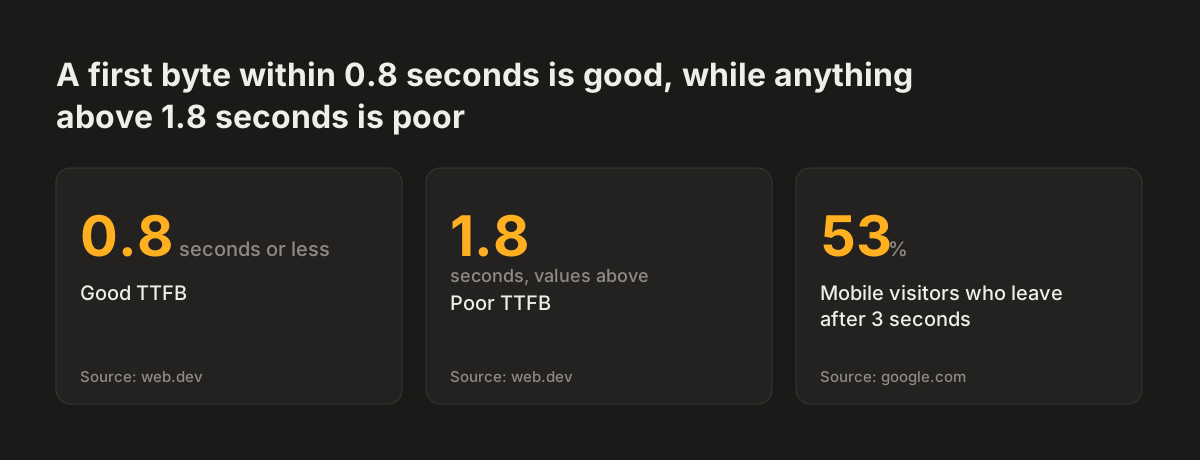
web.dev sets clear TTFB thresholds: good values are 0.8 seconds or less, and poor values are greater than 1.8 seconds. A result between the two is not a failure, but it deserves a closer look. These are the two figures to hold every candidate host against.
The thresholds matter because the first byte eats into the visitor's patience. HostPapa cites a Google study that found 53% of mobile site visitors leave if a page takes more than 3 seconds to load. Time & Leisure reports that 40% of users lose interest past the same 3 seconds. A first byte at 1.8 seconds spends more than half of that 3-second budget before the browser has anything to show.
Speed also affects how you are found. One hosting guide notes that Google takes mobile and web-based loading speeds into account when deciding which sites appear at the top of search results.
Judge a host by what most visitors get, not by its best run. web.dev frames its target for First Contentful Paint around the 75th percentile of users. The same habit works for TTFB. One fast test proves little. A host that stays under 0.8 seconds across repeated tests is the one you want.
Source: web.dev, google.com
Uptime guarantees and plan specifications do not measure response time
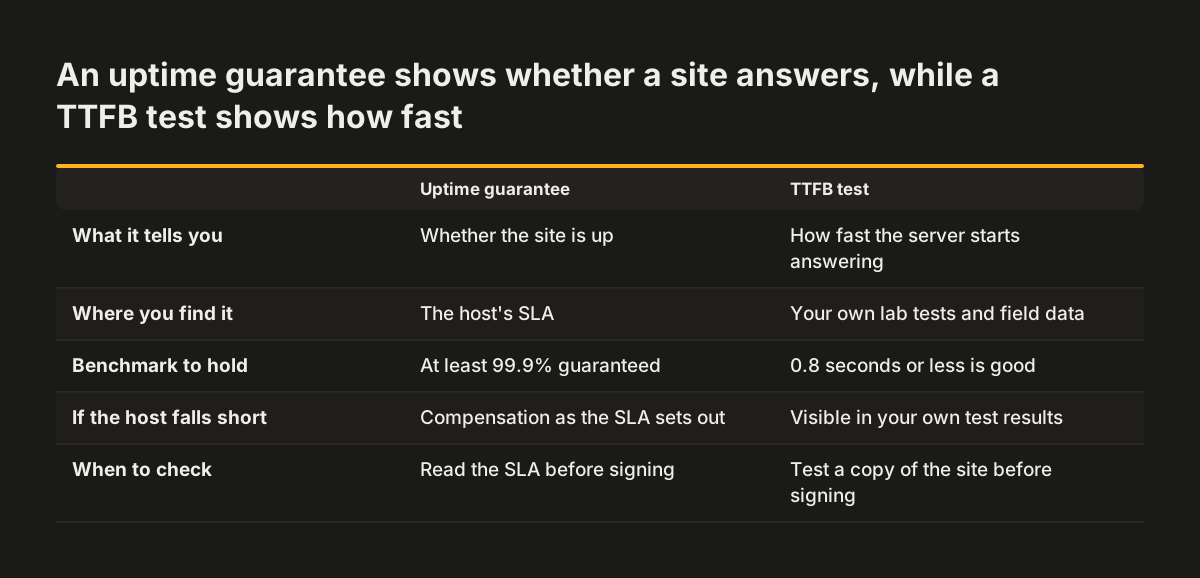
Uptime tells you whether a site answers, not how fast it answers. HostPapa defines average uptime as the average amount of time a website stays up within a given period. Hosting guides agree on a floor. Time & Leisure advises a host that guarantees at least 99.9% uptime, since 100% is impossible. Another guide puts the industry standard at around 99.95% and says anything under 99.9% should usually be avoided.
An SLA, or service level agreement, is a host's guarantee that a certain level of uptime will be achieved, or compensation will be given. An SLA is worth reading. But a server can meet its uptime promise every month and still take well over 1.8 seconds to send its first byte. Both count as "up".
Plan specifications have the same blind spot. Storage and bandwidth describe capacity. One guide notes that an average website can operate with around 1GB of hosting storage. HostPapa defines bandwidth as the amount of data a site can deliver to visitors over a period of time. Neither figure says how quickly the server responds to a single visitor.
HostPapa names three main factors for judging a host: average uptime, page load time and customer support. Treat uptime as the minimum a host must meet. Treat measured response time as the test that decides between hosts that meet it.
Hosting type, server location, caching and a CDN all change TTFB
Four parts of a hosting set-up change how fast the first byte arrives. Each one is worth asking about, and each one should be tested rather than assumed.
Hosting type
The three most common hosting types are shared, dedicated and VPS hosting. Shared hosting means sharing the resources that run your website with other companies, and it is the cheapest option. Dedicated hosting gives complete access to a server you share with no one, and it is the most expensive. A VPS sits between the two.
The price tells you what you rent, not what TTFB you will get. Test the exact plan you intend to buy.
Server location
The physical location of a host's servers influences how quickly pages reach users. Distance adds time to the connection phases of TTFB. A server near your customers starts with an advantage.
Content delivery network
A content delivery network (CDN) is a network that stores pages closer to customers, in server locations around the world, which reduces loading times. Time & Leisure recommends hosts that offer CDNs and solid-state drives.
Caching
Caching keeps a ready copy so the server does not rebuild a page each time. It can distort your tests. web.dev notes that a cached resource can report a responseStart of 0. A repeat test on a cached page can therefore look far better than a new visitor's first visit. Record first-visit and repeat results separately.
Field data and lab tests: the tools that measure TTFB
TTFB can be measured in two ways, and you need both. Field data comes from real visitors on your live site. A lab test is a controlled measurement you run yourself, from a chosen place, at a chosen time.
web.dev lists these tools for measuring TTFB:
- The Chrome User Experience Report, a field source.
- The web-vitals JavaScript library, a field source you add to your own site.
- The network panel in Chrome's DevTools, a lab tool in your browser.
- WebPageTest, a lab tool.
web.dev adds that you can measure the TTFB of navigation requests in the browser with the Navigation Timing API, which is the browser feature the other tools draw on. One hosting guide also suggests checking a host's TTFB results with WebPageTest or Bitcatcha.
Use field data to understand your current host, because it reflects what your visitors actually experience. Use lab tests for a candidate host. A candidate has no real visitors yet, so a lab test is the only evidence you can gather before you sign. Run both kinds of test on your current site too, so you know how your lab results compare with real use.
Worked example: testing a candidate host from your visitors' location
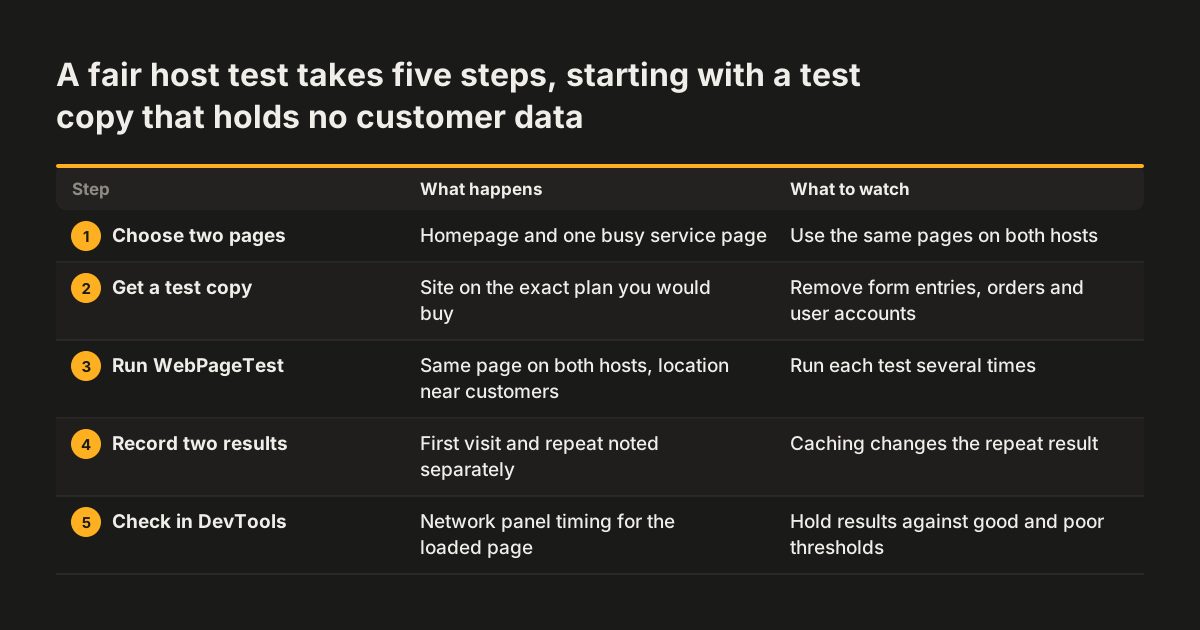
Testing a candidate host follows the same steps every time. Take a business whose customers are mostly in one country. Its current site sits on shared hosting, and it is weighing a move to a VPS plan with another host. The steps below compare the two fairly.
- Choose two pages: the homepage and one busy service page.
- Ask the candidate host for a test copy of the site on the exact plan you would buy.
- Open WebPageTest and run the same page on both hosts from a test location close to your customers.
- Run each test several times. Note the first-visit and repeat results separately, because caching changes the repeat result.
- In Chrome DevTools, open the network panel, load the page and check the timing of the first document request.
- Hold each result against the web.dev thresholds: 0.8 seconds or less is good, above 1.8 seconds is poor.
- Check your current site in the Chrome User Experience Report, to see how real visitors fare today.
Read the results in order of importance. A candidate that stays at or under 0.8 seconds on first visits from your customers' location is a strong option. A candidate that only looks fast on repeat visits is showing you its cache, not its server. If both hosts sit above 1.8 seconds, the cause may be the site rather than the host. In that case, fix the site before you pay for a move.
TTFB comparisons between hosts can mislead unless the test is identical
TTFB figures from different platforms are not always measuring the same moment. web.dev explains that a 103 Early Hints response counts as the "first bytes". Early Hints is an early reply some servers send before the real page. A server using it can report a lower TTFB without delivering the page any sooner.
For this reason, browsers also record finalResponseHeadersStart. web.dev describes it as an additional timing entry that measures the start of the final document response, typically an HTTP 200 response. web.dev says plainly that early responses make it difficult to compare TTFB across platforms or technologies, depending on the features they use.
Third-party resources add a further trap. Resources hosted on cross-origin servers, meaning other domains, can add latency because the browser must set up connections to those servers. web.dev also notes that a cross-origin resource served without a Timing-Allow-Origin header can report a responseStart of 0. A host is not responsible for slow scripts loaded from someone else's domain.
Keep every comparison identical: same page, same tool, same test location, same number of runs. When Svennis moves a client site, we test the same page on the old and the new host from the same location before the switch. We do it because a test from the wrong region is the most common way we see a good host made to look slow.
Questions to ask a hosting provider before you sign
A hosting provider's answers to a few direct questions show whether its response time will hold up. The table lists the questions, why each matters and what a useful answer looks like.
| Question | Why it matters | A useful answer |
|---|---|---|
| Can we test our site on the exact plan first? | Lab tests are the only TTFB evidence before you sign. | A test copy on the plan you would buy. |
| Where are the servers? | Server location influences delivery speed. | A location close to most of your visitors. |
| Is a CDN included? | A CDN stores pages closer to visitors. | Yes, with a clear statement of what it covers. |
| What uptime does the SLA guarantee, and what compensation applies? | Uptime is the minimum a host must meet. | At least 99.9%, with compensation in writing. |
| Which support channels exist, and when? | Hosts usually offer phone, chat or ticket support. | Several channels, ideally around the clock. |
| How are backups and security handled? | Hosts typically schedule backups, but accidents happen. | Regular backups, firewalls, SSL and DDoS protection. |
| What will renewal cost? | Renewal can cost more than the sign-up price. | The renewal price, stated before you sign. |
Check the refund terms independently. HostPapa suggests searching forums and review sites for complaints, to see whether a money-back guarantee is as hassle-free as the provider claims.
Response time for a UK or European business: match the server to your visitors
For a business in the UK or elsewhere in Europe, the first hosting question is where your visitors are. If most of them are in one country, a server close to that country gives the connection phases of TTFB less distance to cover. Test from that country, not from wherever a testing tool happens to default.
If you sell into several countries, one server location may not suit all of them. A CDN stores pages in server locations around the world, closer to each group of customers. Plan the structure of the site at the same time. Our guide to multilingual websites for several countries covers URLs, hreflang and local pages.
Look past the introductory offer. HostPapa notes that renewal can cost more than the sign-up payment. It also notes that many hosts offer a free domain for one year, after which you pay a fee. Ask for both renewal figures in writing.
Finally, check that support is available during your working hours. Time & Leisure recommends hosts with several support channels, such as email, live chat and phone, at any time of day or night. A slow site on a Monday morning is a support question as much as a server question.
Next steps: measure your current host, then compare one candidate
The practical next step is to measure the host you already have. Without that baseline, you cannot tell whether a move would help. Work through these steps in order:
- Check your homepage and one service page in the Chrome User Experience Report for real-visitor data.
- Run the same pages in WebPageTest from your customers' country, several times, first visit and repeat.
- Compare the results with the 0.8-second and 1.8-second thresholds.
- If TTFB is poor on every host you test, look at the site itself first. Our post on what to fix first on a slow website sets out the order.
- Ask one candidate host the questions in the table above, and test a copy of your site on its plan.
If a host change comes with a wider rebuild, put your speed targets in writing from the start. The website brief template has room for them. The software you build on also shapes how the server responds after launch, so read choosing a CMS based on what happens after launch before you commit. When you want help with the whole project, see how Revylio approaches website redesign, hosting and maintenance.