

What a slow website costs in enquiries and how to find the leak on your own site
A slow site loses enquiries before the contact form loads. Learn to trace the loss to load time with free tools, and which redesign fixes recover it.
- Nº
- 10
- Published
- Read
- 12 min
- Category
- Notes
- Written by
- Revylio
A slow website costs you the enquiries of visitors who leave before the form loads
What a slow website costs in enquiries is every visitor who meant to contact you and left before your form had loaded. Those visitors never fill anything in, so the loss never reaches your inbox or your reports. You find the leak by timing the pages on the route to your form, then comparing those timings with where your enquiries actually come from.
The scale can be large. SA13 Digital's article on website speed says that over half of mobile visitors will leave a page that takes longer than three seconds to load. On most business sites, the page that loses them is a service page or a landing page, which is exactly the page that should send people to your contact form.
This guide covers three things. First, how load time turns into lost enquiries. Second, how to measure it on your own site with free tools. Third, which fixes recover those visitors, either in place or as part of a redesign.
Lost enquiries never appear in reports, because the visitor left first
A lost enquiry is a visit from someone who intended to contact you and gave up before they could. Your analytics records the visit, if the tracking code loaded in time. Your inbox records nothing, because no form was sent. That gap is why slow pages rarely show up as a line item in any monthly report.
The nearest signal most owners see is bounce rate. Bounce rate is the share of visitors who leave after viewing a single page. A high bounce rate on a service page tells you people arrived and did not continue, but it does not tell you why. Slow loading is one possible reason, and it is the one you can measure.
A high bounce rate can also cost you search traffic. SA13 Digital argues that a high bounce rate signals to the search engine that a site provides a poor user experience, and that rankings then slip down the results page. If that happens, a slow page loses enquiries twice: once from the visitors who leave, and again from the visitors who never find it.
The practical consequence is simple. You cannot wait for lost enquiries to announce themselves. You have to go looking for them, page by page, on the route a visitor takes to reach you.
Mobile visitors abandon pages that take longer than three seconds to load
Mobile load time matters most, because mobile visitors are the least patient. SA13 Digital states that consumer attention spans have shrunk dramatically, particularly on mobile devices. Its article puts the turning point at three seconds: beyond that, over half of visitors abandon a mobile page entirely.
Many business websites are designed and checked on a desktop in the office, over a fast connection. The owner sees a quick site. A customer standing outside on a phone, on mobile data, sees a blank screen and a loading bar. Both people are looking at the same page, but only one of them is deciding whether to contact you.
Speed also feeds into search. SA13 Digital describes Core Web Vitals, the measures of loading speed, interactivity and visual stability, as core components of Google's ranking algorithms. A page that is slow on mobile therefore risks two things at once. It loses the visitors who arrive, and it may be shown to fewer visitors in the first place.
For that reason, every measurement in this guide starts with the mobile result. If a page is fast on desktop and slow on mobile, treat it as a slow page.
Core Web Vitals measure loading, interactivity and visual stability
Core Web Vitals are Google's metrics for how a page feels to a visitor: how fast it loads, how quickly it responds, and how steady it stays while loading. They give you a common language for "slow", which matters when you brief a developer or compare quotes.
The three areas cover these questions:
- Loading speed: how soon the main content of the page appears.
- Interactivity: how quickly the page reacts when someone taps a button or a menu.
- Visual stability: whether text and buttons jump around while the page is still loading.
Each one can cost you an enquiry in a different way. Slow loading loses the visitor before they read anything. Poor interactivity makes the "Contact us" button feel broken. Poor stability moves the button just as someone reaches for it.
The free tool for checking all three is Google's PageSpeed Insights. You open it in a browser, paste in the address of one page, and it reports on that page. Run each page on the mobile setting first and write down the result. Do this for the pages people actually land on, not just your homepage, because the homepage is often not where enquiries start.
Tracing lost enquiries to load time on your own site, step by step
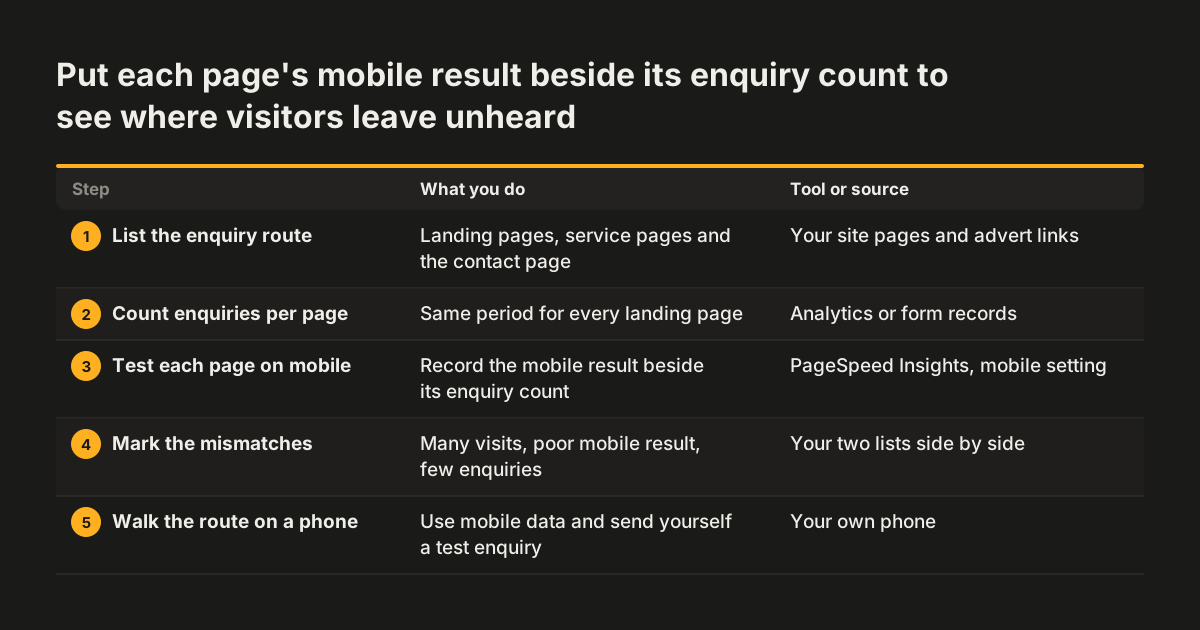
Tracing the leak means putting two lists side by side: how fast each important page loads, and how many enquiries each page produces. Neither list alone tells you much. Together they show where visitors arrive in numbers and still do not get in touch.
- List the enquiry route. Write down the pages visitors land on from search and adverts, the service pages, and the contact page.
- Count enquiries per landing page. Use your analytics or form records, over the same period for every page.
- Test each page on mobile. Run it through PageSpeed Insights and record the result next to its enquiry count.
- Mark the mismatches. A page with plenty of visits, a poor mobile result and few enquiries is your most likely leak.
- Walk the route yourself. On an ordinary phone over mobile data, open the landing page, go to the contact page and send a test enquiry.
The last step catches what the tools miss. At Svennis we time the whole route rather than the homepage alone, from the page a search visitor lands on to the moment the form is sent. The wait we find is often on the contact page itself, where tracking codes and chat widgets pile up.
Step two depends on enquiries being countable. If every form drops into a shared mailbox, you cannot tell which page produced which enquiry. Our post on why your contact form should not end in an inbox covers how to fix that.
Worked example: one service page and the contact form behind it
Take a business whose most visited service page attracts steady traffic from local search but rarely produces an enquiry. The owner assumes the problem is the wording. The steps above test a different explanation first.
What the measurements show
On desktop, PageSpeed Insights rates the service page acceptably. On the mobile setting, the same page loads slowly. The large photograph at the top was uploaded straight from a camera without compression, which SA13 Digital names as a common cause of slow business sites. Every mobile visitor waits for that image before they see the text below it.
What the walk-through shows
On a phone, the owner taps "Get a quote" and reaches the contact page. That page carries a booking widget, a chat box and several tracking codes. SA13 Digital lists stacked plugins, tracking codes and widgets as a cause of slow server response. The form appears late, and the submit button shifts down as the chat box loads.
What the owner does next
The owner now has two specific fixes instead of a vague worry. The photograph gets compressed. The chat box and unused codes come off the contact page. Then the owner tests again on mobile and watches enquiries from that page over the following weeks.
If the count rises, the leak was load time. If it does not, the wording is the next suspect.
Four causes behind most slow business websites, and how each is fixed
Most slow business sites suffer from a short list of causes. SA13 Digital names unoptimised images, bloated plugins and scripts, and cheap shared hosting as the usual culprits. It adds streamlining the layout to its list of fixes. Shared hosting means your site sits on a server alongside many others, all competing for the same resources.
The table sets each cause against what you see, the usual fix, and whether the fix fits the current site.
| Cause | What you see | Usual fix | In place or redesign |
|---|---|---|---|
| Unoptimised images | Slow loading on mobile, large photos at the top of pages | Compress images before upload | Usually in place |
| Plugins, tracking codes and widgets | Slow server response, a busy contact page | Remove the unused ones, clean up unused code | In place, unless the site depends on them |
| Cheap shared hosting | Slowdowns when traffic peaks | Upgrade the hosting | In place, often done during a redesign |
| Heavy, cluttered layout | Slow pages even after the other fixes | Streamline the layout | Usually a redesign |
Work down the table in order. The first rows are cheap and quick to test. The last row is where a page's structure, not its content, is the problem. For a fuller order of attack, see what to fix first on a slow website.
Fixes that recover enquiries in place, and fixes that need a redesign
Fix in place when the cause is content you can change: images, plugins, tracking codes or hosting. SA13 Digital lists compressing images, cleaning up unused code, upgrading hosting and streamlining the layout as the main fixes for a slow site. The first three of those rarely need a new site.
A redesign becomes the better route when the slowness is built into the site. Signs include a theme that loads every feature on every page, or a layout that stays heavy after the images and plugins are cleaned up. Another sign is a site where removing one plugin breaks three pages. In those cases you keep paying to patch something that cannot get fast.
The decision also depends on what else is wrong. If the site is slow but otherwise does its job, fix the slow parts. If it is slow, hard to update and fails other checks such as accessibility, rebuilding once usually costs less than fixing everything separately. Our post on when a website redesign pays off, and when to fix the site in place walks through that choice.
Whichever route you take, measure before and after on mobile. Then keep counting enquiries per page. Speed is only worth paying for if the enquiry count moves.
A speed-led redesign must keep rankings and prove speed on the live site
A redesign done to recover enquiries can lose them again if it breaks the addresses search engines already know. When page addresses change, old links lead nowhere unless each one is redirected. Revylio's website redesign service handles this directly: every changed path gets a 301 redirect, and the sitemap is resubmitted at launch. A 301 is a permanent redirect that tells search engines a page has moved for good. As the page puts it, "The redirects are what stop a move being a fall."
Speed should be proven where visitors meet it. Revylio measures Core Web Vitals on the real site after launch, not on a template in a demo. A demo runs on a clean server with sample content. Your live site carries your images, your tracking codes and your traffic.
The process starts with evidence. Revylio's redesign runs in six stages: Discover, Structure, Design, Build, Connect and Launch. The Discover stage looks at traffic, enquiries and what search actually sees, which is the same comparison this guide asks you to make.
Duration and price follow from the site itself. Revylio prices a redesign on how many pages there are, how much content exists and what has to connect to what, and agrees a schedule at the scope stage. Our post on what drives the cost of a website redesign explains each factor.
What slow pages and enquiry forms mean for a UK business
For a UK business that relies on local customers, a slow mobile page is where local search traffic leaks away. SA13 Digital, writing about why local traffic bounces, ties the loss to mobile visitors with little patience. Someone searching for a nearby service on their phone is usually ready to get in touch. If your page stalls, they press back and tap the next result.
Fixing the leak also means collecting more enquiries, and every enquiry form gathers personal data. Under UK GDPR, a person can ask what data you hold about them. The ICO's guidance on responding to a subject access request says you must comply without undue delay and at the latest within one month of receipt.
The same ICO guidance says you can extend the time to respond by a further two months if the request is complex or the same person has made a number of requests. It also suggests that you could adopt a 28-day period to make sure you always reply within a calendar month.
That deadline is much easier to meet when every enquiry lands in one known place rather than in several staff mailboxes. So when a redesign rebuilds your forms for speed, decide at the same time where each submission goes and who can find it. A faster form that scatters data across inboxes solves one problem and creates another.
Next steps: measure the enquiry route, list the causes, then decide
You can start on your own site today, with free tools and an hour of time. Work through these steps in order:
- Write down the pages visitors land on before they contact you, plus the contact page.
- Run each one through PageSpeed Insights on the mobile setting and record the result.
- Put each result next to that page's enquiry count for the same period.
- Walk the route on a phone over mobile data and send yourself a test enquiry.
- Match each slow page to a cause in the table above and try the in-place fixes first.
- Test again on mobile, then watch whether enquiries from that page rise.
If the in-place fixes do not move the numbers, the problem is likely the site's structure. That is the point to look at a rebuild. Revylio's website redesign page sets out the six-stage process, how scope and price are worked out, and how speed is checked on the live site after launch. Take your list of slow pages and enquiry counts with you. It turns a vague sense that the site is slow into a brief anyone can quote against.