
Website terms and conditions template and the pages to check before relaunch
The sections a website terms and conditions template usually covers, and how terms sit beside the privacy notice, cookie banner and other legal pages.
- Nº
- 35
- Published
- Read
- 11 min
- Category
- Notes
- Written by
- Revylio
Website terms and conditions template: what it is and whether you need one
A website terms and conditions template is a ready-made draft of the rules for using a website. You adapt it instead of writing from a blank page. No single UK law requires every website to have terms, and brochure sites can run without them. Most business sites still publish them, because terms set the rules, the governing law and the limits of your liability.
Website terms and conditions are the rules and regulations of a website, acting as a legal contract with its users. You will also see them called terms of use or terms of service. According to TermsFeed's terms and conditions template guide, the names are interchangeable in practice. Not even the GDPR requires a terms and conditions agreement.
A privacy policy is different. Under the UK GDPR, you need one if you collect personal data. That difference shapes how you plan a relaunch: the terms page is a business choice, while several of the pages beside it are legal duties.
This post is a checklist for planning your relaunch, not legal advice. Template publishers state that you do not need a lawyer to write terms, though a lawyer can review them for peace of mind. If you sell online or limit your liability, that review is worth having.
Sections a business website's terms usually include
Most terms and conditions templates share a common core of sections. A terms agreement tells users the rules and expectations for using your site and sets the governing law. It also covers topics such as dispute resolution and payment terms.
The sections you will usually find are:
- Who you are: your trading name and legal entity, and if you are a company, its registered name, number, registered office and place of registration, plus contact details and VAT number where applicable.
- Acceptable use: the rules for using the site and what users may not do.
- Intellectual property and user content: who owns the site content, and what happens to contributions such as comments, reviews or uploads.
- Disclaimers: an "as is" and "as available" clause, meaning users decide to use the service at their own risk.
- Limitation of liability: what you will and will not be responsible for.
- Termination: your right to end the contract or disable accounts when someone breaks the terms.
- Governing law and disputes: which country's laws apply, and how conflicts are resolved, for example by mediation, arbitration, or mediation then arbitration.
- Changes to the terms: how you will tell users about updates.
- Link to the privacy policy: a pointer to the separate document on personal data.
For governing law, most UK small businesses name the laws of England and Wales, or Scotland or Northern Ireland, depending on where they operate. A brochure site may need little more than this list. A shop or a site with user accounts needs more, as the next sections explain.
Extra terms when you sell online: disclosure, cancellation and consumer rights
Selling through your website adds legal duties that a brochure site does not carry. You must meet disclosure rules under the Electronic Commerce Regulations 2002 and the Consumer Contracts Regulations 2013. The E-Commerce Regulations include identity and contact information about your business.
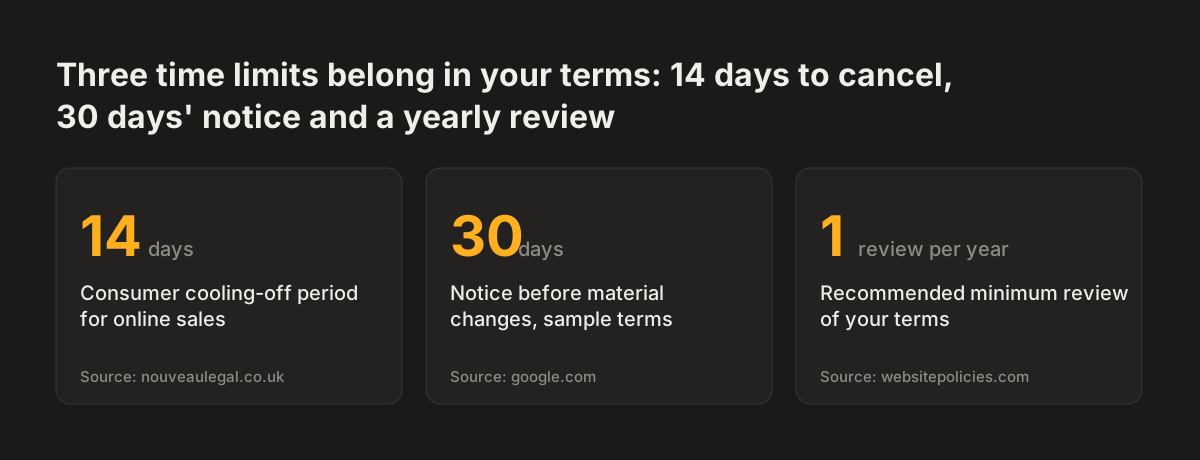
Consumer protection law requires certain information to reach customers before they buy. Your cancellation terms must reflect the 14-day cooling-off period for most online sales to consumers. Consumers who buy goods online can usually cancel within 14 days of receiving them. For services, the 14 days run from the day the contract is made.
Many sites split their terms in two when they sell:
- Terms of use set the rules for using the site, and suit every website.
- Terms of sale govern purchases, payment and refunds, and are needed in practice for selling online.
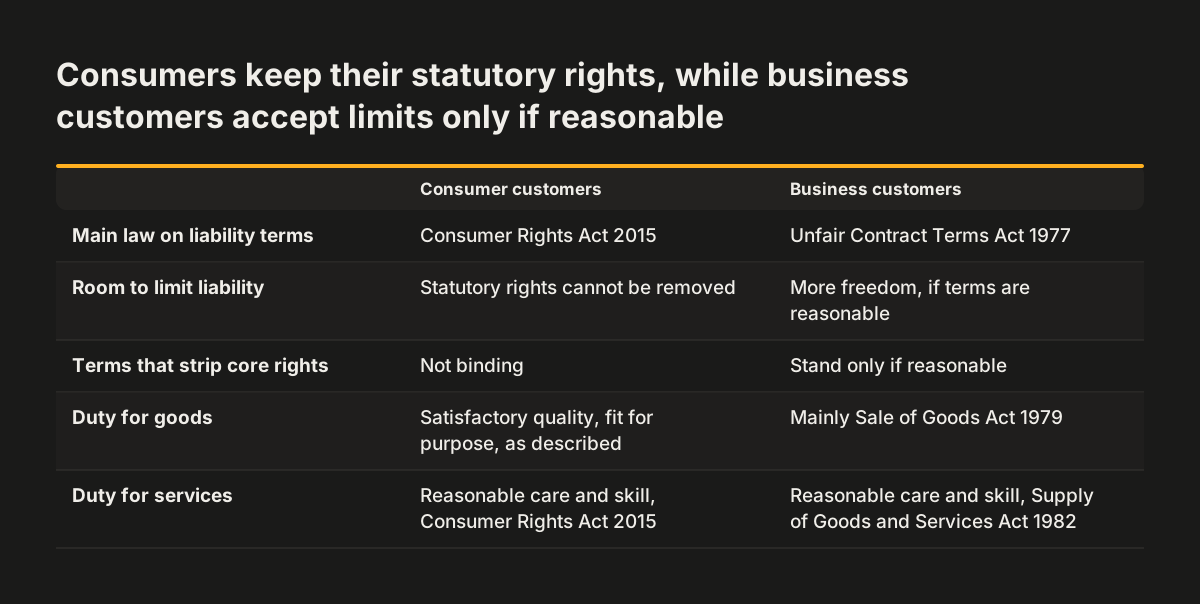
Who you sell to changes which laws apply. Consumer contracts fall under the Consumer Rights Act 2015. That Act requires goods to be of satisfactory quality, fit for purpose and as described, and services to be carried out with reasonable care and skill. Business-to-business deals run mainly under the Sale of Goods Act 1979 and the Supply of Goods and Services Act 1982.
A relaunch is a good moment to check that your checkout, your order emails and your terms of sale all state the same cancellation period. A new checkout built on old terms is a common source of mismatch.
Liability clauses and what UK law will not let you exclude
A limitation of liability clause cannot exclude your liability for everything. UK law restricts these clauses through the Consumer Rights Act 2015 for consumer contracts and the Unfair Contract Terms Act 1977 for certain business-to-business cases. Broad "we are not liable for anything" wording can be risky and may not be enforceable.
The rules differ by customer type:
- Consumers: you cannot remove the statutory rights the Consumer Rights Act 2015 gives them. Terms that try to strip out core consumer rights are not binding.
- Business customers: you have more freedom to limit liability under the Unfair Contract Terms Act 1977. Even then, you can never exclude liability for death or personal injury caused by negligence. Most other exclusions stand only if they are reasonable.
Unfair terms can be unenforceable, and misleading terms can create regulatory risk. A clause that overreaches does not protect you. It can mislead customers about their rights.
Templates often show disclaimers and liability limits in blocks of capital letters, so they stand out from the rest of the document. One sample template from TermsFeed caps liability at the amount the user paid, or 100 USD if they bought nothing. A figure written for a US template is a placeholder, not a recommendation for your business. Liability wording is the part of your terms where a lawyer's review earns its cost.
Adapting a terms template without copying another site's terms
A terms and conditions template is a free starting point, not a finished document. Termly's terms and conditions template describes the method: read it through, fill in the blanks with details about your website, and remove any clause that does not apply.
Copying another company's terms is not a shortcut. Several template publishers warn that copying another site's terms could count as copyright infringement. Copied terms may also leave out protections you need, or include clauses a court would not enforce for you.
Many free templates are written for the US market, so the "remove what does not apply" step matters. Clauses to look out for in a UK or EU business template include:
- DMCA copyright notice procedures that refer to 17 U.S.C. § 512(c)(3).
- Children's data wording based on the US Children's Online Privacy Protection Act.
- Mobile app licence terms naming the Apple Store or Google Play, if you have no app.
- Minimum age options, such as 18 or 13, that you have not actually decided on.
Each of these sections is reasonable in its own context. Left in by accident, they describe a business you are not. Read every clause and ask whether it matches how your site works today, after the relaunch, not before it.
Terms and conditions are separate from the privacy notice
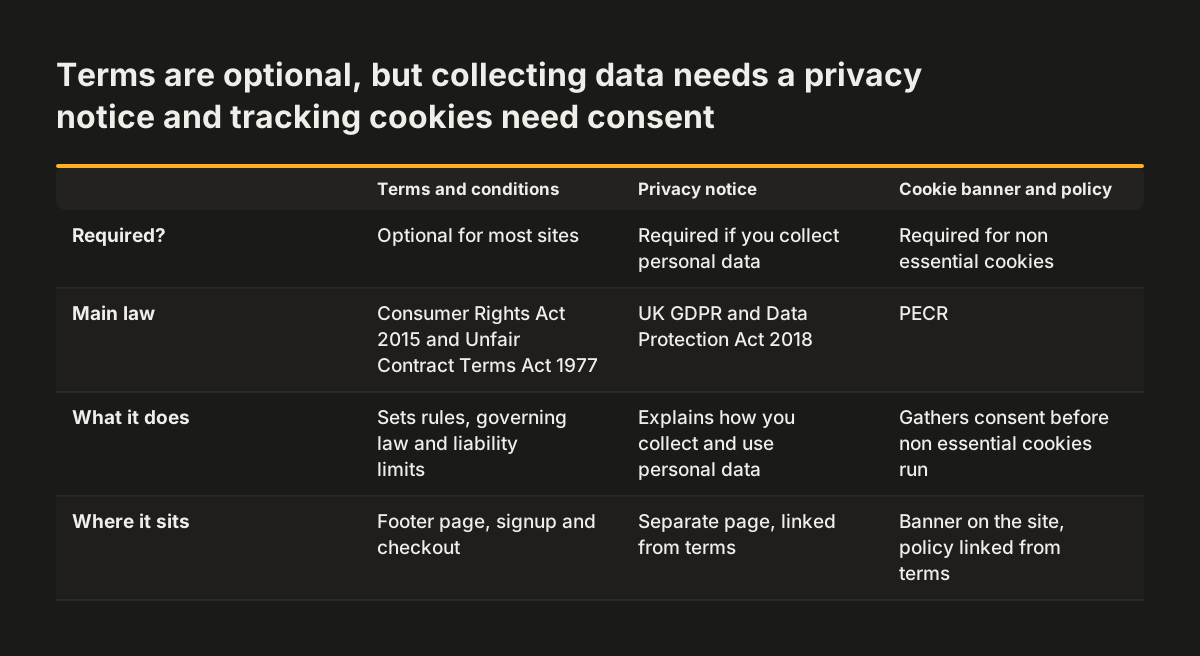
Your terms and conditions and your privacy notice are two different documents with two different legal bases. Terms are optional. A privacy policy is required under the UK GDPR if you collect personal data, and in the UK its requirements come mainly from the UK GDPR and the Data Protection Act 2018.
A privacy policy tells users how you collect, use, disclose, protect and manage their personal information. Many templates blur terms and privacy into one page. Sprintlaw's guide to UK website terms warns that this blurring can create compliance issues under the UK GDPR and the Data Protection Act 2018. Keep a separate privacy page, and link to it from your terms.
UK data law has moved recently, so an old privacy notice may be out of date at relaunch. Three changes stand out:
- Most provisions of the Data (Use and Access) Act 2025 took effect on 5 February 2026.
- From 19 June 2026, people gained a right to complain directly to data controllers.
- On 30 September 2026 the Information Commission took over from the Information Commissioner, though the regulator is still known as the ICO.
If your privacy notice names the regulator or explains how to complain, check that wording before launch. If you sell to people in the EU or track the behaviour of visitors there, the EU GDPR may apply to you as well as the UK GDPR.
Cookie banner and cookie policy fall under PECR, not your terms
Cookie consent is handled by a cookie banner and a cookie policy, not by your terms and conditions. A cookie policy and banner are required under PECR for non-essential cookies. Sites that use cookies for marketing or personalisation will need both. So will most analytics tools, unless they fit the narrow PECR exception for statistical purposes.
Putting a sentence about cookies in your terms does not replace consent. The banner gathers consent before non-essential cookies run. The cookie policy explains what tracking the site does. Your terms can link to both, but neither should live only inside the terms.
The stakes for cookie mistakes have risen. Cookie breach fines under PECR now match UK GDPR levels, far above the old £500,000 cap. A relaunch often brings new analytics tags, embedded video or chat tools, and each can set cookies the old banner never listed.
Before launch, compare the cookies the new site actually sets with the cookies your policy describes. Then check that the banner offers a real choice. WebsitePolicies advises asking for affirmative consent and avoiding pre-ticked boxes. That advice applies to consent checkboxes anywhere on the site, from the banner to newsletter forms.
Where legal pages go on a relaunched site, and how users accept the terms
Terms and conditions usually sit on a standalone page linked from the website footer, so the link appears on every page. Template publishers also recommend linking them on account creation or login pages, and on checkout or payment screens. Plan these placements in your sitemap, not after launch.
How users accept the terms matters as much as where they appear. Terms bind users only if they were clearly brought to their attention before or when the contract was made. A footer link alone, called browsewrap, is weak. Clickwrap is a method in which users take an action, such as ticking a box or clicking "I agree", to accept the terms.
Clickwrap tends to be stronger, especially for e-commerce and signups, and lets you keep proof of acceptance. TermsFeed recommends an un-ticked checkbox next to a link to the agreement.
The same footer usually carries the privacy notice, cookie policy and accessibility statement. Treat them as one set during the relaunch. At Svennis, we list every legal page in the redirect map and test each footer link and checkout checkbox on the staging site before go-live, because a moved URL quietly breaks the link a customer accepted.
Legal pages are long text, and they belong in your accessibility checks too. Run them through the same tools and manual checks for WCAG 2.1 AA as the rest of the site, and apply the habits in writing accessible content that stays accessible after launch.
Version history and an annual review keep your terms enforceable
Keep a record of every version of your terms, with its effective date. That record can matter in a dispute about which version applied at the time. A relaunch often produces a new version, so date it when the new site goes live.
Users need to know when terms change. If a user is not aware of changes, they can argue that they never agreed to them. One TermsFeed sample template promises reasonable efforts to give at least 30 days' notice before material changes take effect. Whatever period you choose, state it in the terms and follow it.
Terms also go stale as the business changes. WebsitePolicies recommends reviewing terms and conditions at least once a year. A practical trigger list for an earlier review includes:
- adding online payments or a new checkout;
- launching user accounts, reviews or uploads;
- selling into a new country;
- changing your legal entity, address or company details.
Put the review date in the same calendar as your privacy notice and cookie audit. All three pages describe how the live site behaves, so they drift out of date for the same reasons.
Source: nouveaulegal.co.uk, google.com, websitepolicies.com
Next steps for the legal pages in your website relaunch
Start by listing every legal page your current site has and what the new site will need. A content audit before a website redesign is the natural place to record them, with an owner and a review date for each.
Then work through these steps in order:
- Decide which documents you need: terms of use, terms of sale if you sell, privacy notice, cookie policy and accessibility statement.
- Choose a template, fill in your business details, and delete every clause that does not apply.
- Check liability and cancellation wording against your customer type, and ask a lawyer to review it if you sell or limit liability.
- Update the privacy notice for recent UK data law changes and the new regulator name.
- Compare the cookies the new site sets with the cookie policy and banner.
- Place the links in the footer, sign-up and checkout, as set out when planning the sitemap and navigation.
- Test every link and checkbox on staging, then record the version date on launch day.
If you are briefing an agency, name these pages in your website brief so they are scoped from the start. For a working example of the structure, you can read Revylio's own terms of use.
Sources
- LawDepot: Free Website Terms and Conditions Template (UK)
- Termly: Free Terms and Conditions Template with Examples
- WebsitePolicies: Free Terms and Conditions Template and Examples
- TermsFeed: Terms and Conditions Template
- Simply-Docs: Terms and Conditions Templates
- Sprintlaw: UK Website Terms and Conditions Template
- Nouveau Legal: Website Terms and Conditions UK, a Plain-English Guide