Local SEO for a small business starts with your website
Local SEO for a small business needs more than a Google profile. Your website must back it up with location pages, matching contact details and a fast build.
- Nº
- 17
- Published
- Read
- 13 min
- Category
- Notes
- Written by
- Revylio
Local SEO for a small business depends on your website as much as your Google profile
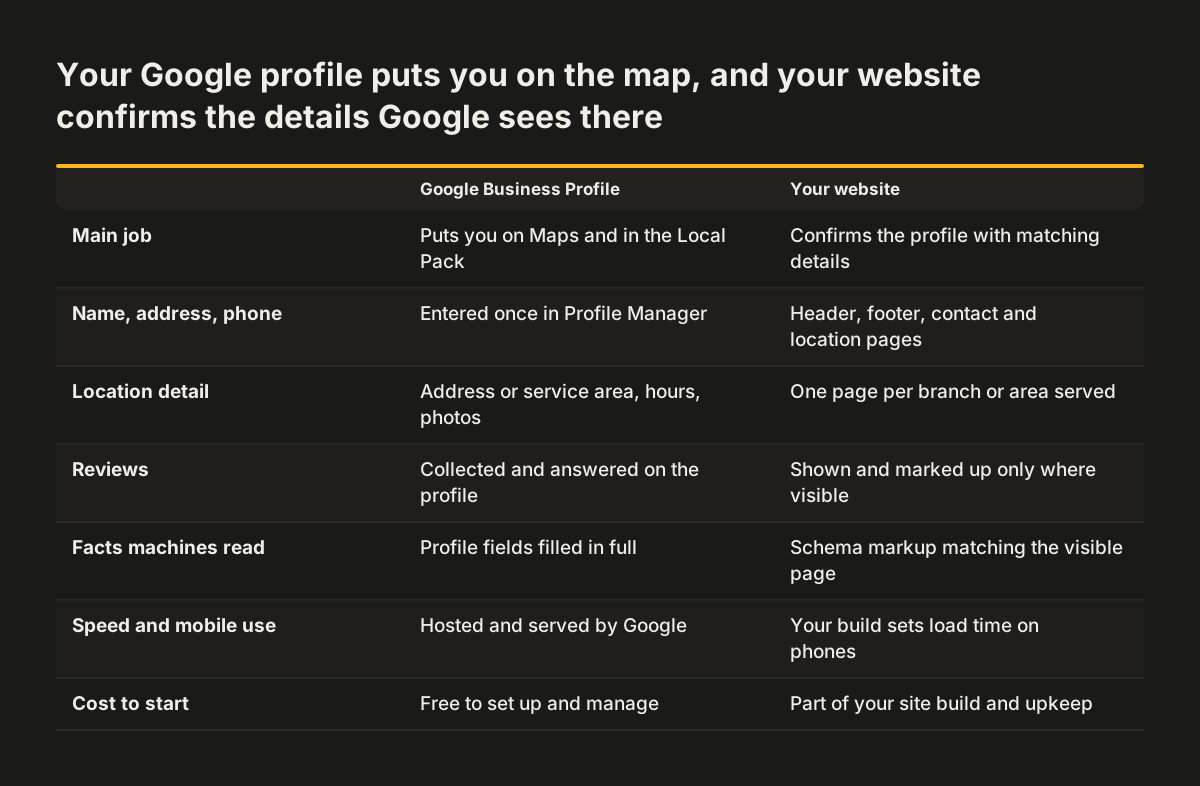
Local SEO for a small business works only when your website backs up your Google Business Profile. The profile puts you on the map. The website confirms it with matching name, address and phone, clear location pages, structured data and a fast, mobile-friendly build. When the two disagree, your rankings can suffer.
Local SEO is the process of optimising your online presence so that your business appears in local search results. That definition comes from Digital Internet's beginner's guide. The same guide explains that local SEO adds location-based tactics to general SEO. These include optimising your Google Business Profile, managing reviews and keeping your name, address and phone number consistent across directories and your website.
Most local SEO advice stops at the profile. This guide covers the profile and reviews briefly, then spends most of its time on the website work that supports them. It ends with a worked example, a checklist table and practical next steps.
You do not need to be technical to follow it. Each term is defined the first time it appears.
How Google picks the three businesses in the Local Pack
Google decides which local businesses to show first on three factors: proximity, relevance and prominence. The Local Pack is the set of three local business listings that appear at the top of the search results. Those three places get the most attention, so they are the target for most local businesses.
Each factor has a plain meaning:
- Proximity is how close your business is to the person searching.
- Relevance is how well your business matches what the searcher is looking for.
- Prominence is how well known or trusted your business is online.
According to Digital Internet, prominence is influenced by the number and quality of reviews, backlinks from other sites, local media mentions and general website authority. A backlink is a link from another website to yours. Google Maps results can also differ from standard Google Search, because Maps uses its own ranking signals and gives extra weight to proximity and customer feedback.
You cannot change where your customers stand. You can change relevance and prominence, and your website drives a large share of both. Its content tells Google what you do and where. Its authority and backlinks feed prominence.
Sponsored listings sit apart from all of this. They come from Google Ads or Local Services Ads, which businesses pay to appear in. Alev Digital points out that paid ads stop working the moment you stop paying, whereas local SEO compounds over time.
Google Business Profile: the free listing that puts you on Maps
A Google Business Profile is the free listing that powers the map results and the Local Pack. Without a profile, your business will not show up in Google Search or on Google Maps. Setting one up costs nothing, and you manage it in Google Business Profile Manager.
Completeness matters. DesignLab notes that incomplete profiles may rank lower in local search results. Fill in every field that applies to you, and keep your hours and contact details current.
Service areas and hidden addresses
A service area is the region or set of locations where you are happy to take on clients. If you visit customers rather than receive them, you can hide your physical address in your Google Business Profile. You then list your city or region instead. This suits tradespeople and consultants who work from home.
Photos and updates
Fresh photos keep a profile active. Digital Internet reports that some experts recommend adding photos at least two or three times a week to boost rankings. Treat that as an upper bound. A steady habit you can keep beats a burst you abandon.
Some businesses do not need a website to have a Google Business Profile. A profile on its own, though, gives Google little to confirm. The rest of this guide covers how your site provides that confirmation.
Reviews feed prominence, so ask for them and answer them
Reviews are a local ranking factor, so a steady flow of genuine reviews helps you rank. DesignLab states that Google considers reviews a ranking factor. Digital Internet lists the number and quality of reviews among the main influences on prominence.
Alev Digital names active review management as one of the fundamentals of local SEO. In practice that means three habits:
- Ask every customer for a review, soon after the job is done.
- Reply to every review, positive or negative, in a calm and specific way.
- Read reviews for recurring complaints and fix the cause.
Content matters as well as volume. Alev Digital notes that local search looks at what people say in reviews, alongside proximity and relevance. A review that names the service and the town tells Google more than a single word of praise.
Your website can carry reviews too. DesignLab notes that review schema markup can display star ratings and review snippets in search results. Schema markup is covered in its own section below. Only mark up reviews that are real and visible on the page.
Consistent name, address and phone number across your site and directories
Your name, address and phone number must read the same everywhere they appear. This trio is called NAP. Digital Internet warns that inconsistencies across directories can hurt your rankings. Alev Digital adds that Google favours businesses with accurate and consistent information in listings such as Google Business Profile and Bing Places.
Local citations are mentions of your business name, address and phone number in online directories and citation sites. They also come from local news sites and any other website that lists your details. Alev Digital names Yelp, Bing Places and Google Maps as platforms that help you appear in "near me" searches.
The website is where NAP errors hide most often. Your details may appear in the header, the footer, the contact page, each location page and the structured data. Each copy can drift when someone changes a phone number in one place but not the others.
At Svennis, when we rebuild a local business site, we keep one master record of the name, address and phone and check every page, the structured data and the Google profile against it before launch. The mismatch we catch most often is an old number left in a footer or an image nobody remembered.
Pick one exact format and use it everywhere. That covers "Street" or "St", the unit number and the phone format, and it applies on your site and in every directory.
Location pages: one clear page for each branch or service area
A location page is a page on your website dedicated to one branch or one area you serve. DesignLab notes that businesses with multiple locations benefit from separate location pages with details specific to each branch. Alev Digital lists location-specific keywords in web content among the fundamentals of local SEO.
Location pages build relevance. A single contact page that lists three addresses tells Google little about any of them. A page per branch can answer the questions a local customer actually has.
A useful location page usually includes:
- The branch name, address and phone, in exactly the format used on the Google profile.
- Opening hours for that branch.
- The services offered at that location, described in plain words.
- Directions, parking or access information.
- A contact form or call button that goes to the right team.
If you have one base and a service area, write a page only for areas where you have something specific to say. Mention the jobs you do there or the response times you offer. Pages that swap one town name for another and repeat the same text help nobody.
Link each location page from your main navigation or contact page, so visitors and search engines can reach it in one or two clicks.
Structured data tells search engines what your pages describe
Schema markup is a form of structured data that provides additional information to search engines. It sits in the page code, invisible to visitors. It labels facts such as your business name, address, phone number and opening hours so a machine can read them without guessing.
Structured data on a local site should follow three rules:
- Put the markup on each location page, describing that branch only.
- Use exactly the same name, address and phone as the visible page and the Google profile.
- Mark up only what a visitor can see, including any reviews.
Structured data that contradicts the page is one more NAP inconsistency. It is also easy to miss, because nobody sees it in the browser. Add it to your NAP check whenever you change a detail.
Structured data serves more than search results. AI assistants also read the structure of a page when they answer questions about local businesses. Our post on how AI assistants read your website covers what they look for and what to fix first.
After you add markup, watch Google Search Console. Alev Digital names it as the tool for tracking website performance, alongside Google Analytics.
A fast, mobile-friendly and accessible build keeps local visitors
Local searchers are mostly on phones, so a slow or awkward mobile site loses them first. Alev Digital states that most region-specific searches are carried out on mobile phones. DesignLab adds that Google prioritises mobile-friendly websites in its rankings.
Speed affects rankings as well as enquiries. DesignLab notes that pages that load slowly can have a high bounce rate, which can negatively affect search rankings. Bounce rate is the share of visitors who leave after viewing only one page. A customer on a pavement looking for a nearby service will not wait.
Voice search points the same way. DesignLab observes that many voice searches occur on mobile devices. It also notes that search engines now understand conversational queries better. A clear page that answers a plain question serves both.
If you suspect speed is costing you, our guide on what a slow website costs in enquiries shows how to find the leak on your own site.
Accessibility belongs in the same conversation. A site that works with a keyboard, a screen reader and large text also works better for a hurried visitor on a small screen. Our post on the European Accessibility Act and WCAG 2.1 AA explains the standard and how to meet it.
Worked example: local SEO for a heating engineer with a service area
Take a hypothetical heating engineer who works from home and covers one city and four nearby towns. Customers never visit the home address. The steps below apply the earlier sections in order.
- Google Business Profile. Create the profile in Google Business Profile Manager. Hide the home address and set the service area to the city and the four towns. Fill every relevant field and add photos of real jobs.
- Master NAP record. Write down one exact business name, one phone number in one format and the city as the listed location. Use that record for everything that follows.
- Website contact details. Update the header, footer and contact page to match the master record. Remove any old numbers, including ones baked into images.
- Location pages. Create a page for the city and for each town where the engineer has specific work to describe. Include the phone number, hours and the services offered there.
- Structured data. Add schema markup to each page with the same name and phone as the visible text.
- Directories. Claim or correct listings on Bing Places and Yelp, using the master record.
- Reviews. Send a short review request after each completed job and reply to every review.
- Mobile check. Open each page on a phone over mobile data and fix anything slow or hard to tap.
- Tracking. Connect Google Search Console and Google Analytics, then review them monthly. Before Analytics goes live, check your cookie banner tells visitors about it and asks for consent where the law requires it.
None of these steps needs a large budget. Most of the effort sits in steps three to five, which is the website work that most guides leave out.
Local SEO checklist: what to check, where, and how often
The table below turns this guide into a checklist. Each row names the item, where it lives and what to look for. Work through it once in full, then repeat the recurring checks on the schedule shown.
| Item | Where it lives | What to check | How often |
|---|---|---|---|
| Google Business Profile | Google Business Profile Manager | Every field filled, hours current, service area correct, recent photos | Monthly, and before holidays |
| Reviews | Google profile and other review platforms | New reviews answered, recurring complaints noted | Weekly |
| NAP on the website | Header, footer, contact page, location pages | Exact match with the master record | After any change of detail |
| Directory listings | Bing Places, Yelp, local directories | Same name, address and phone as the website | Quarterly |
| Location pages | Your website | One page per branch or genuine service area, specific content | When branches or services change |
| Structured data | Page code on location pages | Values match the visible page and the profile | After any change of detail |
| Mobile speed | Your website on a phone | Pages load quickly, buttons easy to tap | Quarterly |
| Measurement | Google Search Console, Google Analytics | Local queries, clicks and enquiries trending | Monthly |
The website rows are the ones owners most often skip. They are also the rows that confirm what your profile claims.
What local SEO means for a small business in the UK
For a UK small business, local SEO runs on the same tools and the same rules described above. Google Business Profile, Bing Places and Yelp all serve UK searches. Digital Internet, a UK guide, gives the same core advice: an optimised profile, managed reviews and consistent NAP across directories and your website.
Local backlinks are worth pursuing close to home. Digital Internet names local media mentions and backlinks among the main influences on prominence. A local news story, a trade association listing or a directory entry can count. Each one should carry your exact NAP.
Location pages often add contact forms, and forms collect personal data. The Information Commissioner's Office publishes guidance for private and third sector organisations and for sole traders. It also notes that the Data (Use and Access) Act 2025 brings updates to key aspects of data protection law. Check your privacy notice whenever you add a form to a new page.
Be realistic about timing. Alev Digital states that outcomes differ by competition, sector and the work done. Some companies see improvements in weeks, while others need several months. Plan on months and measure monthly.
Next steps for your local SEO this month
Start with the checks that cost nothing and catch the most errors. Write your master NAP record today. Then compare it against your Google Business Profile, your website footer, your contact page and your Bing Places listing.
Work through this order:
- Complete and correct your Google Business Profile.
- Fix every NAP mismatch on your website and in directories.
- Draft one proper location page for your main branch or area.
- Add structured data that matches that page exactly.
- Test the page on a phone and note anything slow.
- Set up a simple monthly report.
For the report, our guide to measuring what a website brings in shows how to follow a visit through to an enquiry.
If your site cannot support location pages, clean contact details or a fast mobile build, a rebuild may be the better route. Our website redesign service page sets out the process. That process gives every changed path a 301 redirect and resubmits the sitemap at launch. If you are moving to a new site, read how to migrate without losing Google traffic before you start.