
Website redesign timeline and project phases, from kickoff to maintenance
Plan each phase of a website redesign, including the accessibility audit, consent checks, redirects and maintenance that most plans leave out.
- Nº
- 46
- Published
- Read
- 11 min
- Category
- Notes
- Written by
- Revylio
Website redesign timeline: seven phases from kickoff to maintenance
A website redesign timeline and its project phases normally run in seven steps. They start with planning and discovery, then content audit and structure, then an accessibility audit. Design and development follow, with testing alongside. GDPR and consent checks come next, then redirects and launch, then hosting and maintenance.
Research, content and approvals decide how long each phase takes. Design work alone rarely does.
A website redesign timeline is the dated sequence of phases from the first brief to a live, maintained site. A timeline gives each phase an owner, a deliverable and an end date, so you can see where delays will land.
Published plans do not agree on the order. One widely read redesign guide sets out ten steps. They run from project planning, structuring, buyer personas and SEO to content planning and content adaptability. The last four are development and testing, marketing, launch and maintenance. The same guide says "there is no fixed order in planning your website redesign project".
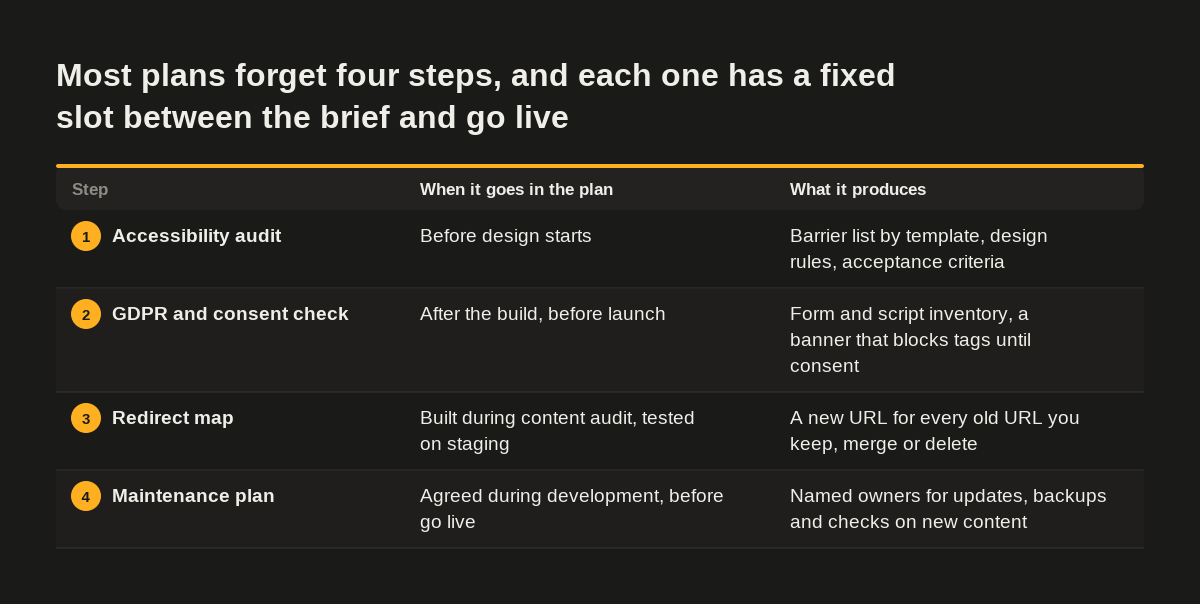
Four steps often go missing from plans like that. They are an accessibility audit against WCAG 2.1 AA, GDPR and consent checks, redirects that protect search visibility, and hosting and maintenance after launch. This guide gives each one a place in the sequence. It also shows a real public timeline, from Barking and Dagenham Council, so you can see what the phases cost in calendar time.
Planning and discovery: goals, brief and user research come first
Planning and discovery is the phase where you agree what the new site must achieve and learn how people use the current one. Every later phase depends on it. A vague goal here becomes a rejected design later.
Planning produces three things:
- A written brief with business goals, audiences and constraints.
- A list of decision makers and how quickly each one can approve work.
- Evidence about current users, from analytics, surveys or interviews.
The brief is the cheapest place to fix a misunderstanding. Our website brief template for a redesign lists the questions to answer before anyone opens a design tool. The ten-step guide mentioned above also puts buyer personas early, meaning short profiles of the customers the site must serve.
User research takes calendar time, even when it takes little effort. Barking and Dagenham Council started its redesign with an initial user experience survey. It wanted to understand how residents used the existing site. The council also planned to invite residents to interviews and to test new designs before they went public.
Surveys need time to collect answers, and interviews need people to book. Put those weeks in the plan from day one rather than squeezing them in later.
Content audit and site structure before any design work
A content audit is an inventory of every page on the current site, with a decision for each: keep, rewrite, merge or delete. The audit belongs before design, because designers need to know what content each page template must hold.
Skipping the audit has a measurable cost. The redesign guide claims that development teams lose 40% of their time on design concepts that are rejected or fall short. The guide links that waste to content that does not fit the designs. When real content arrives late, layouts built around placeholder text break, and the design phase starts again.
Structure follows the audit. Once you know which pages survive, you can plan the sitemap and the navigation menus. Our posts on running a content audit before a website redesign and planning a sitemap and navigation for a redesign cover both steps in detail.
The audit also feeds two later phases. Every old URL you list becomes a row in the redirect map. Every form and embedded tool you find becomes an item for the GDPR and consent check. Collect those details now, while someone is already reading every page.
Accessibility audit against WCAG 2.1 AA, planned before design starts
An accessibility audit tests the current site against a published standard and records every barrier you find. WCAG 2.1 is the Web Content Accessibility Guidelines. AA is the conformance level this guide treats as the target. Run the audit before design, not after launch.
The timing matters because accessibility decisions live in the design system. Colour contrast, focus states, heading order, form labels and keyboard navigation are all settled when templates are drawn. Fixing them after build means changing templates that dozens of pages already use.
An accessibility audit in a redesign should produce:
- A list of barriers on the current site, grouped by template rather than by page.
- Design rules that prevent each barrier, such as minimum contrast and visible focus.
- Acceptance criteria that developers and testers check against during the build.
- A note of third-party tools, such as booking widgets or maps, that you cannot fix yourself.
The third-party list is often the slowest item. A supplier may need weeks to confirm whether its widget meets your target, or to offer an alternative. Start that conversation during the audit, so it does not block launch.
Design and development, with testing running alongside the build
Design and development is the phase where templates are drawn, approved and built in your chosen content management system. Testing should run inside this phase, not after it. The redesign guide puts it plainly: testing "cannot be left for a later part, it has to go in line with the development process".
Testing alongside the build catches problems while they are cheap. Check each template as it is finished, against the accessibility criteria from the audit, on real phones and on desktop. A template that fails on mobile is a template that fails for many of your visitors.
Mobile failures cost real customers. A site that is hard to use on a phone loses visitors, and many of them go to a competitor instead.
Your choice of platform shapes this phase and everything after launch. Our post on choosing a CMS based on what happens after launch explains what to weigh. Approval speed matters too. Plan fixed review rounds with named approvers, because open-ended feedback is where design phases stretch.
GDPR and consent checks before the new site goes live
A GDPR and consent check confirms that the new site collects personal data only where you intend, and asks permission where it should. Schedule the check after the build and before launch, when every form and script is in place.
A redesign changes more data collection than people expect. New templates bring new analytics tags, embedded videos, chat tools and forms. Each one may send visitor data to a third party.
The GDPR and consent check covers these items:
- Every form: what it asks for, where the data goes and who can read it.
- Every cookie and tracking script, matched against the consent banner's categories.
- The consent banner itself: does it hold back every tag that needs consent until the visitor chooses?
- Tags that run without consent: is each one covered by a cookie law exception and clearly explained?
- The privacy notice: does it describe the tools the new site actually uses?
- Embedded third-party content, such as video players and maps.
Use the inventory from the content audit as your starting list, then compare it with what the new site loads in a browser. Ask your adviser which data protection rules apply to your organisation. A web team can make the site behave correctly. It cannot decide your legal position for you.
Redirects and search visibility: protecting traffic at launch
Redirects protect the search visibility your old site has earned. A redirect is an instruction that sends visitors and search engines from an old URL to its new address. Without redirects, links from Google, from other sites and from your own emails lead to error pages.
The redirect map is a simple table: one row per old URL, one column for its new URL. Build it from the content audit inventory. Every page you keep, merge or delete needs a destination, even if that destination is the closest related page.
At Svennis, the team behind Revylio, we build the redirect map while the content audit is running and test it on the staging site before launch day. Redirects left until launch week are the step we most often see go wrong, because nobody has checked them against the old URL list.
Launch day itself needs a short checklist. Switch the redirects on, confirm the new site is open to search engines, submit the new sitemap, and spot-check the most visited old URLs. Then watch for error pages over the following weeks. Search visibility is the slowest thing to rebuild if it is lost, so this phase deserves its own owner.
Hosting and maintenance after launch belong in the original plan
Hosting and maintenance are the phase that never ends, and they belong in the plan before launch. Hosting is the service that keeps the site online and fast. Maintenance is the routine work of updates, backups, security patches, accessibility checks and content fixes.
The ten-step guide includes maintenance as its final step, after launch. Many project plans stop at launch instead, and the site starts to decay. Plugins fall behind, new pages skip the accessibility rules, and nobody notices a broken form.
Agree the maintenance plan during development, so it covers what the build actually contains. The plan should name who applies updates, how often backups run, who checks new content against the accessibility criteria and who reviews consent settings when a new tool is added.
Measurement starts here too. The redesign guide offers rough bounce-rate bands: 26 to 40 percent is excellent and 41 to 55 percent roughly average. It calls 56 to 70 percent alarming and anything above 70 percent disappointing. Treat these as a prompt to investigate rather than a target. Our post on measuring what a website brings in explains how to track enquiries, not just visits.
Worked example: Barking and Dagenham Council's published redesign timeline
Barking and Dagenham Council published its redesign stages on its One Borough Voice consultation page. The plan put at least half a year between the first resident survey and the planned relaunch. Research and content took most of that time.
| Stage | Dates on the council page | What happened |
|---|---|---|
| Initial user experience survey | September and October 2021 | Residents described how they used the current site |
| Survey closes | 22 October 2021 | Collection of responses ended |
| Data analysis | After the survey closed | Responses reviewed and analysed |
| User research and workshops | October to December 2021 | Interviews and sessions with residents |
| Website content design | Early 2022 | Content written for the new site |
| Website relaunch | Spring 2022 | New site planned to go live |
Three lessons carry over to a business site. First, research overlapped with analysis rather than waiting for it. Second, content design had its own stage, separate from visual design. Third, named teams were responsible for listening: the council lists its Customer Experience Team and User Research.
The council page does not show accessibility, consent or redirect stages. Your plan should add them, in the places this guide describes.
Redesign phase checklist: deliverables and what makes each phase longer
The published sources give no standard number of weeks per phase, so this checklist names the deliverable and the factors that stretch each phase. Use it to build your own dates with your web team.
| Phase | Deliverable | What makes it longer |
|---|---|---|
| Planning and discovery | Brief, approvers, user evidence | Surveys and interviews, unclear goals |
| Content audit and structure | Page inventory, sitemap, navigation | Large or old sites, several languages |
| Accessibility audit | Barrier list, design rules, acceptance criteria | Third-party widgets, many templates |
| Design and development | Approved templates, built site, test results | Late content, open-ended feedback |
| GDPR and consent checks | Form and script inventory, working banner | New tools added late, unclear data owners |
| Redirects and launch | Tested redirect map, launch checklist | No URL inventory, staging not ready |
| Hosting and maintenance | Agreed maintenance plan, monitoring | Never ends; scope grows with the site |
Read the right-hand column as a risk list. If a factor applies to your organisation, add time to that phase now. A site in several languages, for example, needs extra structure work. Our guide to multilingual websites for several countries covers that case.
What a redesign timeline means for a UK business
A UK business planning a redesign should budget calendar time for research, content and approvals, as Barking and Dagenham Council did. The council example is a UK public body consulting residents. Your equivalent is your customers, and they are just as slow to answer surveys.
Smaller organisations often have fewer approvers but less spare staff time. The person who writes content is usually also running the business. That makes content the most common source of delay. Set content deadlines as firmly as design deadlines.
Credibility is at stake while the old site stays up. Visitors judge a business partly on how its website looks and works. An old site that stays up too long can cost you trust. A delay costs more than time, so plan realistically rather than optimistically.
If you sell to customers in the EU, ask your advisers which accessibility and data protection rules apply to your site. Then write those checks into the plan as named phases with owners. A rule that has no phase in the timeline tends to become a fix after launch.
Next steps for planning your own redesign timeline
Start your redesign timeline by listing what you already have, then add dates with the people who will do the work. These steps turn this guide into a working plan:
- Write the brief, with goals, audiences and named approvers.
- Decide how you will gather user evidence, and give it calendar time.
- Run the content audit and record every URL, form and embedded tool.
- Audit the current site against WCAG 2.1 AA and turn the findings into design rules.
- Agree review rounds and test each template as it is built.
- Check forms, scripts and the consent banner before launch.
- Build and test the redirect map on staging.
- Agree hosting and the maintenance plan before go-live.
Give each step an owner and an end date, and mark which ones overlap. If you are still unsure whether a full redesign is the right move, settle that before you plan. When you are ready to plan the phases with a team, our website redesign service page explains how we run each one.