AI SEO: how AI assistants read your website, and what to fix first
What ChatGPT, Claude, Perplexity and Google's AI features read on a business website: crawler tokens, llms.txt, structured data, and the fixes to make first.
- Nº
- 07
- Published
- Read
- 13 min
- Category
- Notes
- Written by
- Revylio
What AI SEO means for a business website
AI SEO is the work of making a website readable, and worth quoting, for the assistants people now ask instead of a search box. ChatGPT, Claude, Perplexity, Microsoft Copilot and Google's AI Overviews and AI Mode all answer with sources. They can only cite a page they have fetched and understood. If your site is slow to render, hides its answers behind clicks, or blocks the wrong crawler, the answer is built from someone else's page.
The good news is that none of this needs a new discipline. Google states that there are no additional technical requirements for its AI features. A page must be indexed and eligible to show with a snippet, and that is all. Google also says you do not need to create AI text files or add any special structured data. The same fundamentals that earn a search result earn a citation.
What changes is the reading. An assistant does not scan ten blue links; it pulls a handful of pages and quotes the passages that answer the question. So the page that answers one question plainly, in HTML, with its facts visible, wins more often than the long page that covers everything. This guide walks through the crawlers, the files they look for, and the fixes in the order we make them.
One line on scope. Building an assistant that answers your visitors on your own site is a different trade, and it is the AI practice of our sister brand, svennis.ai. This article is about the website those assistants read.
The crawlers behind the answers, and their robots.txt tokens
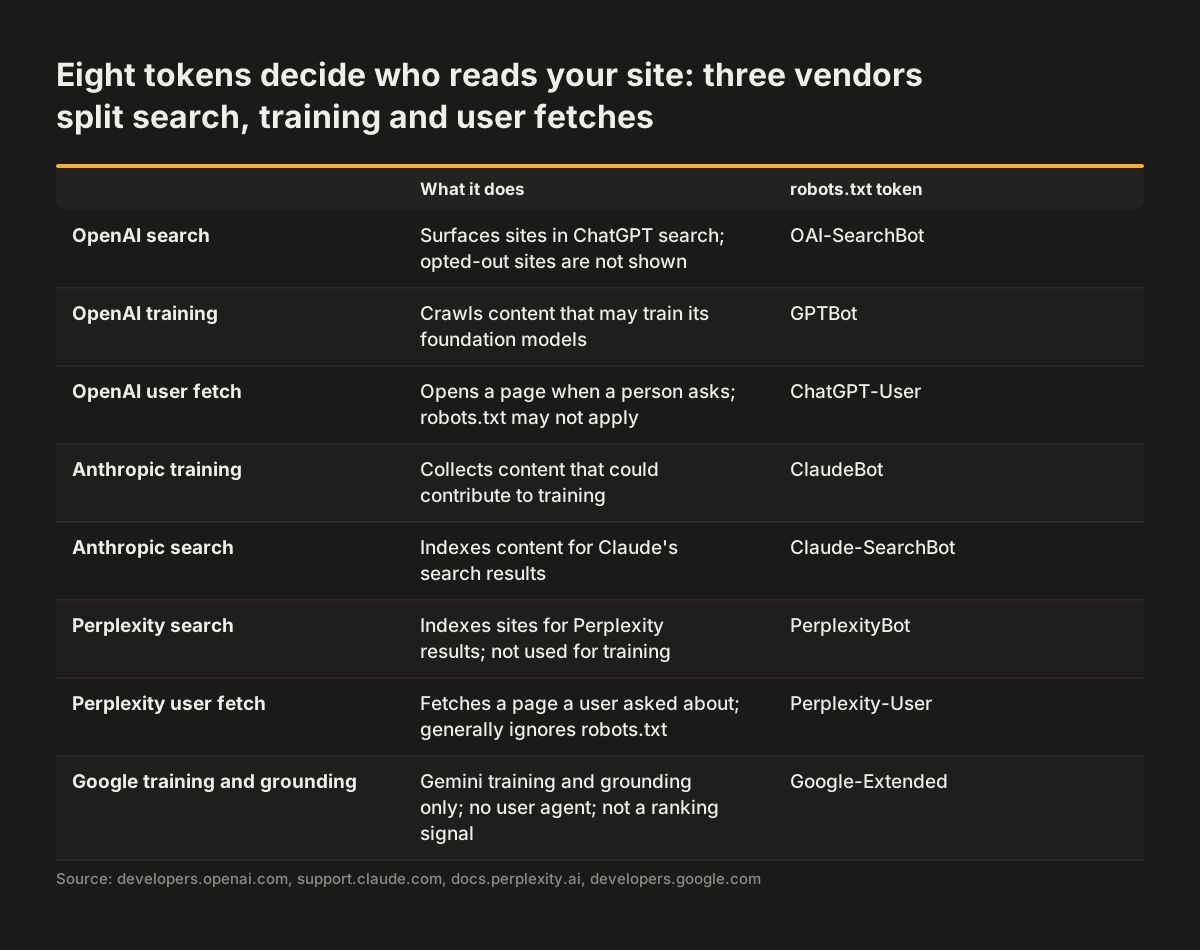
Each vendor runs more than one bot, and they do different jobs. The distinction that matters for a business website is between a crawler that builds a search index, a crawler that collects training data, and a fetcher that opens a page because a user asked. All three tokens below are documented on the vendors' own pages, read on 23 October 2026.
OpenAI runs three that matter. OAI-SearchBot surfaces websites in ChatGPT's search features, and OpenAI states that sites opted out of it "will not be shown in ChatGPT search answers". GPTBot crawls content that may be used to train its foundation models, and disallowing it signals that your content should not be used for training. ChatGPT-User fetches a page when a person asks, and because the action is user-initiated, OpenAI says robots.txt rules may not apply. Each setting is independent.
Anthropic mirrors the pattern for Claude. ClaudeBot collects web content that could contribute to training, and blocking it excludes a site's future material from training datasets. Claude-SearchBot indexes content for search, and Claude-User fetches pages for a user's question. Anthropic says all three honour standard robots.txt directives and support a Crawl-delay line, so blocking Claude-User stops Claude opening your pages on request.
Perplexity runs PerplexityBot, which indexes sites for its search results and is not used to collect training data, and Perplexity-User, which fetches a page a user asked about and, by Perplexity's own statement, generally ignores robots.txt because the request came from a person.
Google is simpler than it looks. AI Overviews and AI Mode are part of Search, so Googlebot and the usual robots.txt rules govern them. Google-Extended is a separate product token that controls whether crawled content may train future Gemini models or be used for grounding. It has no user agent string of its own and, in Google's words, is not used as a ranking signal in Google Search.
Source: developers.openai.com, support.claude.com, docs.perplexity.ai, developers.google.com
What to allow, what to block, and what blocking costs
Most business websites want the search and fetch bots and need to make a separate decision about training. The two decisions do not conflict. OpenAI documents a robots.txt that allows OAI-SearchBot while disallowing GPTBot, and notes that where both are allowed it may use a single crawl for both purposes. Anthropic and Google offer the same split through ClaudeBot and Google-Extended.
The cost of a block is concrete. A site that disallows OAI-SearchBot does not appear in ChatGPT search answers. A site that blocks Claude-SearchBot is not indexed for Claude's search. A site that blocks PerplexityBot is not crawled for Perplexity's search results.
A search block also buys little protection. OpenAI says robots.txt rules may not apply to ChatGPT-User, and Perplexity says Perplexity-User generally ignores them, because a person asked for the page. Anthropic is the exception: Claude-User follows robots.txt.
A block on training is a different kind of choice, and a legitimate one. Disallowing GPTBot, ClaudeBot and Google-Extended tells those three vendors not to use your future content for training, and each says it respects that signal. It does not touch your visibility in their search features, it does not reach content already collected, and it does not bind other crawlers. The position is simple to state: cite us, do not train on us.
Two practical notes. OpenAI and Perplexity both say a robots.txt change can take around 24 hours to take effect, so test the day after, not the minute after. And robots.txt is a technical signal that well-behaved crawlers follow, not a lock. Anything that must stay private belongs behind authentication, never behind a Disallow line. Our own robots.txt allows every crawler and disallows only the API and lab paths, which is the default we recommend for a site that wants to be found.
llms.txt: what it is, and what it is not
llms.txt is a proposal, not a standard. Jeremy Howard published it on 3 September 2024, and the current version of the proposal is dated 10 August 2026. The idea is a Markdown file at /llms.txt that tells an AI agent what a site is and where its important pages are.
The format is strict. An H1 with the site name is the only required part. Then come a blockquote summary, optional paragraphs, and H2 sections of links, each a name, a URL and a short note.
Adoption is real but one-sided. The proposal's own site says thousands of sites publish the file and that documentation platforms generate it automatically. OpenAI, Anthropic and Google's Gemini publish one for their developer documentation. What the site does not say is that any assistant has committed to reading it. Google, for its part, states that no AI text files are needed for its AI features.
So the honest position is: cheap to publish, unproven in effect, and harmful only when it goes stale. A hand-written llms.txt that still lists last year's services is worse than none. It is the one file that claims to be the authoritative summary.
Our sister site svennis.ai generates its llms.txt and llms-full.txt from its own code, with a build check that fails on a broken link. So the file never drifts from the pages, and that is the only way we would add one to a client site: generated, not typed.
If you do publish one, keep it to the pages that answer a buyer's questions. What you do, for whom, where, and how to get in touch. Leave the blog archive to the sitemap.
Content that is actually in the HTML
The most common failure we find on business websites has nothing to do with AI. The answer exists on the page, but only after a click.
Accordions that mount their text when opened. Tabs whose panels render on selection. FAQ answers that live in a script until a visitor expands them. A person sees all of it, and a fetcher sees the headings and nothing underneath.
We have measured this on live sites. Fetch the served HTML, strip every script block, and search for a sentence unique to an FAQ answer. On the worst pages the sentence occurred zero times. The page looked complete in a browser, the build was green, and every answer was invisible to anything that does not click. Google's guidance for AI features says it directly: make sure important content is available as text.
The fix is a rendering decision, not a content one. Keep the text in the document and use CSS to collapse it, so the collapsed state is a visual choice rather than an absence. On a framework site, that usually means rendering the content on the server and hydrating the interaction, not the other way round.
Speed belongs in the same conversation. A fetch made because a user is waiting for an answer is a fetch with a budget. Our guide on what to fix first on a slow website covers the order. The thing the visitor waits for comes first, then the three fixes that usually matter, then everything that can wait. The same order serves a crawler.
Pages that answer one question in plain language
An assistant quotes passages, so the unit of AI SEO is the passage, not the page. The pages that get cited share a shape. The heading states the question or the subject in the words a customer would use. The first paragraph answers it directly, in two or three sentences, before any context. The specifics follow: which service, for which kind of company, in which area, with what included and what excluded.
This is the discipline we already ask of a homepage. Our guide on the questions a homepage has to answer in the first screen lists them. What this is, who it is for, and what to do next.
A service page answers the same three questions for one service. A location page answers them for one place. Each page earns one citation well instead of five badly.
Three habits make a passage quotable. Write dates and figures as plain text in the sentence, not in an image or a chart alone, because a fetcher reads text. Name things with their real names: the product, the standard, the town. And avoid the hedged paragraph that says a service "may be suitable for some organisations in certain circumstances". An assistant cannot quote a sentence that says nothing.
What not to do is equally clear. Pages written for a keyword rather than a question. Pages that repeat the same paragraph with the town name swapped. Pages whose answer is "contact us to find out". Each gives an assistant nothing to cite and gives Google a reason to treat it as thin.
Structured data that still earns its keep
Structured data has not become an AI shortcut. Google says plainly that there is no special schema.org markup needed for its AI features, and that its role is to support accuracy: the structured data must match the visible text on the page. The same guidance has applied to rich results for years. Google recommends JSON-LD, warns against describing anything the visitor cannot see, and does not promise a rich result even for valid markup.
What it still does is remove ambiguity. An Organization block with the legal name, the logo, the same address and phone as the footer, and sameAs links to the company's real profiles tells every reader which entity this site belongs to. A LocalBusiness block does the same for a place. Article markup with a real published date and an author organisation dates a page so an assistant can prefer the newer one. Breadcrumbs describe where a page sits.
The failure modes are the same as in classic SEO. A phone number in the markup that differs from the one on the page. An address copied from another site in the group. A product block on a page that no longer sells the product. Each one is a contradiction a machine will find before a person does, and a contradiction is a reason not to cite.
Our rule on a rebuild is simple: the structured data is generated from the same source as the visible page, never typed twice. If the footer changes, the Organization block changes with it. That is also why a redesign is the moment to fix it. Our website redesign work treats the markup as part of the template, not as a plugin added later.
Forms, consent and what an assistant should never see
Being readable does not mean being open. The pages an assistant should read are the public ones: services, locations, guides, contact. The things it should never see are the same things a search engine should never see. Account areas, internal tools, staging copies, and any URL that reveals a customer's data. Those belong behind authentication, and their paths belong in a Disallow line as a courtesy to well-behaved crawlers, never as the only protection.
Forms deserve a specific look. A contact form that posts to an inbox is a dead end for the visitor and for you. Our guide on why your contact form should not end in an inbox explains what to connect first.
For AI readability the point is narrower. The form's purpose and the promise around it should be stated in text next to it. That text is what gets quoted when someone asks how to reach you.
Consent is unchanged by AI search. In the UK, cookies and similar tags that are not strictly necessary generally need the visitor's consent before they are set, under the Privacy and Electronic Communications Regulations. Since February 2026 there are narrow exceptions, for example some first-party analytics, provided you explain them clearly and give visitors an easy way to object. Advertising and most third-party tags still need consent.
A form that collects personal data needs a privacy notice at the point of collection: who you are, why you want the data, on what legal basis, and who else receives it. A consent banner that blocks the whole page until it is dismissed is also a page a fetcher may read as empty. The content must render whether or not the banner has been answered.
None of this is new work. It is the consent and privacy groundwork we build in anyway, checked once more with a crawler's eyes. This is general information, not legal advice. If your site handles anything sensitive, check your consent and privacy set-up with an adviser.
What to fix first, and how to tell it is working
The order below respects a budget. Each step is cheap on its own and each one makes the next one measurable.
- Read your robots.txt against the token list above and decide, in writing, the search and training positions for each vendor. Test again a day later.
- Fetch your five most important pages without JavaScript and check that the answers are in the text. Move anything that is not into the HTML.
- Rewrite the first paragraph of each of those pages so it answers the page's question in plain words, with the real names and the real place.
- Validate the structured data against the visible page and remove anything that contradicts it.
- Add llms.txt only if it is generated from the same source as the site, and keep it to the pages a buyer needs.
- Watch two things: the vendor tokens in your server logs, which show which crawlers come and how often, and referral traffic from chatgpt.com, perplexity.ai and claude.ai in your analytics.
If the site needs more than this, the question becomes whether to repair it or rebuild it, and our guide on redesign or repair gives the signs for each. The work we have done for clients is on our work page.
And when a site should also answer visitors itself, with an assistant that reads your pages and books the meeting, that is the AI practice of our sister brand. Their AI customer assistant service starts from exactly the pages this guide tells you to fix first.
Sources
- OpenAI: Overview of OpenAI crawlers
- Anthropic: Does Anthropic crawl data from the web, and how can site owners block the crawler?
- Perplexity: Perplexity crawlers
- Google Search Central: AI features and your website
- Google Search Central: Google's common crawlers (Google-Extended)
- llmstxt.org: The /llms.txt file
- Google Search Central: Introduction to structured data markup